
nginx-amplify-agent
 nginx-amplify-agent copied to clipboard
 nginxinc
Option to automatically remove dead FPM pools
We create new FPM pool for every version of our application.
Our dashboard is currently full of dead FPM pools: 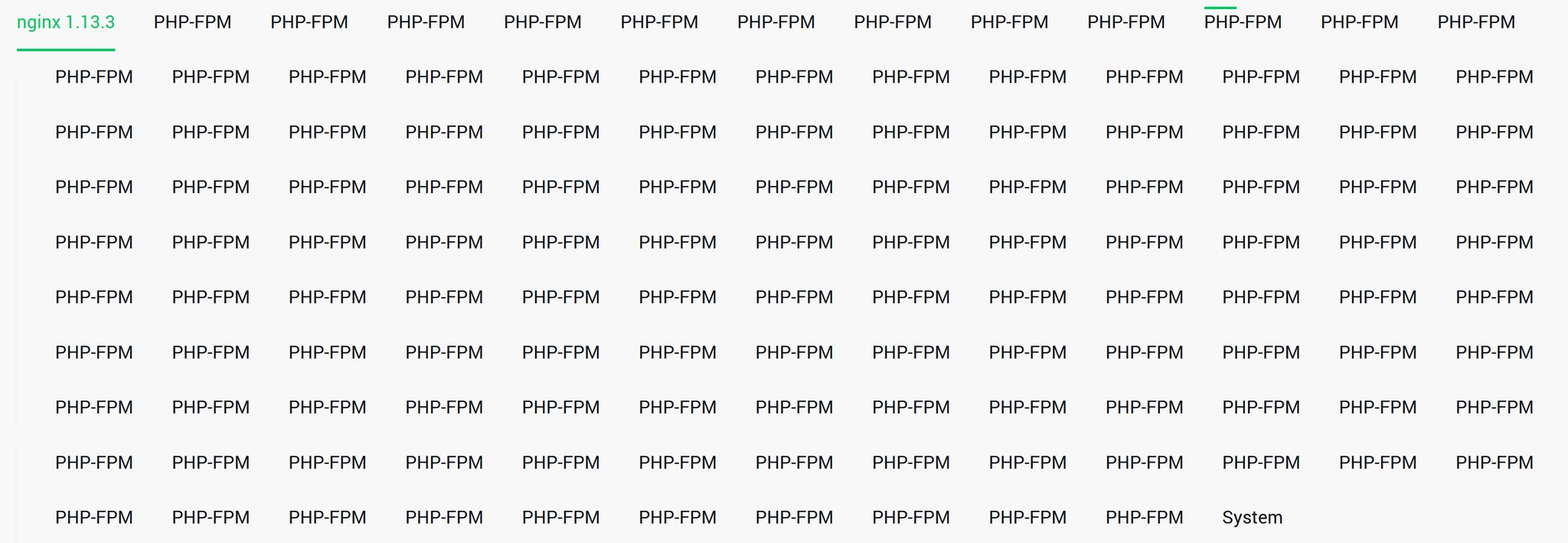
It would be superb if dead FPM pools could be removed automatically after some time without no data. Remove dead pool one by one is very complicated.

Hi, @kukulich! We automatically remove all objects (including FPM pools) which sent payload last time more than a week ago. Yes, a week is a long period, so we will think about providing some options to tune this period in UI here.
If you could choose the "non-active time" from 1w, 2d, 1d, 1h - will it solve your issue?

It would be better however it would be nice to have even short periods - eg. 5m, 1m.
Just wanted to throw it out there but this looks like it's a snapshot of PHPFPM masters, not pools. While I think offering tune-able time periods for auto remove is a good idea, I think we should also look at why we are "discovering" so many master instances repeatedly.

Hi @kukulich!
I dug a bit deeper into our inventory for your account and I think I have figured out why we are creating so many PHPFPM master objects for you.
We identify different FPM objects on the same host by their config path and ps output (which also has the config path). It appears that each of these FPM objects has a different config file name. What I am guessing happens here is:
- You update the config file (including changing the name).
- You restart FPM.
- Agent finds this FPM but calculates a different local ID hash with this new config path.
- Backend creates a new PHPFPM object since it does not match the locally reported object with an existing one.
Unfortunately, we don't have a good way of distinguishing co-resident FPM processes except by configuration path.
As a work around you might try:
- Copying the current config from an archive directory to the active config location.
- Using a symbolic link to the current config from an archive directory.
As a side note, you have revealed a visual bug when a host has a lot of child objects and we are working on a UI redesign to accommodate large numbers of child objects.
Thanks!
@gshulegaard
I think it's ok we have so many master FPM :)
Our deploy looks like:
- Create new FPM pool configuration
- Run new FPM pool
- Change nginx configuration to use new FPM pool
- Reload nginx configuration
- Stop unused FPM pool
- Remove configuration of stoped FPM pool
We have two problems:
- Dead FPM pools don't dissapear automatically.
- All FPM pools have PHP-FPM name so we are not able to find the currently running pools.
Hi @kukulich,
Thanks for the use case! Having a large number of FPM master processes is definitely a challenge when it comes to proper identification.
As mentioned above, we do remove non-reporting objects after a week...this applies to all inventory objects (FPM masters as well as pools). I believe we will work on allowing users to configure this "dead" period from accounts.
Just to re-iterate:
We have two problems:
- Dead FPM pools don't dissapear automatically.
- All FPM pools have PHP-FPM name so we are not able to find the currently running pools.
These are not pools, but rather FPM master processes. Because you are changing the config name, we believe we have found a "new" FPM master and create a new FPM master object.
Now if you are only running a single pool per master you might consider doing graceful reloads with FPM instead:
https://stackoverflow.com/questions/16890855/can-we-reload-one-of-the-php-fpm-pool-without-disturbing-others
But regardless, we will investigate adding configurable "dead" periods and update here when we know more.
Thanks!
It's not possible to do graceful FPM reload for us unfortunately. We prefill the opcache before we change the nginx configuration. Graceful restart would empty the opcache.
Interesting! Well I will update when we have more news about configurable removal bounds that will hopefully suffice for your use case.
Thanks again for the report.