

 ngardiner
Car_At_Home does not work since last major Tesla Software Update
I am using TWC Manager v.1.3.0 with my two Tesla (MS and MX) for my smart home. Since may be 5 Weeks (may be since the last 2-3 updates...) the check if the car is at home for enabling the control of the charging of TWCManager via Tesla API does not work anymore. The only work around is to set the "onlyChargeMultiCarsAtHome": false in the config.json. But of course there is the problem, that my car will stop charging at work-site when my solar system stops my other car at home.
I tried different addresses from my nearest neigbors, I learned the car the Homelink codes of my garage opener, no chance. The car will not start or stop charging unless I set "onlyChargeMultiCarsAtHome": false. Funnywise the location of my car in the IOS app and the homeadress settings in the Tesla car software are identical, same street, same building number.
Are there other users already solved this issue with the latest car Software: 2022.4.5.5 with "onlyChargeMultiCarsAtHome": true?
Thanks for your ideas...
Yours sincerely, Titus

If you look in settings.json, is the home latitude/longitude set correctly? The existing logic is to assign the coordinates reported by the first car that appears in the API to be charging... and if that happens to be the car at work, then TWCManager would identify vehicles at home as being away.
If that's your problem, the workaround would be to remove the coordinates from settings.json entirely and restart TWCManager while both cars are at home and charging.
Ideally, for TWCs that report VINs, we'd specifically take the location of the car the TWC tells us is within 18' of the device, but this code currently skews toward the lowest common denominator. (Perhaps when a VIN is reported, we should check the location of that vehicle and if we don't think that location is home, reset home's location.)

It's worth noting that TWCManager has no API access to the location your car believes is home -- it only has access to the car's present GPS coordinates. So it has to infer a location for "home" by looking at where the car is at a likely moment.
I noticed the same (with v1.2x and v1.3.0) and both times fixed it with:
- both cars parked at home
- deleted settings.json
- rebooted TWC
- generated new tokens

Hm. The fact that you had to do it twice, though, suggests that TWCManager is forgetting and snapping to a new (wrong) location.
just tried on 1.3.0, to unset and set home location, and again to work, had to do the steps described earlier. I think it stops communicating with the Tesla server as well. Possible issue with the format after applying the changes?
Sadly I don't know the reason for the issues that have arisen (but changes to API would not at all shock me given past experience) but just wanted to note that v1.3.0 includes several features which will help here.
If you navigate to the settings page, there's now a map where you can see the home location & current vehicle location, clear the set home location or set it to a specific vehicle's current location.

@ngardiner the option is cool and thanks to you and all others for developing the app. I think I found the reason but you can tell better. Please find files before (working) and after (not working after location update) where you'll see the difference. I make 00 the coordinates on the file before. before.txt After.txt
homeLat and homeLon aren't defined at all in after.txt
The thing is, every TWCManager starts with a blank settings.json so the absence of that setting itself shouldn't be an issue, you should just be able to delete them entirely and start it without issue (although I do need to check and confirm we haven't changed anything recently that would make that statement untrue).
I've just tested and the complete removal of homeLat and homeLon from settings.json doesn't cause any issue for TWCManager, it detected my vehicle was parked and then stored the current location as home location.
Question for you @KirkKirk - once it stops working, if you were to take a look at the map in the Settings tab of the web interface, does the location look correct to you? Trying to work out if the coordinates we're getting are accurate.
@ngardiner coordinates were not correct when UNSET on both cars but it corrected when I click on Make vehicle.... don't remember if I did change the vehicle in dropbox.
Now, I got rid of the problem, thanks of your help. You are great guys. I checked the setting.json file for the homelon and homelat it was set to "homeLat": X7.603625, "homeLon": X.886018, deleted the values to "homeLat": , "homeLon": , then rebooted and plugged in the car. It appares again as: "homeLat": X7.583205, "homeLon": X.913556,. However, it still didnt worked. Those locations are many kilometers from my home. Then I checked my correct location in google.maps which is X7.57345236604473, X.993940568998383 about 15 Kilometers away. Then I copied the first 8 digits to the settings.json file ("homeLat": X7.573452, "homeLon":X.993940, and now it works fine.
Thank you guys once again and greetings from Germany... Titus
In order to understand what happened here, I checked the wrong GPS data stored in the settings.json file. When I push these data to maps.google, this is not simply a wrong adress, it has been adresses where the car has been a day before. Obviously TWCManager gathers not the latest GPS data from the API but an old one. This will explain why KirkKirk had to do the deletion of the GPS Home Data and reboot twice. After the second gathering of the data, you will get the real GPS data of the car, not one of the last ones... This is at least a guess.
However, if you type in the GPS data with 8 digits directly from maps.google.com into the settings.json file everything works perfectly well!
Yours sincerely, Titus
Just as an idea. If someone has problems with multiple cars and the definition of the car@home location. If there would be a line where the current home GPS data is shown in the GUI-->Settings, where you can simply drop in the data from e.g. maps.google.com or directly from the tesla screen at the home location, just in the case where the settings get wrong data. This would be quite easy to implement and quite intuitively to understand if there are are rising problems with the location...
If you have two cars, one is in the garage, on is in the car port at the charger. The TWCManager does not automatically gather the data from the car which is plugged in, but which is first in the list of your cars in the account. This does not matter if both are at the same location at home and do have a proper GPS connection. But if one of them does not have GPS connection, and the data is gathered from the wrong car during initialization, you will run into those problems.
Good luck, Titus
So it sounds like we're seeing cases where TWCManager is losing/changing homeLat/homeLon, causing it to believe that vehicles aren't home. I haven't had it happen to me (that I know of - I'll certainly keep monitoring it) but if you do see it, would be great to get some feedback on when it happened and if there's any related event that might have contributed, so I can make sure it doesn't keep happening.
With a quick glance at the code:
-
setHomeLatis invoked only withinis_location_home()if the current value is unset (or actually, 10000 as a sentinel value) - The only recent change to that function appears to be invoking sunrise/sunset when the home location is changed; I don't see how that would cause this.
I do recall that we've had a few other issues regarding things in settings disappearing -- tokens, spike settings, etc. Is it possible something is causing us to dump settings.json wholesale under certain conditions, but the way it manifests depends on how people are using TWCManager?
i dont see any VIN number on my yesterday installed 1.30 (docker image)
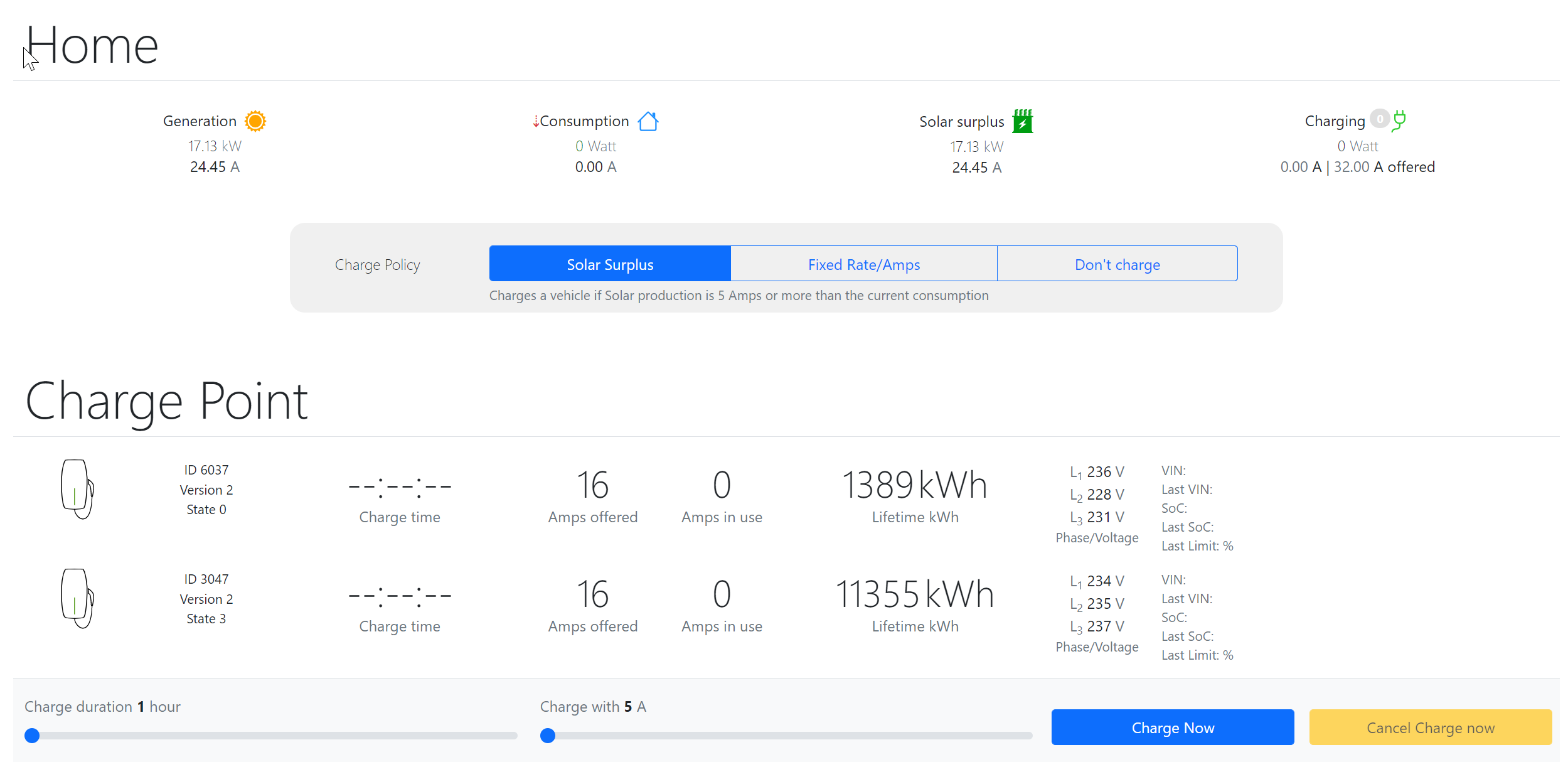
the offer Amps are mutch higher than the Solar surplus value
