

 nextui-org
[BUG] - Dynamic table throws error when items is undefined
Describe the bug
When using the dynamic Table, an error is thrown if the items passed to <Table.Body items={items}> is undefined.
The error is: props.children was a function but props.items is missing
See this fork of the Dynamic Table example: https://codesandbox.io/s/sandpack-project-forked-vovzzp?file=/App.js
I came across this error while using react-query to retrieve the data for my table on page load. I used a hook to load the data as follows:
const { data, error, isLoading } = useProjects(user);
The data is initially undefined until it is loaded from the server, which causes the error above.
Your Example Website or App
https://codesandbox.io/s/sandpack-project-forked-vovzzp?file=/App.js
Steps to Reproduce the Bug or Issue
- Start with the Dynamic Table example: https://nextui.org/docs/components/table#dynamic
- Set the
rowsvariable to undefined. - See the error:
props.children was a function but props.items is missing
Expected behavior
I would expect the table to be displayed with no rows, rather than throwing an error. Alternatively there could be an icon or message to indicate there is no data.
Screenshots or Videos
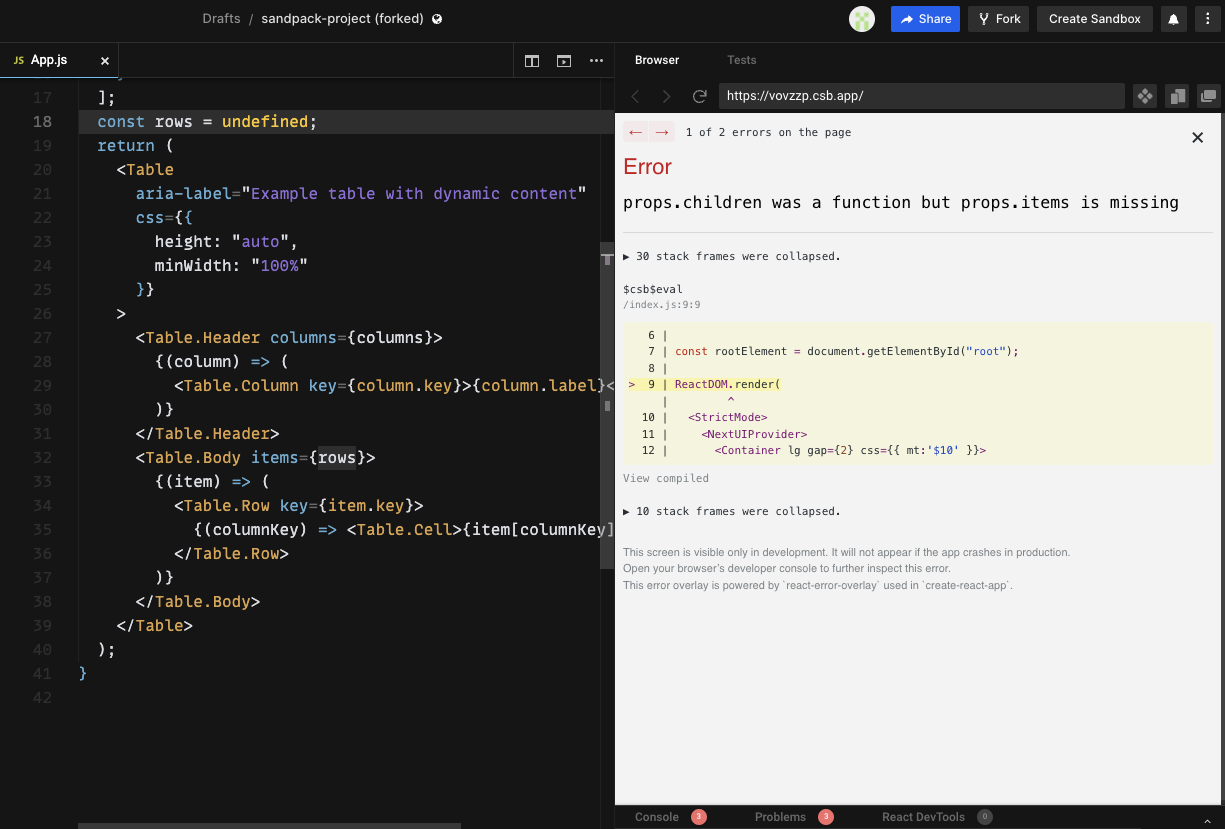
Operating System Version
macOS
Browser
Firefox

This bug is intentional, it is not a bug in nextui.
props.children is a looping function call, you should make sure props.items exist
@jrgarciadev Error thrown from @react-stately/table case.
      if (typeof children === 'function') {
        if (!items) {
          throw new Error('props.children was a function but props.items is missing');
        }
      }

I see, the error is actually coming from @react-stately/table. Thank you for pointing that out.
Is there a way to workaround this? I feel this is a very common case that should be handled without an error. Most data displayed in a table will be loaded dynamically, and very possibly will be undefined while being loaded. This is the first thing I ran into when starting with nextui table, and it was very frustrating to track down on first use. I'm sure I won't be the only one hitting this error.
Obviously I can workaround this in my code, but seems it would be beneficial to support in nextui.
Hey @rshov as @wangly19 mentioned before, the Table.Body behavior is handled by @react-aria/table unfortunately there nothing we can do from our side due to the NextUI is the UI implementation, we could point that out on the docs though
Thanks for reporting it

Hey dude, I was having a similar problem using the Autocomplete component with dynamic data.
<Autocomplete label={'Attribute'}
    isLoading={meaningAttributesQuery.isLoading}
    defaultItems={meaningAttributesQuery.data?.attributes ?? []}>
      {(item) => (
        <AutocompleteItem key={item.attribute} className="capitalize">
          {item && item.attribute}
        </AutocompleteItem>
      )}
</Autocomplete>
adding ?? [] into defaultItems prop resolved the error props.children was a function but props.items is missing. You may wanna try rows ?? []
Hope this workaround works for you as well!
