

 nextui-org
[BUG] - On focus, outline is not visible.
HeroUI Version
2.8.0-beta.4
Describe the bug
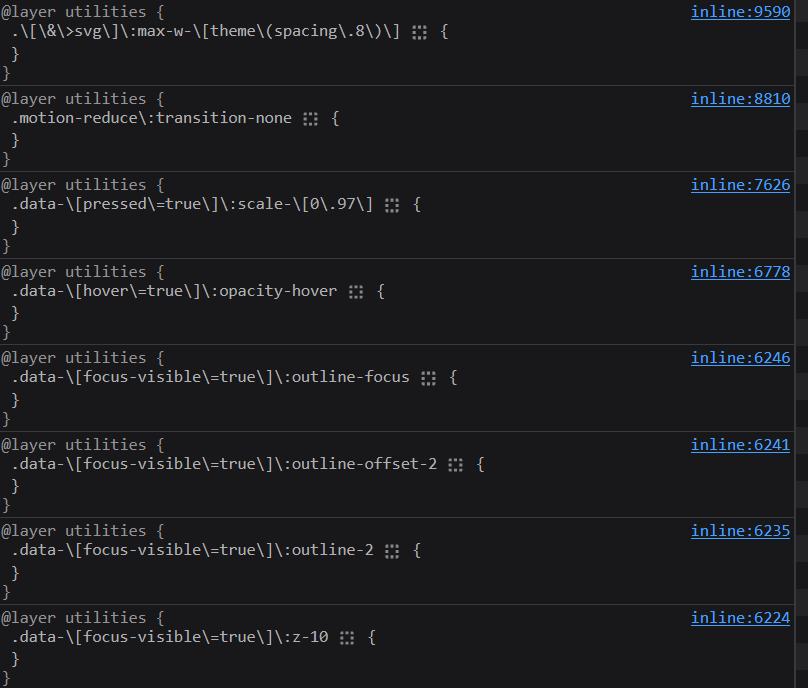
As you will observe from the screenshot, the selectors are there. However, the actual styles are not being properly projected on the actual style.
Example
Imagine that the following className
<button className="data-[focus-visible=true]:outline-2">Test My Button</div>
Translates to a selector with no effective CSS payload (i.e. outline-2)
.data-\[focus-visible\]=true\]\:outline-2 {}
The real issue
It seems the other styles are mostly working as expected, which is strange because the same selector pattern works for the hover.
Your Example Website or App
Tried stackblitz and others, but none is accepting tw4 with vite setup like this, so decided to simply post.....
Steps to Reproduce the Bug or Issue
It is relatively fast to reproduce.
- Install the deps as below...
{
    "name": "heroui-focus-tw4-vite-react19",
    "private": true,
    "version": "0.0.0",
    "type": "module",
    "scripts": {
      "dev": "vite",
      "build": "tsc && vite build",
      "preview": "vite preview"
    },
    "dependencies": {
      "@heroui/react": "2.8.0-beta.4",
      "@tailwindcss/vite": "^4.1.5",
      "react": "^19.1.0",
      "react-dom": "^19.1.0",
      "tailwindcss": "^4.1.5"
    },
    "devDependencies": {
      "@tailwindcss/postcss": "^4.1.5",
      "@types/react": "^19.1.2",
      "@types/react-dom": "^19.1.3",
      "@vitejs/plugin-react": "^4.4.1",
      "typescript": "^5.8.3",
      "vite": "^6.3.4"
    }
  }
- Add postcss.config.js
export default {
    plugins: {
        "@tailwindcss/postcss": {},
    },
};
- Add initial hero plugin
// src/hero.ts
import { heroui } from "@heroui/react";

export default heroui();
- Setup css for tailwind and heroui plugins. (adjust path if required. Here, I have put it to src/style.css)
@import "tailwindcss";
@plugin './hero.ts';
@source '../node_modules/@heroui/theme/dist/**/*.{js,ts,jsx,tsx}';
@custom-variant dark (&:is(.dark *));
- Setup main.tsx (the main entrypoint for the React App)
import {createRoot} from "react-dom/client";
import {StrictMode} from "react";

import './style.css'
import App from "./App.tsx";
import {HeroUIProvider} from "@heroui/react";

createRoot(document.getElementById("root")!).render(
    <StrictMode>
        <HeroUIProvider>
            <App/>
        </HeroUIProvider>
    </StrictMode>
);
- At last.... the App.tsx.
import {Button} from "@heroui/react";

export default function App() {
    return (
        <div className='w-dvw h-dvh flex justify-center items-center gap-x-2'>
            <Button variant='faded'>Test HeroUI Button</Button>
            <Button variant='shadow'>Test HeroUI Button</Button>
            <Button variant='ghost'>Test HeroUI Button</Button>
            <Button variant='faded'>Test HeroUI Button</Button>
            <Button variant='light'>Test HeroUI Button</Button>
            <Button variant='solid'>Test HeroUI Button</Button>
            <Button variant='flat'>Test HeroUI Button</Button>
        </div>
    )
}
Expected behavior
Outlines must be visible (or more precisely, the tailwind utility class projection must be corrected.)
Screenshots or Videos
Operating System Version
Windows 11
Browser
Chrome

![linear[bot] avatar](https://avatars.githubusercontent.com/in/20150?v=4 "Published by a pub.dev verified publisher")
@state303 Seems can't reproduced in beta docs https://beta.heroui.com/docs/components/button

I am seeing this issue as well on my HeroUI Buttons where focus rings don't appear when navigating with tab key. As far as I can figure out, the outline style of solid isn't being applied correctly. When I focus a button, the data-focus=true, data-focus-visible=true attributes are set, but a selector applies outline-style: var(--tw-outline-style) to one of these attributes. This doesn't seem to apply the 'solid' value properly. I can fix by adding to my button a className="focus:outline-solid"`.
versions: tailwindcss: 4.1.4 @heroui/react: 2.7.6-beta.2
Relevant selectors in the browser:

I don't know if this is relevant, but that --tw-outline-styles variable is set to an @property with the value below. I don't really know how @property works, but I tried overrididing the @property with a straight variable in my global.css like this, * { --tw-outline-style: solid; }, and it fixed the focus ring missing issue on my buttons.
Original setting of --tw-outline-style:
@property --tw-outline-style  {
  syntax: "*";
  inherits: false;
  initial-value: solid;
}
I'm curious if this issue is relevant: https://github.com/tailwindlabs/tailwindcss/discussions/16772
I don't know if this is relevant, but that
--tw-outline-stylesvariable is set to an@propertywith the value below. I don't really know how@propertyworks, but I tried overrididing the@propertywith a straight variable in my global.css like this,* { --tw-outline-style: solid; }, and it fixed the focus ring missing issue on my buttons.Original setting of --tw-outline-style:
@property --tw-outline-style  {
  syntax: "*";
  inherits: false;
  initial-value: solid;
}
I did the same as an escape hatch! However, I was curious about what would be the root cause.. Since I cannot reproduce from other examples, I guess this specifically affects vite and tailwind v4.
@winchesHe Hi, I think the issue is that the templates and examples are not made with tailwind v4. Just have tried to reproduce in fresh template and checked that the template is on v3, not v4. I guess this follows the migration guide for tw4, however, just wanted to know what would be the cause 😅
Everything just works fine, except the focus outline.
Issue still there a month later. It was the first thing I noticed when I installed it.


Thank you for revisiting and fixing so quickly. Love your library guys.