

 nextcloud
Accounts disappear (+notifications are still delivered)
Steps to reproduce
see below
Expected behaviour
see both servers
Actual behaviour
After updating from RC2 one of my two servers is gone, the account is away but I get notifications for this account. Reinstalling and adding my 2 servers does not solve it
Device brand and model
Pixel 4a
Android version
12
Nextcloud Talk app version
15.0.0-rc.1
Nextcloud server version
No response
Talk version
No response
Custom Signaling server configured
No response
Custom TURN server configured
No response
Custom STUN server configured
No response
Android logs
No response
Server log
No response
Additional information
No response

you mean after "Reinstalling and adding my 2 servers" while using 15.0.0 RC3 the missing server still not appears in the account switcher and it's conversations are not shown, but notifications still arrive?

can't reproduce yet. can you maybe try to reproduce this? so installing the old version you had before (i guess it was RC1 ?) and try the same again? if you can reproduce it would be great to have test accounts for your servers if you're okay with that.
added a third server, now I see all. I hope it was a hiccup only on my side
Hi @jakobroehrl and @mahibi , it continues happening, but I think that it's related to our specific environment. I've X nextclouds servers running like VM behind a apache running like reverse proxy.
Steps to reproduce
Not always happens at the same moment, i don't catch the correct way to reproduce. I've seen this issue in Talk-Android since v14.2.0-RC1 passing through all the RC until v15.0.0-RC3 (included). In v14.1.1 and v14.1.0 (and previous) didn't happen.
In my case it happens exactly with 2 configured accounts (same username), but on 2 virtual servers running his nextcloud instance each. The apache reverse proxy it's manager that routes the specific request to each server... and I think that it's doing ok.
I've the feeling that it happens more easily when you are doing something like changing between accounts and you "lost the connection" to the server. Or when you are sharing something from other apps (like gallery) to nextcloud talk.
Expected behaviour
All configured accounts always available on nextcloud-talk android app.
Actual behaviour
One of the account "eats" the another one. Well not eat, it puts "before/first than" the other account and hiddes it. at nextcloud-talk android app.
When you "delete" the visible account at nextcloud-talk android app, the hidden one comes to "light" (to be visible) in the app.
Device brand and model
Xiaomi Mi 9
Android version
12
Nextcloud Talk app version
14.2.0-RC1 to 15.0.0-RC3.
Nextcloud server version
23.0.8
Talk version
13.0.8
Custom Signaling server configured
No response
Custom TURN server configured
Yes
Custom STUN server configured
Yes
Android logs
No response
Server log
No response
Additional information
No response

@jakobroehrl :
- your accounts have the "same username" ?
- The accounts are in the same server ?
- The servers "share the same public ip (reverse-proxied)" or "have different ip each one"?
Another thing, that make me suspect that it's something wrong "written"/confusing in the configuration file at nextcloud-talk "android data app" is that if you try to import the hidden account from accounts configured at the "nextcloud android client" (app for files), the hidden one nor the visible one aren't shown to import to the "nextcloud talk-android app". When you "delete" the visible one on nextcloud talk-android app, then you can choose this account to re-add it to nextcloud-talk app from the "nextcloud android client"*
*Well it's possible if you have all these accounts configured on the "nextcloud android client" (files).
@jakobroehrl :
* your accounts have the "same username" ?

* The accounts are in the same server ?

* The servers "share the same public ip (reverse-proxied)" or "have different ip each one"?
no, no, different ip
@jakobroehrl, so, it seems it could happen with any scenario. It continues happening to me.
@mahibi, must @jakobroehrl, or I, reopen an issue about this ?
@migulen always feel free to reopen issues if you think something is not solved.
I've seen this issue in Talk-Android since v14.2.0-RC1 passing through all the RC until v15.0.0-RC3 (included). In v14.1.1 and v14.1.0 (and previous) didn't happen.
this is actually a very useful info, thank you @migulen :+1: So i guess it's maybe the migration from requery to room, since v14.2.0-RC1 contained these changes https://github.com/nextcloud/talk-android/milestone/57?closed=1
fyi @AndyScherzinger
@jakobroehrl do you also see this behaviour reported by @migulen:
When you "delete" the visible account, the hidden one comes to "light" (to be visible) in the app.
?
Could you maybe create test accounts for me on your server so i can try to reproduce this @jakobroehrl ?
@migulen always feel free to reopen issues if you think something is not solved.
I've seen this issue in Talk-Android since v14.2.0-RC1 passing through all the RC until v15.0.0-RC3 (included). In v14.1.1 and v14.1.0 (and previous) didn't happen.
this is actually a very useful info, thank you @migulen +1 So i guess it's maybe the migration from requery to room, since v14.2.0-RC1 contained these changes https://github.com/nextcloud/talk-android/milestone/57?closed=1
fyi @AndyScherzinger
@mahibi Can I reopen an issue than I'm not the creator/owner/issuer ? I don't known how to do it, if it's possible. Or you mean that I've to create a new one referencing ?
I'm now trying v15.0.0-RC4, i will report if it happens with this version.
RELATED OFFTOPIC: By the way, I just was going to try to "reopen" https://github.com/nextcloud/talk-android/issues/2446, when I've seen your answer ;-). I'll give a chance in "spreed"
@migulen ah i was not aware it's not possible to reopen. jakob was able to reopen because he closed it..
I'm now trying v15.0.0-RC4, i will report if it happens with this version.
i'm pretty sure it happens also with this version as nothing was fixed regarding this issue..
I've the feeling that it happens more easily when you are doing something like changing between accounts (....) Or when you are sharing something from other apps (like gallery) to nextcloud talk.
can you confirm this behaviour @jakobroehrl ?
@jakobroehrl @migulen How often can you reproduce these issues? If you are willing to create test accounts for me on your servers please send url and credentials to marcel . hibbe at nextcloud . com
@jakobroehrl do you also see this behaviour reported by @migulen:
When you "delete" the visible account, the hidden one comes to "light" (to be visible) in the app.
?
Could you maybe create test accounts for me on your server so i can try to reproduce this @jakobroehrl ?
When an account get "hidden", you can see if it's configured in nextcloud-tak, but hidden, doing this:
1.- Open Nextcloud-talk/Add account/Import account from the Nextcloud app <--- Remember that must have configured the accounts on "Nextcloud app" before.
2.- You can not import from here because "it's not listed". <--- The already imported/configured (hidden too) accounts on nextcloud-talk are not shown/listed on this import function.
After that you go to:
3.- (Account Selector or User settings)/Settings/Remove account <------ The visible account gets deleted and the hidden one, instantly, gets shown and selected.
4.- Repeat 1.- and you can import the just before deleted account and , after that ("normally") the 2 accounts gets correctly configured and visible in nextcloud-talk... until it happens another time "for not clear reasons".
@jakobroehrl @migulen How often can you reproduce these issues? If you are willing to create test accounts for me on your servers please send url and credentials to marcel . hibbe at nextcloud . com
It depends in the use of the app. Normally it happens when you use it more. I could have this problem 2 times a day if I use a lot, the days I don't use or use only few times, it's perfectly possible it don't happen.
There is some index on the account selector ? It seems it gets overlapped or something.
@mahibi I'll try to create you an account this night.
maybe related: #2218
Yes... could be. Not so serious bug like that one (#2218)... but really annoying one. I'm not sure all the notifications arrive to the hidden account.
Two things to remember:
-
it starts to happen to me from v14.2.0-RC1 until now (v14.1.1 works ok).
-
It happens with 2 accounts (same username) in different instance nextcloud server but same ip reverse-proxied. (@migulen )
-
it happens with 2 accounts (different username) in different instance nextcloud server server with different ip. (@jakobroehrl )
REFER:
mahibi commented [on 18 Jul] (https://github.com/nextcloud/talk-android/issues/2218#issuecomment-1187041748)
as expected, and now approved: this happens only for accounts that are on the same server. So this should not affect too many users, anyway it's a serious bug. <---------- Not this case for @jakobroehrl for sure... and I think it's not mine too.
AndyScherzinger commented on 16 Jul
--> issue must be client side <------ I've the same feeling for this problem... but the root ¿ could be some type of misunderstood with the server?
When you "delete" the visible account, the hidden one comes to "light" (to be visible) in the app.
@mahibi not sure if a db migration went wrong, I rather don't think so because if deleting accounts, data and app with a reinstall lead to the same behavior I would suspect something with the db queries then. But that might be hard to find except it can be reproduced but a Dev, so they can debug it.

When you "delete" the visible account, the hidden one comes to "light" (to be visible) in the app.
@mahibi not sure if a db migration went wrong, I rather don't think so because if deleting accounts, data and app with a reinstall lead to the same behavior I would suspect something with the db queries then. But that might be hard to find except it can be reproduced but a Dev, so they can debug it.
For confirming this issue wasn't related to an upgrade problem between versions of the app (v14.2.0-RC1 until v15.0.0-RC3) (sometimes) I clear all data from "nextcloud-talk android app" (wipe the data cache and user data from the app), and then uninstall the app. After, I do fresh install of "nextcloud-talk android app" from github .apk package, and configure my usual accounts at the "nextcloud-talk android app" (importing these accounts from de "nextcloud android app") but I have the same results... before or later, one of the accounts gets hidden on "nextcloud-talk android app" when using the app. The hidden account could be any of the two configured, I haven't seen a pattern between them (order, server, etc...).
@AndyScherzinger, the times i don't make a "fresh install", I always check the accounts after upgrading versions of the app, and I never saw any account get hidden in the process. So, it seems to me, that it isn't a a migration problem... but I'm a neophyte.
Thanks for the details @migulen - does the hiding happen instantly or after some time? Also very important point you mentioned is that it is imported accounts, not accounts that get added via the usual web login flow. also cc @mahibi
@AndyScherzinger
Thanks for the details @migulen - does the hiding happen instantly or after some time?
https://github.com/nextcloud/talk-android/issues/2446#issuecomment-1276241805
It depends more on use of the app (or some special action/situation/triggers), than for time count.
Also very important point you mentioned is that it is imported accounts, not accounts that get added via the usual web login flow. also cc @mahibi
https://github.com/nextcloud/talk-android/issues/2446#issuecomment-1265882897
Yes, I pointed it before, normally I import the accounts from "nextcloud (client) android app", but not always ;-) . I don't think it's related to be imported from there. Next time hiding happens, I will try to log on "nextcloud-talk android app" using manual way.
@AndyScherzinger,
less or more, this is the list of "hiding" events of one of my accounts:
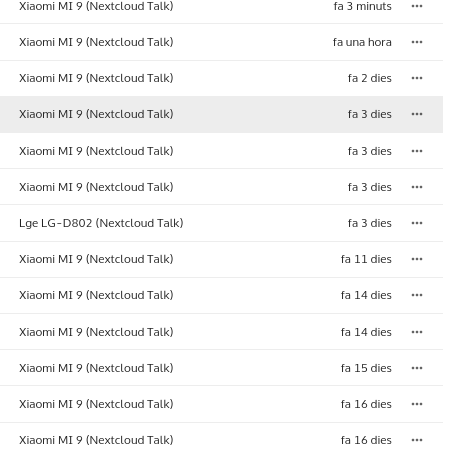
The same situations for the other account.
Yesterday I upgraded my nextcloud server to v23.0.10, Spreed (Talk) to v13.0.9. Today I've been using v15.0.0-RC4 nextcloud-talk and "account hiding" didn't happened.
I upgraded to v15.0.0-RC5 to just now... and will continue testing tomorrow.
thanks @migulen i plan to have a closer look in the evening.
tbh i wonder how import account from files app can work for you. i had a short look today and I had the impression it's broken :D
however one info from @jakobroehrl would be interesting: did you also import the accounts from the files app?
tbh i wonder how import account from files app can work for you. i had a short look today and I had the impression it's broken :D
Ough.... broken ??? It (seems) works perfectly for me :-P. Which version it's supposed to be broken ? I don't remember if import account works in nextcloud talk v14.x.x, but I think so.
https://github.com/nextcloud/talk-android/issues/743
@mahibi , Could be not being a "full import" (url server, username, password) it's what you call "broken" ?? For me, url and username, it's ok for an import account function. <--- I think I found the broken part too, see the issue #743.
Ough.... broken ??? It (seems) works perfectly for me :-P. Which version it's supposed to be broken ? I don't remember if import account works in nextcloud talk v14.x.x, but I think so.
just tested with nc android talk v14.0.0 and import option was shown and worked correctly. with broken i mean that current versions don't even show the option to import accounts. But apparently this is not the case for all devices(?)/scenarios(?)/..? as it works for you..
just checked: the hidden "import account from nextcloud app" option is not related to versions! it only works when apk is manually installed from github. via play store it fails. will have a closer look on monday..