

 nextcloud
📊 Simple polls
Similar to other chat solutions we also need a quick poll option in Talk. It can be kept rather basic as for complicated/non-instant polls the polls app can be used and modified to allow sharing polls into the chat similar like deck-cards, map-locations and tasks are already shared.
Basic options are (only settable on creation, there is no editing):
- Number of options a user can vote for (1-n)
- Result mode:
- Names of the votes are hidden and there is no intermediate result
- It is visible which user voted for which option at anytime
- Only the author and moderators can close the vote (no timeout, no auto-closing)
- Once closed the poll is done (no reopen)
- [x] API https://github.com/nextcloud/spreed/pull/7306
- [ ] Web https://github.com/nextcloud/spreed/pull/7465
- [ ] iOS https://github.com/nextcloud/talk-ios/issues/794
- [x] Android https://github.com/nextcloud/talk-android/issues/2024

WEB Creation:
- button on NewMessageForm > modal with same component for radio question in NC Forms
Voting: ability to directly click and vote
Mobile clients Only viewing, right @nickvergessen? Small card with poll title > 2 tap process to vote

Mobile clients Only viewing, right @nickvergessen?
Definetly not. But they can not create polls. Voting and seeing the result however is a must have.
Current status with the mobile mockups. Only the display of voters in non-anonymous polls is missing. Comments/questions are welcome :)
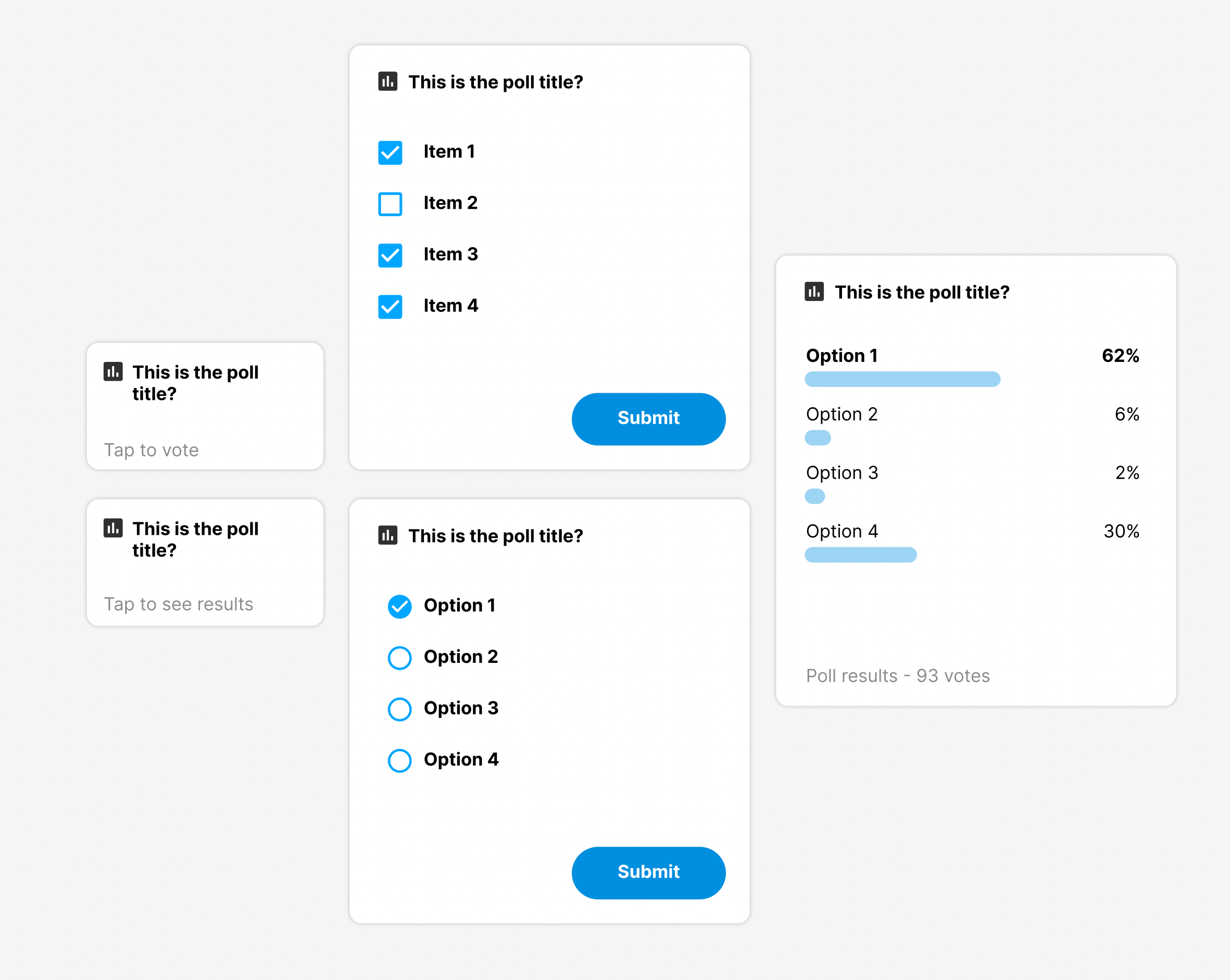
Should have a new section in the shared items tab for polls? Or is "Other" good enough?

Were there already thoughts how to display voters in non-anonymous polls? E.g. displaying mini avatars under the bars vs. opening a listview on click etc.?
I would do both, display the mini avatars just like in text when multiple editing, and upon tapping the avatars list, bring out a dialog that shows a list with the voters
should there be an option to edit the own vote as long as the poll is not closed?
I would say either we:
- Show the results immediately after vote and don't allow changing the vote
- Don't show the result until the poll has ended and allow changing the vote
Currently we're going for option 1. What we cannot do in my opinion is showing the results and allowing to change the vote after it as this could promote the bandwagon effect
i would say it makes sense to change the vote. For example if the poll is an appointment coordination...
To avoid the bandwagon effect we have the resultMode 1 (="hidden").
should there be an option to edit the own vote as long as the poll is not closed?
You can just post a new set of options to the same endpoint as your first voting. That will update your voting until it is closed
so whenever you voted, i suggest the following behaviour:
| poll status | resultMode | show results? | edit button? |
|---|---|---|---|
| open | public | show results (show participants) | yes |
| open | hidden | hide results (but show voting screen + hint that you already voted?) | yes (instead of "Submit" call the button "Update"?) |
| closed | public | show results (show participants) | no |
| closed | hidden | show results (only number of votes) | no |
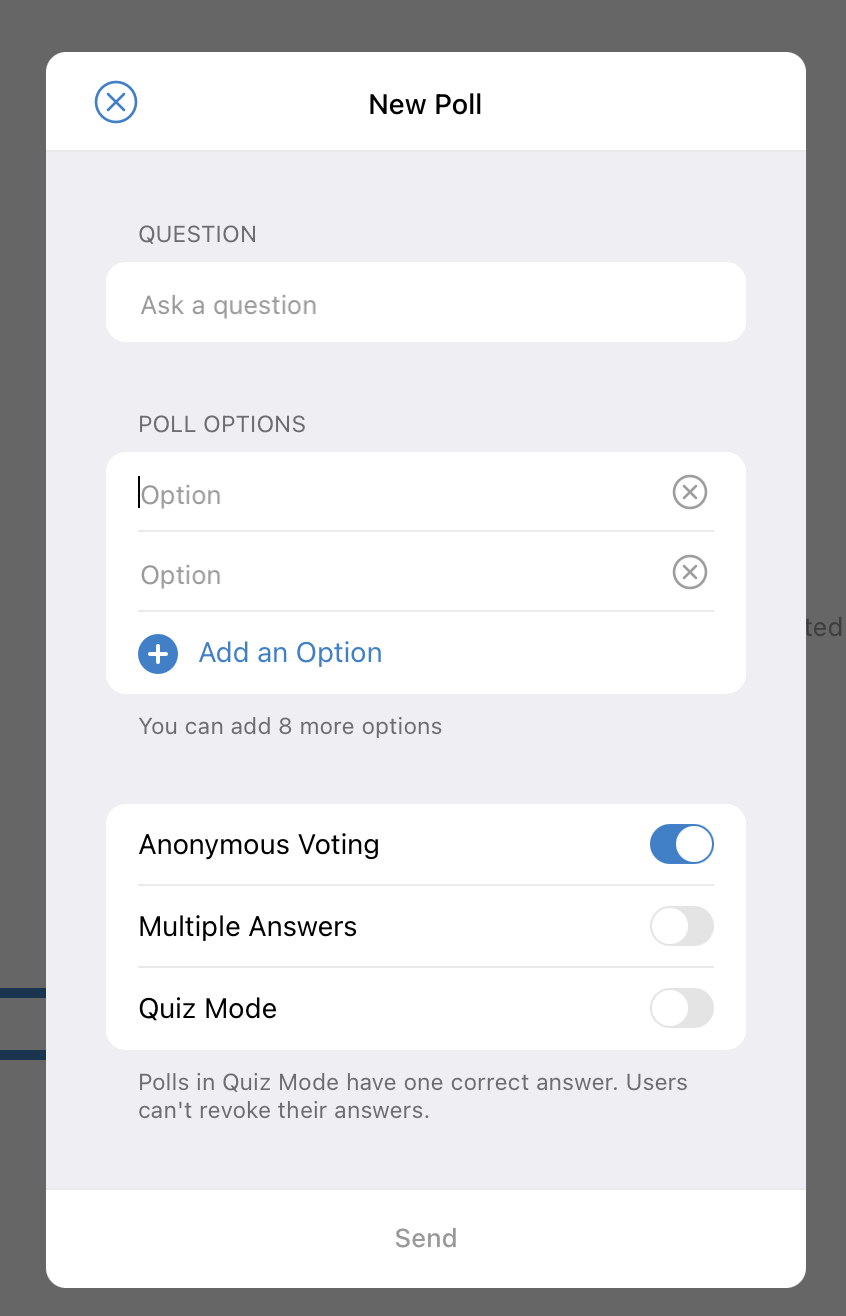
Question that came up: Should we have an option that prevents changing the vote after you voted once? The goal is to prevent Band-Wagon on the second level via the editing option, but e.g. Telegram still allows this and we think it could be useful e.g. when you use it to agree on an appointment and duties change or similar stuff.
where should we place a button to "close" the poll (https://nextcloud-talk.readthedocs.io/en/latest/poll/#close-a-poll) ?
I think this should go on the results screen for moderators. Moderators are always able to see the poll results right? Also given the presence of the new button there, I'd move the grayed out text to the top
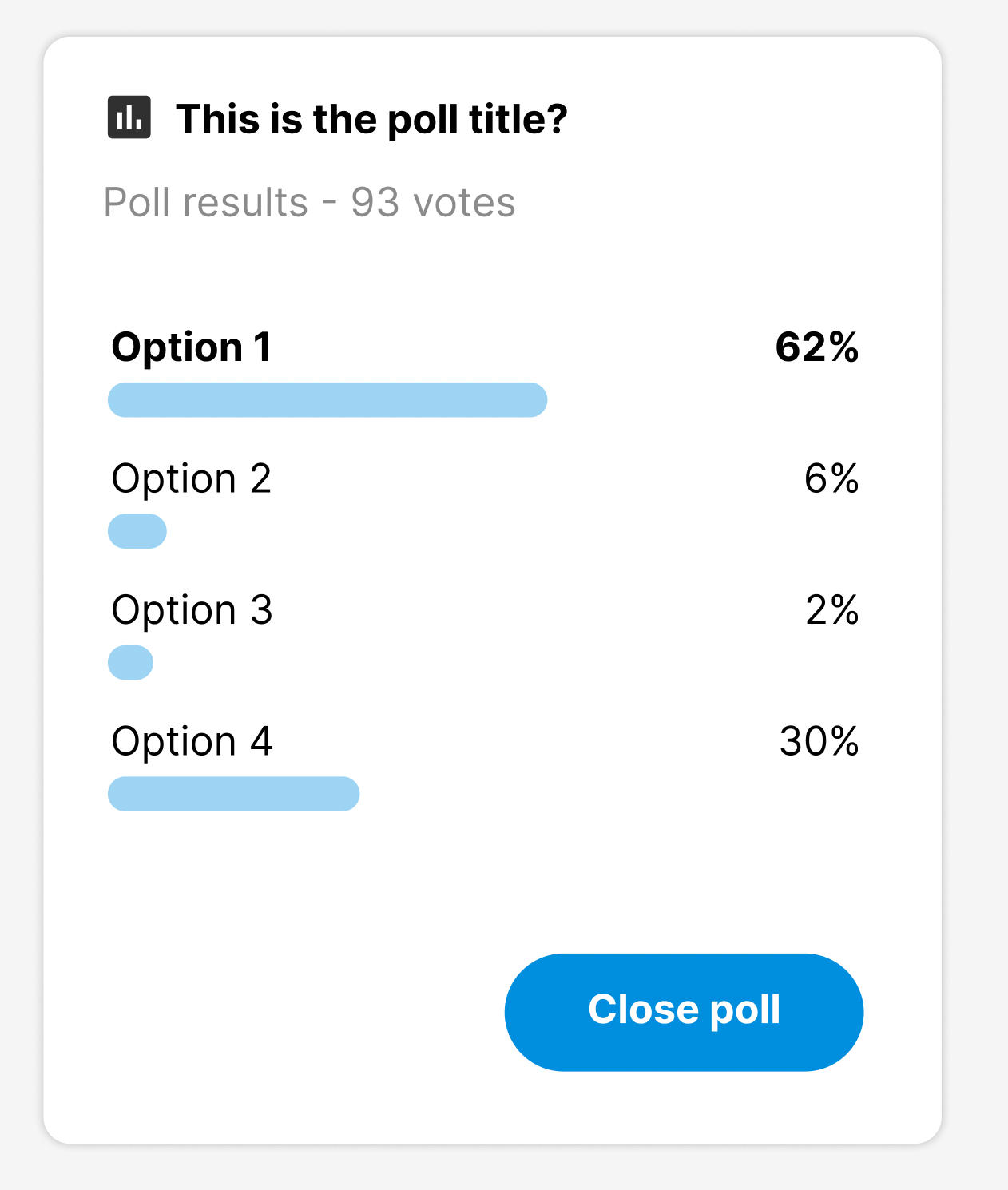
I think this should go on the results screen for moderators.
did it like this :+1:
But it should also be on the voting screen. So you can close a poll also without to vote for it. For example if you recognize a mistake after creating a poll..?
I also have the "Edit" button at the results screen. We decided to go for the edit feature, right??
Moderators are always able to see the poll results right?
they can't because the API won't give the data. or do i miss something?
Also given the presence of the new button there, I'd move the grayed out text to the top
works for me
But it should also be on the voting screen. So you can close a poll also without to vote for it. For example if you recognize a mistake after creating a poll..?
yes we can have a non primary button in the voting screen too
I also have the "Edit" button at the results screen. We decided to go for the edit feature, right??
I'm not aware of this.. Did we?
But it should also be on the voting screen. So you can close a poll also without to vote for it. For example if you recognize a mistake after creating a poll..?
yes we can have a non primary button in the voting screen too
After clicking the button, we should pop up a dialog with explanation if this poll should be really closed? Because otherwise people think the button will just close the current window...
I'm not aware of this.. Did we?
hm right there was no clear decision documented. Joas voted in favor, me too. I already implemented it but in case we decide against it i could just hide the button..
Maybe we should call it "End poll" instead then? But yes it probably makes sense to show a confirmation dialog too.
Moderators are always able to see the poll results right?
Results are hidden for moderators as well when the mode is hidden.
We decided to go for the edit feature, right??
We don't have editing as we also don't have editing of messages yet. Also I dislike editing on polls, because it's unclear at what point we would need to purge all votes. Otherwise you could edit the poll and change Yes to No and No to Yes and everyone was tricked into voting wrongly.
Maybe we should call it "End poll" instead then?
👍🏼
We decided to go for the edit feature, right??
We don't have editing as we also don't have editing of messages yet. Also I dislike editing on polls, because it's unclear at what point we would need to purge all votes. Otherwise you could edit the poll and change Yes to No and No to Yes and everyone was tricked into voting wrongly.
perhaps I have expressed myself unclearly.. we now mix up editing of the poll itself with the ability to change the votes.
- Editing of the poll itself (like title and wording of options) should not be possible, i totally agree.
- But we need a decision if it should it be possible to change the votes. (see https://github.com/nextcloud/spreed/issues/7355#issuecomment-1153878053)
feature wise polls for android is finished i guess (just some minor taks to do..), anyone who would like to give it a try can install the app from https://github.com/nextcloud/talk-android/pull/2095 to review & discuss UI... fyi @nickvergessen @Ivansss
- [ ] Editing shall be allowed in both modes
- [ ] We should show the number of voters to the author and moderators on hidden polls so they know when to close
currently there is the number of votes in the result screen mockup. i suggest it makes more sense to show the number of voters (numVoters) here instead? just like it should be shown now for authors and moderators now in the vote screen..?
should there be / is there any limit how long a question or poll options can be?
The question can be ~65k cahrs and the options array as json encoded can be the same size. I guess it would be sane to limit it to 32k with a hard limit so we can test it outside of the DB and also the clients can prevalidate it?
Notes from Polls Android design review
- [ ] Creation flow
- [ ] Question field should be focused directly
- [ ] When putting in additional options, entire container should scroll instead of just the options list. Otherwise not even any option is visible e.g. in landscape mode.
- [ ] 2 empty options should be created by default as those are the minimum requirement for a poll
- [ ] "Add Option" → "Add option" only first word is capitalized
- [ ] Same for "End Poll" → "End poll" in button and title
- [ ] Instead of "Submit" label the button "Vote"
- [ ] Instead of "You successfully voted for this private poll" just close the dialog and show the toast "Vote submitted"
- [ ] System messages saying "You closed the poll" → "You ended the poll" so it’s consistent
- [ ] "End poll" button can be tertiary (text only) always
- [ ] "voters" → "votes"
- [ ] Border-radius on the dialogs should be larger → on web we have 10px e.g. → needs to work with the primary button on the bottom right
- [ ] Think about if using a bottom sheet for this works nicer
- [ ] Don’t show the system messages "You voted on the poll title"
- [ ] Bottom whitespace is a bit larger than whitespace on sides – reduce bottom whitespace to fit the sides (especially visible with the "Edit vote" button)
- [ ] Buttons look smaller than other ones, possibly up to 44px height min
Voting screen
- [ ] Use same icon for mobile and desktop (the one without the box might be nicer, is less heavy)
- [ ] Align all text left with the poll title (checkboxes / radio buttons will be aligned below the bar icon)
Results screen
- [ ] Results container can be a bit wider, a/b/c options should left-align with "Results" subline text, and on the right the bar should extend to the right of the "Edit vote" button
- [ ] "Edit" → "Edit vote"
- [ ] Bit more whitespace between results list and buttons on bottom, otherwise
- [ ] Thickness of bars is ok on Android, on web we should adjust to what we use in Forms: 6px height with 3px border-radius
- [ ] Bar color should be primary instead of muted different tone
- [ ] Default view should be horizontal avatar list, overlapping, with ~2px/dpi background-colored border around so they are visually separated
- [ ] On click it can expand into the avatars+names below each other list
Discussion: Both checkboxes and radio button questions will get results in percentages.
- For radio button questions, the sum of all options will be 100%
- For checkbox questions, multiple options can be 100%, but this indicates how many of the respondents are on board with an option so that is good → Both result screens look the same which is good
- Question is limited to 32k chars (not multibyte save, so an emoji is 3-4 chars)
- Json encoded options array is limited to 60k chars (not multibyte save, so an emoji is 3-4 chars)
- Options on creation are now validated to be strings
- Options array on creating needs to be at least 2 strings long
- Options on voting are now validated to be integers
- System messages
poll_voteddo not contain the actor anymore to be okay with the hidden result mode
2 things added to the list which we talked about in the meeting but I seemingly forgot to note:
- Bar color should be primary instead of muted different tone
- (Clarified:) Default view should be horizontal avatar list, overlapping, with ~2px/dpi background-colored border around so they are visually separated
