

 nextcloud
[Bug]: Very first download is always 50% slow speed, but following downloads of the same file are ok, cache logic issues?
⚠️ This issue respects the following points: ⚠️
- [X] This is a bug, not a question or a configuration/webserver/proxy issue.
- [X] This issue is not already reported on Github (I've searched it).
- [X] Nextcloud Server is up to date. See Maintenance and Release Schedule for supported versions.
- [X] Nextcloud Server is running on 64bit capable CPU, PHP and OS.
- [X] I agree to follow Nextcloud's Code of Conduct.
Bug description
Nextcloud seems to make some kind of unadvertised caching of files before serving them for the very first time, I'm experiencing this:
- The very first time that you download a big file, it always downloads at 50% of speed of your connection or disk max speed capability. Following downloads are just fine, x2 increase of download speed at full capacity.
- Downloads don't start immediately, there is a significant delay like 10 or more seconds before any byte is downloaded.
- There are some apache processes that continue reading the file from the disk even after the browser has completely downloaded the file, this happens for several seconds.
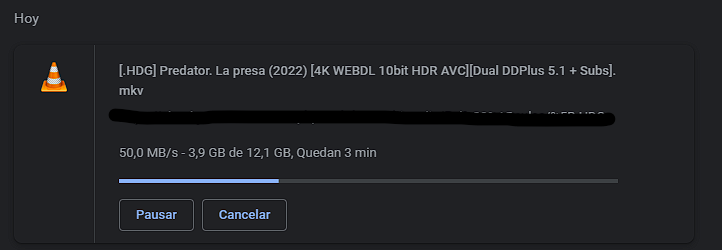
1 - Very first download of a file at 50MB/S:
I can see that clearly there are 3 apache processes reading from the device the very first time:

Real client speed:
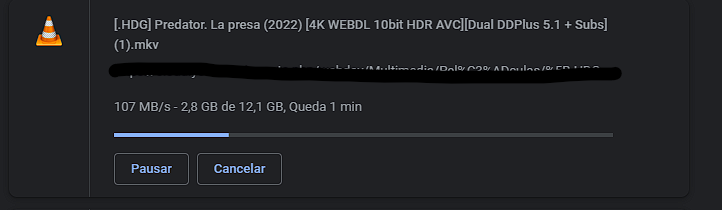
2 - Following downloads of the same file goes to full speed 107 MB/S:
Here i can only see 2 apache2 processes insetead of 3 (as very first download):

Real client speed
Steps to reproduce
I installed this with the official helm chart and official default apache config that the helm chart performs.
- Download a file and analyze apache2 processes of nextcloud with a tool like iotop or similar. You will see 3 apache2 processes for just a unique download reading from disk unnecessariliy.
- After download ends in the client, apache2 processes keeps reading disk anyway. There seems to be some caching logic here.
- Following downloads of same file goes at full speed.
How can this behaviour be disabled? Is it needed at all? Is this cache? This is quite annoying if you never redownload those files and if those files are quite big, as you are always getting half the speed that you should have.
Expected behavior
It should download at full speed the very first time, not needing to download a file previously to get full download speed.
Installation method
Community Docker image
Operating system
Debian/Ubuntu
PHP engine version
PHP 8.1
Web server
Apache (supported)
Database engine version
PostgreSQL
Is this bug present after an update or on a fresh install?
Fresh Nextcloud Server install
Are you using the Nextcloud Server Encryption module?
Encryption is Disabled
What user-backends are you using?
- [X] Default user-backend (database)
- [ ] LDAP/ Active Directory
- [ ] SSO - SAML
- [ ] Other
Configuration report
No response
List of activated Apps
Default installed apps, any installed.
Nextcloud Signing status
No response
Nextcloud Logs
No response
Additional info
No response


Same here. After update from 24 to 25 (docker-compose) the first load is very slow.

I don't really know if it is really server related, or helm related, I posted this there also. Helm chart has serious performance issues when using the nextcloudData volume that leads to complete crashes and extreme in/out disk usage:
https://github.com/nextcloud/helm/issues/294
If you don't use the nextcloudData volume, performance and issues improve, but performance with every first download is still slow.
This issue has been automatically marked as stale because it has not had recent activity and seems to be missing some essential information. It will be closed if no further activity occurs. Thank you for your contributions.

The data volume logic is completely broken, I had to stop using it, because when you use a separated data volume it tries to cache the full file to the main disk every time that you seek a video or when you download a file for the very first time. It just completely crashes the system. If you keep all in the same volume this doesn't happen. Anyway, when using just 1 volume this still happens, very first download is slow and laggy, and is very annoying. Full of related issues in this repository.