

 nextcloud
Folder size displays wrong unit sometimes: MB instead of GB
NC 15.0.0, PHP 7.2
I have found a folder on my Nextcloud that is slightly over 1 GB, and I think it displays wrong.
Shouldn't it show "1 GB", instead of "1.002,1 MB"?
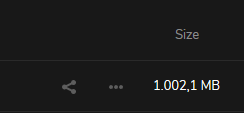

The problem is that Nextcloud uses binary prefixes and being correct, they should be labeled as Mebibytes (1 MiB = 2^20 bytes), and Gibibytes (1 GiB = 1024 MiB), so your 1002,1 M(i)B would be 0,979 G(i)B. It's a longer story but the beauty of the metric system is that such things must not depend on the usage (compared to the imperial system, where you have nautical miles, land miles, ...), so the kilo and giga-prefix should always be the same: https://en.wikipedia.org/wiki/Mebibyte
On ownCloud there was a discussion and Nextcloud kept it: https://github.com/owncloud/core/issues/13386

I know of that owncloud / nextcloud issue you mentioned. I'm fine with MB. It just doesn't look right at the moment, when a number has 4 figures. I only ask for an adjustment in the UI where you convert a 4-figure number into the next higher unit, even if it is technically "wrong". It's wrong anyway. You would've to call it Mebibytes, but nobody knows what a Mebibyte is, so just keep what is most used, MB.

@jancborchardt can you draw the line here? :) so we can move forward? :rocket:

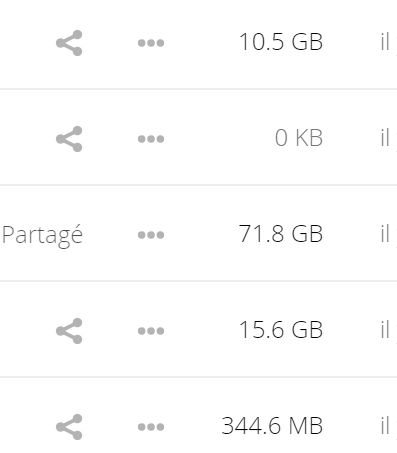
The screenshot by @stratege1401 looks good, right? In the screenshot by @AmonBune, it should indeed just round to "1 GB".

I guess we should also make sure this is the case on our clients. @camilasan, @tobiasKaminsky, @marinofaggiana, how is the current apps displaying the sizes?
We are rounding based on suffix: 0: b, kb 1: mb, gb, tb 2: pb, eb, zb, yb
e.g: 12B, 150Kb 1,1Mb …
https://github.com/nextcloud/android/blob/6643b6c8397a5792e963fa3641d29f45a7b73af6/src/main/java/com/owncloud/android/utils/DisplayUtils.java#L145-L170

https://developer.apple.com/documentation/foundation/nsbytecountformatter

@tobiasKaminsky so something like 1.000,24KB can't happen?
124 bytes => 124 B 1024 bytes => 1024 B 10024 bytes => 10 KB 100024 bytes => 98 KB 1000024 bytes => 977 KB 10000024 bytes => 9.5 MB 100000024 bytes => 95.4 MB 1000000024 bytes => 953.7 MB
Okay, so we'll have to fix android as well. 1000000024 bytes should give 1GB, not 953.7MB
@marinofaggiana could you answer the same as @tobiasKaminsky ? what will output a file with a size of 1000000024 bytes
Okay, so we'll have to fix android as well. 1000000024 bytes should give 1GB, not 953.7MB
Really? This then would just be not true, as only 1024 Megabyte are 1 Gigabyte. It is the same like hdd vendor doing…they assume 1000byte = 1kbyte, which is not true.
1Gb = 1024Mbyte * 1024kbyte/Mbyte * 1024byte/kbyte = 1.073.741.824 byte…
@tobiasKaminsky 1000000000 bytes = 1GB = 1000MB = 1000Mo = 953.7MiB = 953.7Mio
$ dd if=/dev/urandom of=sample.txt bs=1000 count=1000
1000+0 records in
1000+0 records out
1000000 bytes (1.0 MB, 977 KiB) copied, 0.00560095 s, 179 MB/s
953.7 MB because I use
NSByteCountFormatterCountStyleBinary // 1024 bytes are shown as 1 KB
I'm closing this issue due to inactivity. If this is still happening please make sure to upgrade to the latest version. After that, feel free to reopen.

Mega (the prefix M) means "one million", Giga (the prefix G) "one billion" etc. "one million" means the same thing no matter the number system, of course the way to write it differs (one million = F4240 | 1000000 | 1111 0100 0010 0100 0000) but it all refers to exactly "one million".
To state that 1MB = 1 048 576 B is to change the meaning of "one million".
The notion that 1MB=1024KB and so forth came from early programmers finding the approximation of 1000≃2¹⁰ close enough. Maybe there was technical limitations, but they are not relevant now. MiB (etc.) was introduced to solve the inconsistency, without programs needing to change their internal conversions, just the human presented suffix.
If you ask any non programmer how many megabytes theres in a GB, everyone* will say 1000.
This makes the JEDEC "standard" (that defines MB as 1024KB) almost completely objectively wrong, and at least in practice confusing.
IEC standard defines 1MiB as 1KiB. If you want to use the 1024 conversion factor, use this such that it is very clear what the size is.
SI units for data are 1MB = 1000KB. The prefixes are consistent, no-one needs to be confused and its easy for humans.
File explorers in different OSes:
- Mac: 1MB = 1000KB (since osx leopard)
- IOS: 1MB = 1000KB (since ios 10)
- AOSP: 1MB = 1000KB (although inconsistent, especially between OEMs apps)
- Windows: 1MB = 1024KB (incorrect)
- Linux (KDE, Gnome): 1MB=1000KB or 1MiB=1024KiB as defaults, but can change to 1MB=1024KB
Some clouds:
- Gdrive: 1MB=1024KB
- Onedrive: 1MB=1024KB
- Icloud: 1MB=1000KB (from memory)
- SeaFile: 1MB=1000KB
- DropBox: 1MB=1000KB
Internet speeds are typically reported in bits/s instead of bytes, but there always using the SI prefixes, ie 1MB/s = 1000KB/s.
I asked my mobile data vendor about what they use, answer was 1GB=1000MB
Storage vendors, USB, HDD, SDD use SI.
Does nextcloud want to be correct, or contribute to confusion?
Correct: IEC standard (KiB, MiB, GiB, TiB) or SI units (KB, MB, GB, TB.. with correct usage of prefix).
Please stop this nonsense of 1000≃1024. The trend is toward the SI units, or specifying IEC.
