nextcloud
Share links should not open collabora on load
Steps to reproduce
- Enable app
- Select details for a folder
- In sharing enable share link
- Go to link in new window, click on file you want to download
Expected behaviour
File should download
Actual behaviour
Page starts to load something, never completes
Additional info:
right click and opening in new window/tab works as expected i.e. the file starts to download; disabling the Collabora app restores expected functionality.
NB the Collabora app is only installed for testing purposes and is available to a very small group of users (though see #292 ) and certainly not for documents shared by link.

What is the problem exactly? Based on the title and reproduction steps the app behaves as expected, if Collabora Online is enabled, supported formats are supposed to open in it, and you still have the option to download the files either by clicking '...' in the file list and selecting Download, or the Download link when the file is opened.
Now if the problem is that the app is supposed to be restricted to a group of users, and that isn't taken into account (at least right away, since the report says the file fails to open in the end), then the title and reproduction steps should reflect that.

Share link is used when sharing with people who don't know Nextcloud. They are not part of an organisation or team that are consistently using it so have no training. Share link should just work; you share the link, they open the link and the most obvious thing should happen, consistently, with all the items shared.
NB For many organisations the range of files and functions that might be available in their NC means only a few types are dealt with by this particular app, so the consistent behaviour should be download rather than open, whether or not this app is restricted to a group of users. NC is not an online office suite, it's a broad-based collaboration tool. This app shouldn't get in the way of that, it should enhance it where it can. Make "edit" an entry on the menu for file types it works with - or even an option for the file owner (or person with appropriate rights) to enable for a file, which would help stop breaking files that don't round trip).
Hello @putt1ck , I have the same issue. I guess there are different ways to solve it:
- Make an option to chose if we want by default to "Download" or "Open/Edit" a file with Collabora
- Add an "Edit" entry in the 3-dots menu of each file
The 2 use cases where it bothers me are:
- Share a folder with external people (not used to Nextcloud), people click on a file, the file open in Collabora instead of being downloaded
- Share a file with a public link: the file open in Collabora instead of being downloaded (see workaround below)
May I suggest you to change the title of your issue with something closer to what you expect (if I understand you correctly), for example "Download versus open a file: Option to chose the behaviour for shared link and click"
As a workaround for individual files (it doesn't work if you share a folder, and people click on a "Word" document for example): you can add /download at the end of your shared link.

The meta problem for an organisation being that internal users are not going to follow detailed instruction. They want to share a file, like they can (and do) with 3rd party file sharing services. Now the organisation has deployed NC, probably with one of the motivations being to stop staff from using 3rd party file sharing services; user wants it to just work - they send out a share to a client or contractor...
...and it doesn't work because of this app being deployed for (some) internal users. So either default should be download or the app should be able to get out of the way by default i.e. a user who is enabled to use the app could have the choice to enable edit as default action, but download be the default. Personally I think Edit should be a menu option; online editors are useful in some cases and for some document types (types not formats), but local software is more reliable, powerful and responsive.
I agree.
Is there somebody from nextcloud here to bring some comments or solution?
Edit should always be the default option to open a file. As when you can edit online and the file gets automatically saved, the user experience is much smoother than offering a file for download and uploading it afterward.
As for the public shares, we have a big Download button in the header bar, which should give enough of an hint to users who want the file to be downloaded:
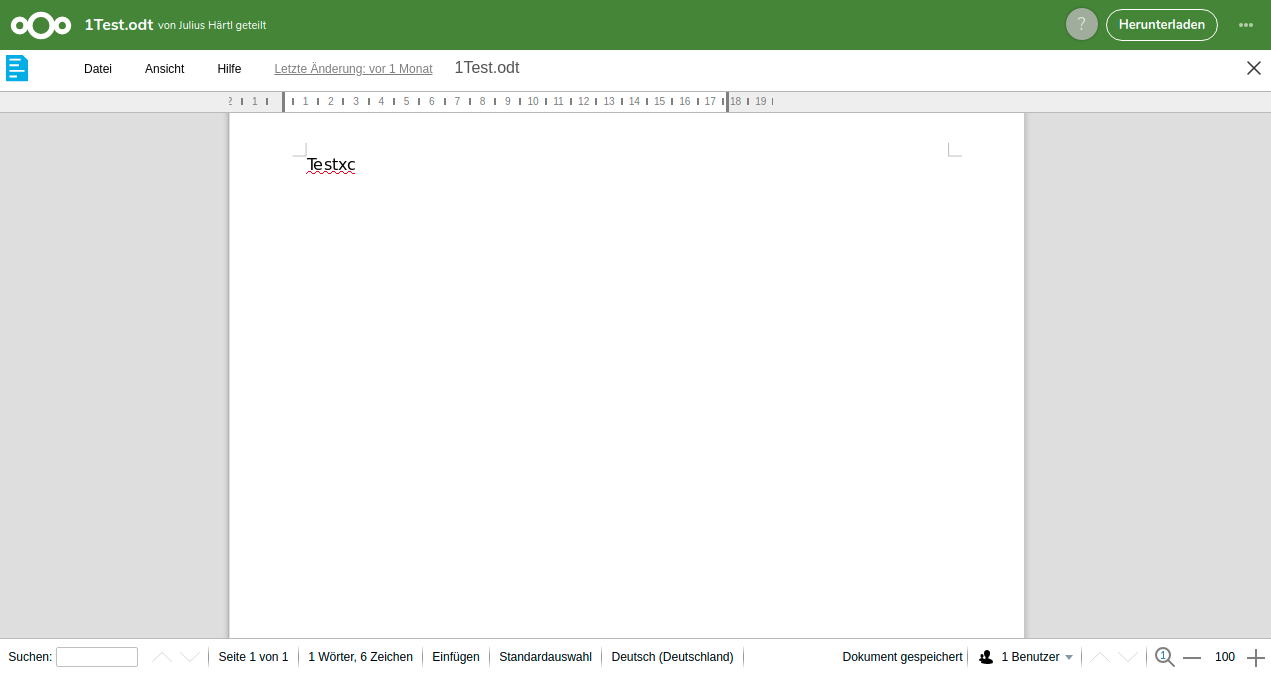

Thanks for your feedback @juliushaertl
Edit should always be the default option to open a file.
That's your point of view, it's not mine ;) But if you think it's the general point of view, it's no problem for me, as soon as I can change this default parameter (even if I have to do it manually in a config file).
As for the public shares, we have a big Download button in the header bar, which should give enough of an hint to users who want the file to be downloaded
Again, here, my experience is different: my partners don't always even understand that it could be possible to download it (yes, my partners are not the most computer-friendly guys ;) ). But more important, Collabora is a great tool, but it's still a bit buggy, sometimes not very responsive, sometimes a slow connection (I'm in Africa) delays the display of the file... So quite often, my partners tell me that the link "doesn't work".
That's why I would really appreciate to chose the default behaviour. For now, I have chosen to deactivate Collabora because of this issue :-(
Thanks for your help and understanding!
Again, here, my experience is different: my partners don't always even understand that it could be possible to download it (yes, my partners are not the most computer-friendly guys ;) ). But more important, Collabora is a great tool, but it's still a bit buggy, sometimes not very responsive, sometimes a slow connection (I'm in Africa) delays the display of the file... So quite often, my partners tell me that the link "doesn't work".
We generally try to have good defaults that work for a big share of the userbase, but I get why this might be useful in your case.
cc @nextcloud/designers
So what @juliushaertl stated is the intended design. Edit is always default, and there is a big download button on the top right.
What we could do to enhance this is while the document is loading, it displays:
⭕ (Spinner icon) Opening Document.odt … [ Download Document.odt instead ] (Button)
What do you think @biva @juliushaertl @putt1ck

Thank you @jancborchardt for your proposal, it could be a first step. But it's not enough for me:
- People who are expecting to download a file would not understand that they should click on an additional button
- With low bandwidth, I don't even see the "Opening Document" and the spinner icon. It's just blank.
- With fast bandwidth and fast server, people would have no time to read, understand and click on download.
So I would really prefer to choose the default behaviour.
@jancborchardt @juliushaertl I have seen several cases, where customization options were denied in favor of a best fitting default behaviour. I think this seemingly common thread (in Nextcloud) should be evaluated if it is really the way to go. I understand the "keep it simple" philosophy and do support it, but I think it can exist in parallel with well implemented customization features. Even if you get 95% users satisfied, you will end up with 5% annoyed users that expect a simple config option (and are even happy to do this outside the UI in a config file not cluttering the ui for the 95% standard users). Highly customizable software is a good thing and nothing bad or complicated as long as the options are clear and not too many of them are located in the UI. +1 @biva @putt1ck

Even if you get 95% users satisfied, you will end up with 5% annoyed users that expect a simple config option (and are even happy to do this outside the UI in a config file not cluttering the ui for the 95% standard users). Highly customizable software is a good thing and nothing bad or complicated as long as the options are clear and not too many of them are located in the UI.
The issue is that these config options only needed by the 5% of users require significant work and increase the testing matrix. See »Choosing our Preferences« for further issues with introducing a mass of options.
There’s plenty of complicated software out there already, Nextcloud aims to not be another one. Usually there can either be a middle ground or a simpler solution. Hence my proposal at https://github.com/nextcloud/richdocuments/issues/305#issuecomment-456398395, which of course could be improved additionally. But the default experience of opening Collabora on click should not be broken for regular users.
To be able to invest resources for more specific use cases, we offer Nextcloud enterprise subscriptions. If your company already has one, you could use the support channel offered so we can prioritize this.
@jancborchardt I understand your point and understand Nextcloud's position in general. But in this specific topic, is it really a complicated change? I'm not a programmer, but it does not look like very complicated if the option is not in the UI, and only in a config file. Obviously, I might be totally wrong in this judgement... ;-)
I have a similar problem, but in my case in the mobile app Collabora is available for everyone, although it is only available for one group. And just as already described above, the documents in shared folders open with Collobara Also in user settings everyone has a tab for Collabora.
I have already opened a issue, I came across this entry today
https://github.com/nextcloud/richdocuments/issues/1859

I also have a similar issue, my point of view is when sharing non-document files (jpeg in my case) they should not be opening in collabora. Whenever i share a photo with someone, they get directed to collabora as if trying to view a presentation. As a middle ground, would it be possible to add a filter to the administrator settings to only view/edit certain file types?

@ShawnTheShadow - Do you have watermarking enabled under Administrative Settings for Office (/settings/admin/richdocuments)?
If I enable watermarking, Collabora seems to get involved in JPG previews. If I don't enable it, JPGs shared by link are rendered in the browser.

We have the same problems in our organisation. We use Collabora mainly for internal usage, but we also want to share files for download with external users. Since we activated Collabora all shared links now open Collabora and we get dozens of complains and questions how to dowload the file. In some cases it's because Collabora fails to open (see https://github.com/nextcloud/richdocuments/issues/3332), but in most other cases the external users are just not able to find the download button (although it's there). So we ended up adding hundrets of RewriteRules in apache2 to manually disable Collabora for certain files:
RewriteRule ^/index.php/s/LINK_ID$ /index.php/s/LINK_ID/download [R=301,L]
However, this is quite time consuming and impractical. It would be great to have an option to disable Collabora for certain files and definitely for certain file types.
@jancborchardt I agree that Collabora is useful for writeable files. So here the default of opening the file in Collabora makes sense. But if a file is read-only the default should be definitely "download". I mean, what are the use cases for opening a read-only file like a pdf in Collabora instead of downloading the file directly? In 99.999% of all cases on the internet the pdf file is downloaded directly and not opened in a strange pdf online viewer. And in the remaining 0.001% of the cases users complain about the online viewer.
Currently we think about setting up an extra Nextcloud instance without Collabora just because of this download issue. Although this fixes the download issue it makes things also more complicated when you have to deal with two NC instances.
So my suggestion would be:
Disable Collabora for read-only files completely. If there are more than 0.01 % of users who actually used this feature you may think about adding a configuration option in the future to enable it again. But since @jancborchardt threshold is a minimum of 5% of users I think this feature can be painlessly dropped.