

 nextcloud
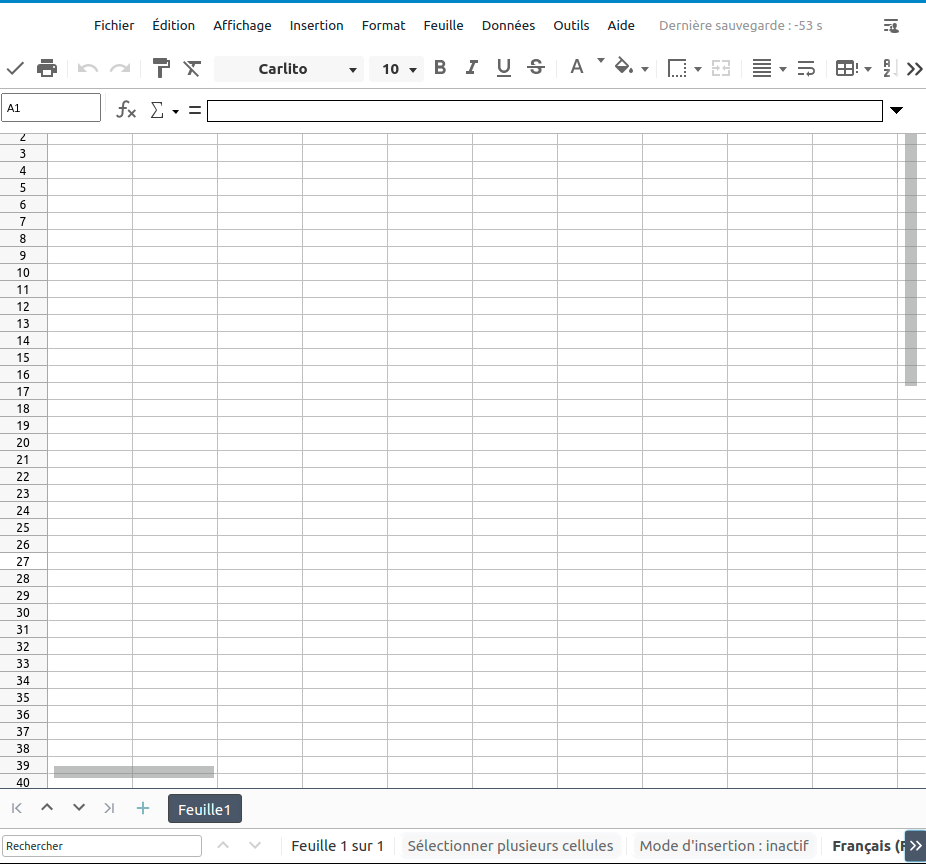
Collabora CODE Calc sheet column names and first row hidden by the formula bar at the top
Describe the bug In Nextcloud Collabora CODE the columns 1st row on a sheet is hidden by the formula bar at the top of the window. See screen capture below. As you can see, 1st row and column names are not accessible with this display.
To Reproduce In Nextcloud Files : click the "+" sign at the top and create a new .odt file. The file then opens in Collabora, and from there the display issue is visible.
Expected behavior The formula bar should not overlap with the 1st row and column names of the sheet.
Screenshots
Client details:
- OS: Ubuntu 16.04
- Browser: Chromium (the issue does not seem to happen in Firefox).
- Version 90.0.4430.72
- Device: Desktop
Server details
Operating system: Ubuntu 16.04
Web server: What does that mean ?
Database: No idea
PHP version: PHP 7.0.33-0ubuntu0.16.04.16+esm3 (cli) ( NTS )
Nextcloud version: Nextcloud Hub II (23.0.2) provided via Snap.
Version of the richdocuments app: No idea.
Version of Collabora Online: Collabora Online - Built-in CODE Server (ARM64) 21.11.204
