

 nextcloud
Very first download of files slow, following downloads fast. Caching issues between devices?
I'im using this helm charts and I've being experiencing lots of issues with download performance and weird behaviours:
- Downloads takes a while to start, like 10 or 15 seconds before downloading any byte. It seems that it is copying the file somewhere before serving it.
- After that, first download is always slow (5x slower) than following downloads of the same file.
- If you cancel a download in the web browser, the server keeps using the hard disk drive reading and writting anyway, until it is served.... nowhere? To a cache?
- Even if you don't cancel a download, the very first time that you finish a big file download, the server continues reading and writting to the disk for seconds or even minutes after the web browser reports having downloaded the full file.
- If I use the built in video player in next cloud and I seek the video, and I start doing the same with other videos, there is a point where nextcloud just crashes and the HDD drive just makes horrible noises until the pod crashes and is restarted. It seems that every time that you just ask for a chunk of a video, it tries to cache the whole video to another place.
- In the very first download I can see 3 apache2 processes reading from the hard drive. In following downloads I can only see just 1 apache2 process, so there is some additional copy to the file to other two places???:

-
Download speeds are slow in my local network (Less than 20 MB/S):
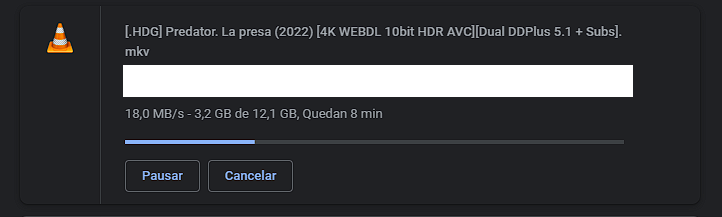
-
If I repeat the download over the same file, I can only see one apache2 process reading from the disk (Wich reads x3 faster):

-
Download speeds are now correct (80-100MB/S over gigabit ethernet):
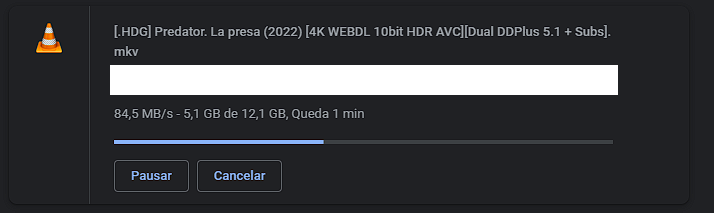
My setup is as follows:
- Main nextcloud exclusive pvc in a fast nvme drive
- Postgresql exclusive pvc in the same fast nvme drive
- Redis exclusive pvc in the same fast nvme drive
- nextcloudData exclusive pvc in a slow HDD drive
Is it possible that nextcloud is copying my files to the nvme drive before serving them the very first time? Whats the logic behind this? Is it trying to use the fast drive as a cache? Can I completely disable this behaviour? How? Thanks!
With this behaviour I'm having very poor performance, as I rearely re-download big files, and my "slow HDD drive" can achieve the same speed as my local network (or remote) at 1gb/s which is aprox 100 MB/S

I just reinstalled everything without using the separated nextcloudData volume for storing files, and it has fixed some of the issues but not all:
-
Now when I pause or seek a video, it doesn't continue downloading anything and the process of apache2 stops reading from the volume immediately as it should. I wouldn't recommend to anybody using this volume, it casues lots of issues that ends with a complete system crash due to extreme i/o usage.
-
The very first download continues being slow, like 60 MB/S (x2 speed improvement over using nextcloudData volume) , and following downloads at 100-108MB/S. It continues caching something in the same disk. And when the download ends in the client, the process keeps reading from the disk for several seconds but much less than before.
This kind of caching behaviours should be documented or advertised somewhere.