

 nextcloud
Show quota to users
Hi,
is it possible to show the remaining quota of the group folder contingent to the user to which the group folder was shared?
Regards,

Hello, I think a quota standard just like for users would be great.
Regards.

How difficult would it be to implement this - can this be done as a novice contributor, or do you need some experience in Nextcloud development?

in general the values car already be read using a PROPFIND on the group folder or any children, and request the following properties:
- d:quota-available-bytes
- d:quota-used-bytes
now, depending where those values are needed the code path will be different
for the sidebar on the right, it would require the following:
- request the quota Webdav properties in https://github.com/nextcloud/server/blob/master/apps/files/src/services/FileInfo.js#L46
- extend the parser to also read those properties: https://github.com/nextcloud/server/blob/master/core/src/files/client.js#L301
- extend FileInfo to expose those properties in https://github.com/nextcloud/server/blob/master/apps/files/src/services/FileInfo.js#L71 (if applicable)
- then in the sidebar Vue the values should be usable: https://github.com/nextcloud/server/blob/master/apps/files/src/views/Sidebar.vue#L421
it also means that the user needs to open the sidebar to see the quota values

now I realize that all the above changes would actually be in the server repository, so if we don't want to always show the quota we'd need a way to detect that we're inside a folder.
unless it's ok to always show the quota in general even for shares, external storages, etc ? @jancborchardt
unless it's ok to always show the quota in general even for shares, external storages, etc ? @jancborchardt
That wouldn’t really make sense, as the general overall quota is already shown on the bottom left, so no need to show it again in the sidebar.
Since you brought up external storages, for which it would probably be nice to show the quota as well, here’s 2 options:
- The quota is shown in the "Details" sidebar tab of the main parent folder of the groupfolder / external storage, as that is what it relates to. It is ok to have in there because it’s not needed that often.
- The quota is shown in the left navigation, alongside with the general quota (only when you are anywhere within the groupfolder. This is nice because this is the expected quota display place:
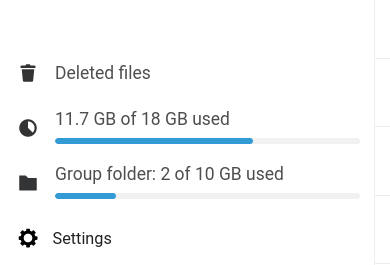
In any case, we should have the 90% and 95% quota warning notification also for groupfolders, just like we have for your own quota.
Now thinking more about it and mocking it up, it seems like solution 2) is the more sensible and obvious one. It shows quota where quota is expected to show.

Hello,
This second solution should be nice, with the groupfolder share name before the quota, as if "Group folder" was the name of the groupfolder, on the above screenshot
Regards,

In any case, we should have the 90% and 95% quota warning notification also for groupfolders, just like we have for your own quota.
Until information about the quota of the group folder you are in is displayed on the left side panel (which would be great), I think it would be (very) useful to simply add free space information to the notification that appears in the top right when the group folder starts to get full. This notification currently only shows a percentage. What is annoying and insufficient is that a percentage "doesn't mean much" because, for example, 5% of 500 MB (= 25 Mb) is not the same as 5% of 5 GB (= 250 Mb), or as 1 Tb ... When you only have 25 Mb, consider that you have no more space, while 250 Mb is a more comfortable margin. So, I propose that in addition to the percentage, we indicate how many Tb, Gb or Mb are still available.


unless it's ok to always show the quota in general even for shares, external storages, etc ? @jancborchardt
That wouldn’t really make sense, as the general overall quota is already shown on the bottom left, so no need to show it again in the sidebar.
Since you brought up external storages, for which it would probably be nice to show the quota as well, here’s 2 options:
1. The quota is shown in the "Details" sidebar tab of the main parent folder of the groupfolder / external storage, as that is what it relates to. It is ok to have in there because it’s not needed that often. 2. The quota is shown in the left navigation, alongside with the general quota (only when you are anywhere within the groupfolder. This is nice because this is the expected quota display place: In any case, we should have the 90% and 95% quota warning notification also for groupfolders, just like we have for your own quota.
Now thinking more about it and mocking it up, it seems like solution 2) is the more sensible and obvious one. It shows quota where quota is expected to show.
Hi @jancborchardt, Any news of this improvement? Your second solution would be excellent. I think it's a missing feature that would really improve the UX in the GF context. Could this be added to the roadmap ?
This would indeed be a nice enhancement. What do you think about my proposal and mockup at https://github.com/nextcloud/groupfolders/issues/44#issuecomment-1060446306 @provokateurin @skjnldsv @sorbaugh?
@jancborchardt I like your mockup, it really makes sense to have it this way. I wonder if the user quota should be hidden when inside a groupfolder as it is not relevant for uploading files. This way we'd only ever show the quota that is relevant which removes the confusing part of having two quotas. It really sounds like something that would need to be done in server and wouldn't even be groupfolders specific if I am right.

I wonder if the user quota should be hidden when inside a groupfolder as it is not relevant for uploading files. This way we'd only ever show the quota that is relevant which removes the confusing part of having two quotas.
@provokateurin good question – I’m not sure if it would be more confusing to switch out the bar than to show both, but I’m fine with trying out just showing 1 bar at a time. :)