

 nextcloud
Temporary failure in name with Apache + Redis + Traefik
Issue
I was running into some issues with a rather slow web UI, and some online research led me to include Redis + Cron in my setup to potentially speed it up but now I'm running into an issue with loading anything. Probably a configuration issue but I'm not sure where I went wrong.
The specific error I see when I go to my nextcloud domain ie https://nextcloud.domain is:
 Warning: Redis::connect(): php_network_getaddresses: getaddrinfo failed: Temporary failure in name resolution in /var/www/html/lib/private/RedisFactory.php on line 92

Warning: Cannot modify header information - headers already sent by (output started at /var/www/html/lib/private/RedisFactory.php:92) in /var/www/html/lib/private/legacy/OC_Template.php on line 350
Internal Server Error The server encountered an internal error and was unable to complete your request. Please contact the server administrator if this error reappears multiple times, please include the technical details below in your report. More details can be found in the server log.
I did keep seeing the following error in the nextcloud container as well, leading me to think that the problem is related to it. I've configured it to my best abilities in my compose file and I can verify that the variables are being set properly in config/config.php but nothing seems to be working.
AH00558: apache2: Could not reliably determine the server's fully qualified domain name, using <some_ip>. Set the 'ServerName' directive globally to suppress this message
Any help in resolving both (?) of these issues would be greatly appreciated! Thanks so much!
Config
My compose file is as follows:
version: "3"

volumes:
  nextcloud:
  db:

services:
  db:
    image: mariadb
    container_name: nextcloud_db
    restart: always
    networks:
      - proxy
    command: --transaction-isolation=READ-COMMITTED --binlog-format=ROW
    volumes:
      - db:/var/lib/mysql
    env_file:
      - db.env

  redis:
    image: redis:alpine
    container_name: nextcloud_redis
    restart: always

  cron:
    image: nextcloud:apache
    container_name: nextcloud_cron
    restart: always
    volumes:
      - nextcloud:/var/www/html
    entrypoint: /cron.sh
    depends_on:
      - db
      - redis

  app:
    image: nextcloud
    container_name: nextcloud
    restart: always
    networks:
      - proxy
    ports:
      - 10080:80
    depends_on:
      - db
      - redis
    volumes:
      - nextcloud:/var/www/html
    environment:
      - VIRTUAL_HOST=${CLOUD_DOMAIN}
      - OVERWRITEHOST=${CLOUD_DOMAIN}
      - NEXTCLOUD_HOSTNAME=${CLOUD_DOMAIN}
      - MYSQL_HOST=nextcloud_db
      - REDIS_HOST=nextcloud_redis
    labels:
      - "traefik.enable=true"
      - "traefik.docker.network=proxy"
      - "traefik.http.routers.nextcloud.entrypoints=http"
      - "traefik.http.routers.nextcloud.rule=Host(`${CLOUD_DOMAIN}`)"
      - "traefik.http.routers.nextcloud.middlewares=nextcloud-https-redirect"
      - "traefik.http.middlewares.nextcloud-https-redirect.redirectscheme.scheme=https"
      - "traefik.http.routers.nextcloud-secure.entrypoints=https"
      - "traefik.http.routers.nextcloud-secure.rule=Host(`${CLOUD_DOMAIN}`)"
      - "traefik.http.routers.nextcloud-secure.tls=true"
      - "traefik.http.routers.nextcloud-secure.tls.certresolver=http"
      - "traefik.http.routers.nextcloud-secure.service=nextcloud"
      - "traefik.http.services.nextcloud.loadbalancer.server.port=80"

networks:
  proxy:
    external: true
The .env file used contains:
CLOUD_DOMAIN=<nextcloud.domain>
and db.env contains:
MYSQL_PASSWORD=<PASSWORD>
MYSQL_DATABASE=nextcloud
MYSQL_USER=nextcloud
MYSQL_ROOT_PASSWORD=<PASSWORD>

I faced with similar issue. Tried first to tune this via env vars, with no luck for some reason, so I ended up with modifying config.php:
  'overwritehost' => 'nextcloud.domain',
  'overwriteprotocol' => 'https',

@zeldigas IIRC, the env vars are only used during installation. Modifying them after doesn't do anything unless you empty the volumes (thus reinstalling nextcloud). I can't figure out where I read this, but I'm pretty sure this is the reason.
@RyanLiu6 I get the same
AH00558: apache2: Could not reliably determine the server's fully qualified domain name, using <some_ip>. Set the 'ServerName' directive globally to suppress this message
twice everytime I start my Nextcloud container, and it works fine. I don't know how to solve the other issue, but this one is more a warning than an error.

you need to specify proxy paramenters to the nextcloud container. I'm also behind traefik and needed to give the following env varaiables:
      - TRUSTED_PROXIES=traefik-proxy   // name of my traefik network
      - OVERWRITEPROTOCOL=https
      - NEXTCLOUD_TRUSTED_DOMAINS=cloud.my.domain
      - APACHE_DISABLE_REWRITE_IP=1
These are also part of the official readme: https://github.com/nextcloud/docker#using-the-apache-image-behind-a-reverse-proxy-and-auto-configure-server-host-and-protocol

Putting a proper entry in hosts file resolves the issue, which indicates to an issue in PHP address resolving mechanism, if I am not wrong.
Did any one find any proper solution (without hard-coding the IP address of Redis container in hosts)?

Did anyone figure out more about this issue?
I'm getting the exact same message. For me, everything works fine. After some time, approximately 1 to 4 weeks, every user is getting sync errors and it turns out Nextcloud stopped responding. The first user that notices sends me a message. Sometimes multiple people send me a messaeg.
Upon manual visit, the famous error:
Warning: Redis::connect(): php_network_getaddresses: getaddrinfo failed: Temporary failure in name resolution in /var/www/html/lib/private/RedisFactory.php on line 91
Warning: Cannot modify header information - headers already sent by (output started at /var/www/html/lib/private/RedisFactory.php:91) in /var/www/html/lib/private/legacy/OC_Template.php on line 349 Internal Server Error The server encountered an internal error and was unable to complete your request. Please contact the server administrator if this error reappears multiple times, please include the technical details below in your report. More details can be found in the server log.
So "all I have to do" is go home, log into the server, and issue a docker-compose restart and the problem is fixed for up to 4 weeks.
I can't figure this out. The proposed env variables are not new. I'm about to simply add a cron job to restart the containers every 24 hours in the middle of the night. It will probably work, but it is really ugly.
The issue is probably with the redis configuration, but the docker-compose setup comes from the Nextcloud documentation.

For the first time ever, it happend twice on one day. That's it. I'm done. Draconian duct-tape solution it is.
crontab -e
0 * * * * /usr/local/bin/docker-compose -f /var/docker/nextcloud/docker-compose.yml restart redis
@Redsandro Did you check that you can actually reach redis from nextcloud?
Try ping redis or curl redis or wget redis, one of these tools should be installed.
Try disabling the redis password if it's not an unsafe environment, I know that it causes some issues.
@schklom thank you for thinking with me.
Yes it is reachable for up to four weeks, and then suddenly the connection to redis is lost. That's why all I have to do is docker-compose restart redis.
$ docker-compose exec app bash
# ping redis
bash: ping: command not found
# apt update && apt install iputils-ping
# ping redis
PING redis (172.20.0.4) 56(84) bytes of data.
64 bytes from nextcloud_redis_1.nextcloud_nextcloud (172.20.0.4): icmp_seq=1 ttl=64 time=0.132 ms
When redis goes away after a random interval between 12 hours and 4 weeks, I see these errors in the Nextcloud logs:
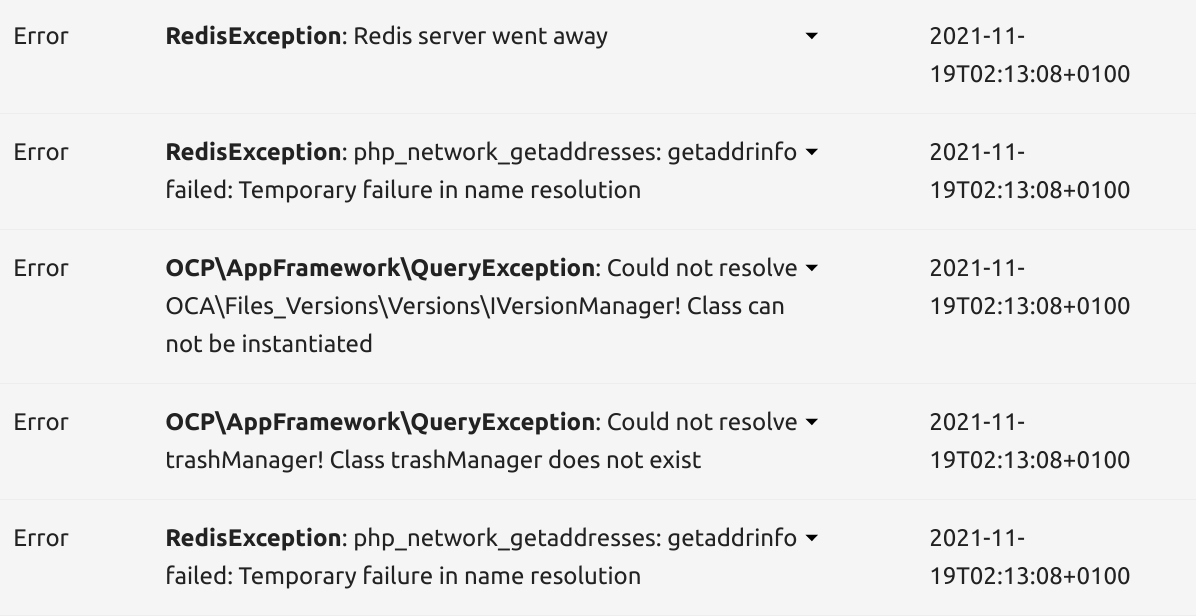
Keep in mind that I'm using the docker-compose file from Nextcloud's Docker repo, so it would be surprising if redis was unreachable all the time. The configuration by that file is the absolute default:
  redis:
    image: redis:alpine
    restart: always
So while we need to look at the redis service, it's probably this compose setup Nextcloud used that causes the same error for all of us. Now I don't know anything about redis, I just use it because the Nextcloud docs tell me to (otherwise Nextcloud will be slow(er)). But I'd guess there is something about keeping the connection alive from Nextcloud to redis or something similar.
@Redsandro Most likely, something causes redis to go down. Imo it is unlikely to bug on its own, but if you think this is the case, grab redis logs and ask about your situation on https://github.com/redis/redis.
The first step would be checking redis logs via docker logs redis. Hopefully, it will say what went wrong.
If it doesn't, you'll need to look at your setup:
- are there any updates that go on and cause
redisto reboot or go down, such aswatchtower? - do you have power outages?
- do you manipulate containers with
docker-composeordocker(maybe via a cronjob) and causeredisto go down?
You can also try to look at the general Docker daemon logs (I think they're in /var/log/syslog). You can try this grep --ignore-case "docker" /var/log/syslog, and look at the time when redis went down.
I created a network on docker-compose specifically to link nextcloud and redis. Try it, maybe it helps?
@schklom thank you for the suggestions. I've been waiting for another shutdown before responding. I found that the redis logs show no error, but it does show this interesting log before going down:
redis_1  | 1:signal-handler (1638026801) Received SIGTERM scheduling shutdown...
redis_1  | 1:M 27 Nov 2021 16:26:41.772 # User requested shutdown...
redis_1  | 1:M 27 Nov 2021 16:26:41.772 * Saving the final RDB snapshot before exiting.
redis_1  | 1:M 27 Nov 2021 16:26:41.776 * DB saved on disk
redis_1  | 1:M 27 Nov 2021 16:26:41.776 # Redis is now ready to exit, bye bye...
Received SIGTERM, user requested shutdown? I'm not using CRON, watchtower, or another scripted docker-compose action. So in my limited understanding, there is either:
- some lesser known edge case with this docker setup documented on the Nextcloud repository; or
- intermittent hacking attempts where it is beneficial for a hacker to shut down redis.
But my understanding is limited. Is there any additional way you know of in this case that causes redis to shutdown by SIGTERM?
@Redsandro Did you give any container access to var/run/docker.sock?
You could try looking if any command was passed to redis in /var/log/syslog near the time of shutdown.
Did you give any container access to
var/run/docker.sock?
Now that you mention it, I did replace the barely maintained jwilder/nginx-proxy with traefik for security reasons.
You could try looking if any command was passed to
redisin/var/log/syslognear the time of shutdown.
You mean on the host? The redis container /var/log is empty. I recall this is usual for docker containers.
@Redsandro
I did replace the barely maintained jwilder/nginx-proxy with traefik for security reasons.
If you're using the official container, I doubt it can cause this. Just in case, make a network specifically for redis and nextcloud, and make another network between nextcloud and traefik. That way, traefik can't talk to redis.
To be honest, I really doubt this is the issue, because many would have had the issue already, complained, and gotten it fixed quickly.
You mean on the host?
Yes, maybe some program/container you forgot about sent a docker command to shut down redis for some reason :p
And did you check nextcloud logs?
That's all I can think of.
If redis still shuts down for no reason after you tried to find the reason this hard, it may be worth to erase Docker and reinstall it, and in the worst case reinstall your OS.
If you think the cause is a container, try to shut them down a few at a time for a few weeks and see if redis still shuts down. But it will take time to figure it out this way.
I had a similar name resolution issue to @RyanLiu6 using redis + nextcloud with docker swarm and traefik. The option mentioned by @schklom helped solve my problem. Here is a generic working redis config within your docker-compose.yml:
  redis:
    image: redis:6
    networks:
      - internal
    command: redis-server --requirepass ${REDISPWD}
    volumes:
      - ${REDISVOLUME}:/data
And the important parts of nextcloud app:
services:
  app:
    image: nextcloud:22-apache
    networks:
      - traefik
      - internal
    environment:
      - REDIS_HOST=redis
      - REDIS_HOST_PASSWORD=${REDISPWD}
Both containers must have a shared network, i.e. "internal" or a dedicated redis-nextcloud link. My sample network config at the bottom of the compose file is:
networks:
  traefik:
    external: true
  internal:
    driver: overlay
    ipam:
      config:
        - subnet: 172.16.12.0/24
Hope this points you in the right direction.

@blackfeather9 Glad that my answer helped you 👍
I think your network names may cause some misunderstanding, so I will make it clear for anyone wondering:
external: true means the network is defined outside of the current docker-compose.yml file (source), it doesn't have anything to do with being accessible from outside.
internal: true is another option for a network, it means the network cannot communicate with any other entity including the Internet (source).
A network can be both internal and external.
@blackfeather9 thanks for sharing your experience. :+1:
If I understand correctly, there are two different problems that result in the same error messages. Could you explain if the problem you have solved was the one that is immediately apparent on (some) instances, or one that only becomes disruptive after a good run?
@Redsandro I was experiencing the issue where redis immediately fails because it can't communicate with the app container. My stack is early in the testing phase, so perhaps I'll be back here in ~4 weeks to report that redis disconnected unexpectedly.
I don't understand why when using just docker-compose format, redis works fine without any networks section defined on the container. This doesn't work when rewriting the file for swarm; adding the networks line was the switch that got it working for me. In my example, the network called internal is an arbitrary name for the nextcloud backend network that is shared between its containers.
When a container dont have network definition it use younameit_default and the default is the network name, the other service that no network definition will included in this, on other side if the container got some network definition won't included to default. So my assumption something miss when you write up container definition. Usually the apache part, only include proxy network and forgot the default network.

Good to know @blackfeather9, and glad it works now.
Just for the people who google: I still have intermittent redis shutdowns due to signal-handler Received SIGTERM scheduling shutdown... and I haven't been able to figure out why. If anyone has a clue, please drop a line. I keep thinking my instance is perpetually under attack, causing redis to shut down periodically, but that's only because I can't think of anything else.
I tried most of @schklom's recommendations. Tbh I've been hoping the problem goes away after a certain version. Until then, I'm doing the cron job. The trick is to find the right balance between too frequent (any in-progress action may get interrupted) and not frequent enough (the Nextcloud instance will be offline until next cron execution). I'm at once every 2 hours so far, even though redis only goes down every couple of weeks, so the downtime will be 2 hours at most.
0 */2 * * * /usr/local/bin/docker-compose -f /var/docker/nextcloud/docker-compose.yml restart redis > /dev/null 2>&1
We're a small group using this for collaboration purposes. If this instance was more widely used, the solution would not be acceptable and we'd probably try to run Nextcloud without docker.
perhaps I'll be back here in ~4 weeks to report that redis disconnected unexpectedly.
If this happens @blackfeather9 be sure to check the redis logs for SIGTERM.
