
desktop

desktop copied to clipboard
 nextcloud
[Bug]: Blurry text in system tray menu
⚠️ Before submitting, please verify the following: ⚠️
- [X] This is a bug, not a question or a configuration issue.
- [X] This issue is not already reported on Github (I've searched it).
- [X] Nextcloud Server and Desktop Client are up to date. See Server Maintenance and Release Schedule and Desktop Releases for supported versions.
- [X] I agree to follow Nextcloud's Code of Conduct
Bug description
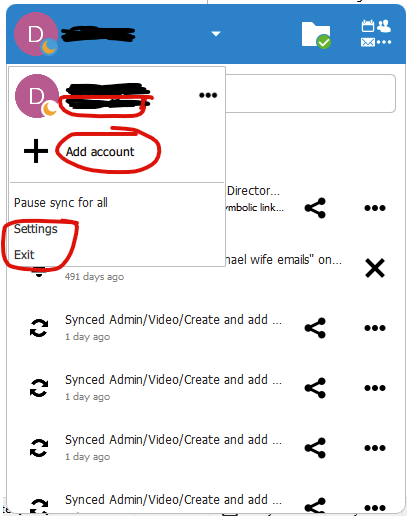
Some text on the system tray menu looks blurry (circled below).
Steps to reproduce
- In system tray, click on Nextcloud icon
- Click on your username (menu on top left)
Expected behavior
Text should appear consistently sharp
Which files are affected by this bug
N/A
Operating system
Windows
Which version of the operating system you are running.
Windows 10
Package
Appimage
Nextcloud Server version
24.0.3
Nextcloud Desktop Client version
3.4.0
Is this bug present after an update or on a fresh install?
Updated to a major version (ex. 3.3.6 to 3.4.0)
Are you using the Nextcloud Server Encryption module?
Encryption is Disabled
Are you using an external user-backend?
- [X] Default internal user-backend
- [ ] LDAP/ Active Directory
- [ ] SSO - SAML
- [ ] Other
Nextcloud Server logs
No response
Additional info
No response

Hi @dbolton could you check if this is still an issue on the latest version of the desktop client (3.5.x)? Thanks!
