

 nextcloud
[Bug]: Nextcloud 22.2.6 upgrade (re)introduced white space syncing issue
⚠️ This issue respects the following points: ⚠️
- [X] This is a bug, not a question or a configuration/webserver/proxy issue.
- [X] This issue is not already reported on Github (I've searched it).
- [X] Nextcloud Server is up to date. See Maintenance and Release Schedule for supported versions.
- [X] I agree to follow Nextcloud's Code of Conduct.
Bug description
After upgrading the server to 22.2.6 files stopped syncing reliably on MacOS 12.3 (using Nextcloud Desktop Client Version 3.4.4) and in particular there are numerous messages "File contains trailing spaces and could not be renamed, because a file with the same name already exists locally."
Previously reports of this issue are at nextcloud/server#11666 and nextcloud/server#5843
Steps to reproduce
- Upgrade server to 22.2.6
- Use MacOS 12.3 (now 12.3.1)
- Use Nextcloud Desktop Client 3.4.4
- Try to sync directories
Expected behavior
All directories will be sync'd and if there is a directory with a trailing whitespace it appears the expected behaviour is that it should be renamed to one without a trailing white space.
Installation method
Manual installation
Operating system
Debian/Ubuntu
PHP engine version
No response
Web server
Apache (supported)
Database engine version
No response
Is this bug present after an update or on a fresh install?
Updated from a minor version (ex. 22.2.3 to 22.2.4)
Are you using the Nextcloud Server Encryption module?
No response
What user-backends are you using?
- [ ] Default user-backend (database)
- [X] LDAP/ Active Directory
- [ ] SSO - SAML
- [ ] Other
Configuration report
sudo -u www-data php occ config:list system
{
    "system": {
        "instanceid": "***REMOVED SENSITIVE VALUE***",
        "passwordsalt": "***REMOVED SENSITIVE VALUE***",
        "trusted_domains": [
            "***REMOVED SENSITIVE VALUE***",
            "***REMOVED SENSITIVE VALUE***"
        ],
        "datadirectory": "***REMOVED SENSITIVE VALUE***",
        "dbtype": "mysql",
        "version": "22.2.6.2",
        "appstoreenabled": true,
        "apps_paths": [
            {
                "path": "\/var\/www\/owncloud\/apps",
                "url": "\/apps",
                "writable": true
            }
        ],
        "dbname": "***REMOVED SENSITIVE VALUE***",
        "dbhost": "***REMOVED SENSITIVE VALUE***",
        "dbtableprefix": "oc_",
        "dbuser": "***REMOVED SENSITIVE VALUE***",
        "dbpassword": "***REMOVED SENSITIVE VALUE***",
        "installed": true,
        "ldapIgnoreNamingRules": false,
        "theme": "***REMOVED SENSITIVE VALUE***",
        "maintenance": false,
        "forcessl": true,
        "mail_smtpmode": "smtp",
        "mail_smtpauthtype": "LOGIN",
        "secret": "***REMOVED SENSITIVE VALUE***",
        "mail_domain": "***REMOVED SENSITIVE VALUE***",
        "log_type": "file",
        "logfile": "\/var\/log\/nextcloud.log",
        "logfilemode": 416,
        "loglevel": 2,
        "memcache.local": "\\OC\\Memcache\\APCu",
        "trashbin_retention_obligation": "auto",
        "appstore.experimental.enabled": false,
        "updatechecker": false,
        "lost_password_link": "disabled",
        "overwrite.cli.url": "https:\/\/***REMOVED SENSITIVE VALUE***",
        "htaccess.RewriteBase": "\/",
        "ldapProviderFactory": "\\OCA\\User_LDAP\\LDAPProviderFactory",
        "updater.release.channel": "stable",
        "mail_sendmailmode": "smtp",
        "mail_from_address": "***REMOVED SENSITIVE VALUE***",
        "mysql.utf8mb4": true,
        "app_install_overwrite": [
            "calendar"
        ],
        "allow_user_to_change_display_name": false,
        "default_phone_region": "US",
        "mail_smtpsecure": "ssl",
        "mail_smtpauth": 1,
        "mail_smtphost": "***REMOVED SENSITIVE VALUE***",
        "mail_smtpport": "587",
        "mail_smtpname": "***REMOVED SENSITIVE VALUE***",
        "mail_smtppassword": "***REMOVED SENSITIVE VALUE***"
    }
}
List of activated Apps
Enabled:
  - accessibility: 1.8.0
  - activity: 2.15.0
  - admin_audit: 1.12.0
  - analytics: 4.1.1
  - bruteforcesettings: 2.3.0
  - circles: 22.3.0
  - cloud_federation_api: 1.5.0
  - comments: 1.12.0
  - contacts: 4.1.0
  - contactsinteraction: 1.3.0
  - dashboard: 7.2.0
  - dav: 1.20.0
  - deck: 1.5.6
  - drawio: 1.0.2
  - federatedfilesharing: 1.12.0
  - federation: 1.12.0
  - files: 1.17.0
  - files_pdfviewer: 2.3.1
  - files_rightclick: 1.1.0
  - files_sharing: 1.14.0
  - files_trashbin: 1.12.0
  - files_versions: 1.15.0
  - files_videoplayer: 1.11.0
  - firstrunwizard: 2.11.0
  - forms: 2.4.0
  - integration_whiteboard: 0.0.14
  - logreader: 2.7.0
  - lookup_server_connector: 1.10.0
  - mail: 1.11.7
  - nextcloud_announcements: 1.11.0
  - notifications: 2.10.1
  - oauth2: 1.10.0
  - onlyoffice: 7.3.2
  - password_policy: 1.12.0
  - photos: 1.4.0
  - privacy: 1.6.0
  - provisioning_api: 1.12.0
  - recommendations: 1.1.0
  - richdocuments: 4.2.5
  - serverinfo: 1.12.0
  - settings: 1.4.0
  - sharebymail: 1.12.0
  - support: 1.5.0
  - survey_client: 1.10.0
  - systemtags: 1.12.0
  - terms_of_service: 1.8.5
  - text: 3.3.1
  - theming: 1.13.0
  - twofactor_backupcodes: 1.11.0
  - updatenotification: 1.12.0
  - user_ldap: 1.12.2
  - user_status: 1.2.0
  - user_usage_report: 1.6.0
  - viewer: 1.6.0
  - weather_status: 1.2.0
  - workflowengine: 2.4.0
Disabled:
  - calendar: 3.0.4
  - encryption
  - files_accesscontrol: 1.12.1
  - files_automatedtagging: 1.12.0
  - files_external
  - mindmaps: 0.1.0
  - oidc_login: 2.2.0
  - piwik: 0.10.0
  - quota_warning: 1.13.0
  - sociallogin: 4.9.7
Nextcloud Signing status
"No errors have been found."
Nextcloud Logs
No response
Additional info
No response

I have just encountered the same issue when upgraded my desktop sync client from 4.3.X to 4.4.4 with server running 22.2.5. This is on MacOS 10.14.6
I have about 160GB synced. When I upgrade the client I lost all of my selective sync setting because it forgot all of the previous exception ot the ask for folders more than 500MB. It then took hours and hour to go thought all the files before producing:
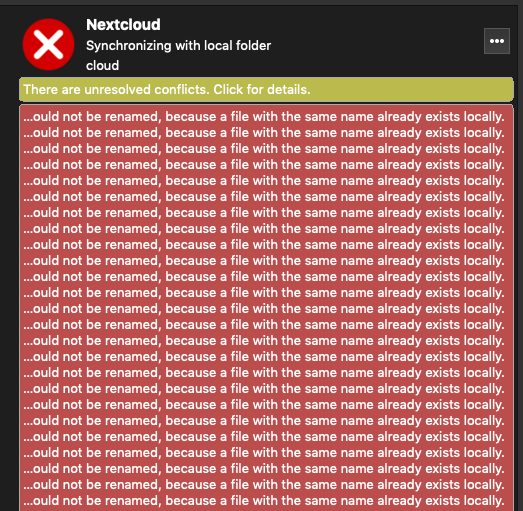
Before updating I had no sync issues at all.
Most of the file names its complaining about are actually leading spaces not trailing ones. I often use these deliberately to change the order files/folders appear in. Having let it sync I've found at least one place where I've ended up with two identical files, one with leading space and one without.

I've now just updated server to nextcloud 22.2.7, which made no difference.
I then updated to Release 3.5.0 RC3 which shows as Nextcloud Desktop Client Version 3.4.83 (macOS) in desktop app settings. I also disable ransomware protection app. This triggered a complete re-sync, which seemed to work better than with 3.4.4. However when it finished I ended up with
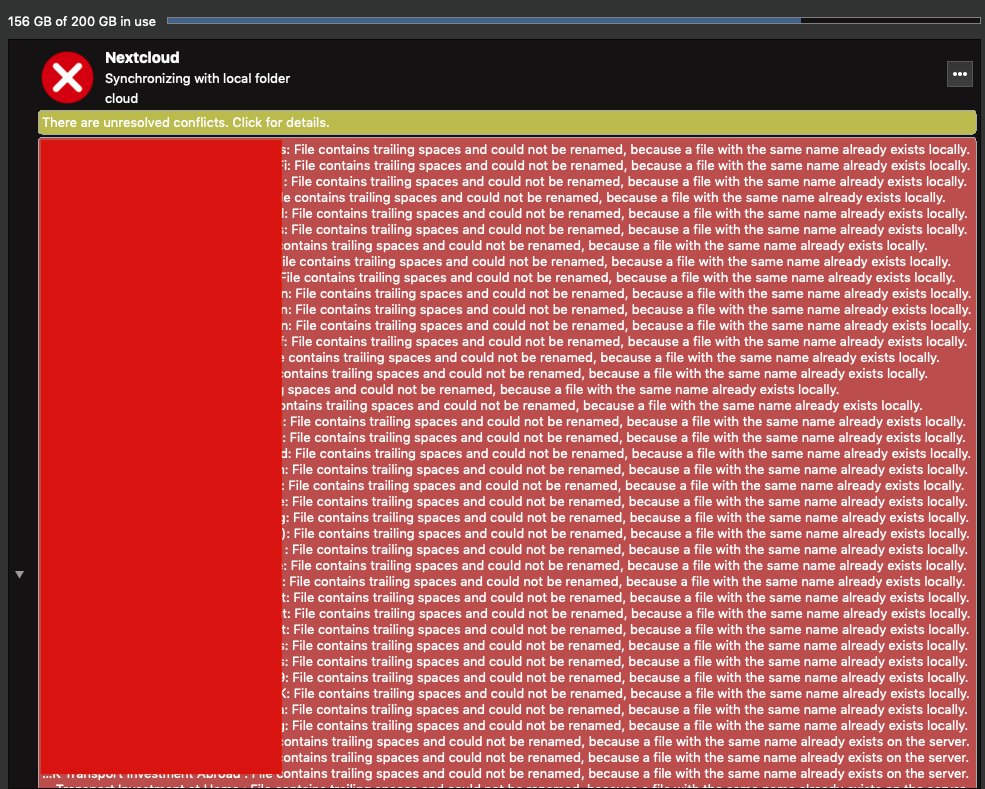
When I look at the 'conflicts' I find that for every file or folder where I had a space at the start or end, it has created a duplicate without space:
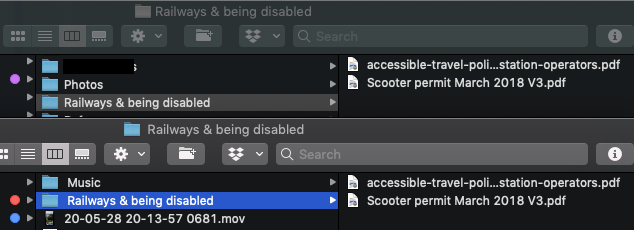
It then complains about the conflict which it created.
-
Why can't nextcloud cope with file names including a space at the start/end if it can cope with file names with a space in the middle? Given that previous version of sync client could cope perfectly fine with leading/trailing spacing - is this a change of policy or a bug?
-
If it can't cope with a character, surely replacing it (e.g. with an _) would be better than removing it? However any renaming for files risk creating duplicates as a result of many to one upload relationship not being reversible. So to preserve one to one sync relationship surely client either needs to use escape characters which can be removed on reverse operation, thus preserving original file name. Or needs to just not sync files in either direction that contain charaters if can't cope with.
-
It would be really helpfully to have published somewhere (ideally accessible from setting of sync client) some documentation of what file names are and aren't acceptable, and what nextcloud should do if it encounters them.
Thanks :)
This bug report did not receive an update in the last 4 weeks. Please take a look again and update the issue with new details, otherwise the issue will be automatically closed in 2 weeks. Thank you!
![github-actions[bot] avatar](https://avatars.githubusercontent.com/in/15368?v=4 "Published by a pub.dev verified publisher")
I've now updated Nextcloud Client to 3.5.0 and manual go thought and remove all of the leading trailing spaces in my local file system. This was a tedious and complicated process, but nextcloud had in effect duplicated lots of these folders (some in GB with 1000s of files) in my local file system, and then stopped syncing either copy because they both map to the same folder name in the cloud. I'd not notices this, so had keep editing files in one copy, so hand to manually check which was the upto version and delete other with nextcloud client closed, before re-syncing.
Client version 3.5.0 seems to be working more reliably than either 3.4.4 or 3.5.0_RC3. Although I suspect it would still give me grief relative to 3.3.X if still had lots of folders/files with leading trailing spaces.
@andrewperry I'm not sure what server version you updated from to 22.2.6 but a some point presumable server behavior changes from including leading/trailing spacing in server file/folder names, to removing them. Initially If you synced a folder with leading spaces in some names to two computers, these leading spaces appears on the other computer, now I presume they don't, because they aren't stored in the computer. There must however be some interesting server <-> client versions compatibility issues as it was Server upgrade the caused problems to present for you, and client upgrade for me. Did older version of the sync client already have protection against many to one relationships from local to server files/folder names, and then 3.4.4 removed these? (presumably as a side affect of another improvement?)
I would summaries the bug all the above discussion flags as:
- If there is going to be a many to one relationship between local sync folder and nextcloud server, the sync client should stop syncing with an error rather than duplicating files/folders by assuming the version without illegal characters is a separate folder. E.g. if there is a file/folder in local sync folder called " Photos", which gets uploaded to server as "Photos", the client needs to stop syncing with error rather than downloading "Photos" as a separate folder along side " Photos".
I would summarise the improvements all the above flag as:
- It would be best to avoid having many to one sync relationship between local file system and nextcloud server.
- If a newer server version or sync client is going to change acceptable folder/file names characters, or the character replacement mapping used by sync clients, at it would be helpful for this to be flagged in release notes or as part of installer.
- Better still it client would flag list files containing illegal characters in local sync folder and give user oppurtunity to rename them before syncing
- Client would a helpful cheat sheet which stipulated the rules for files names
I am facing to this problem as well. Very annoying. My sync is uncompleted and don't want to spent time to rename folders.
edit: Nextcloud server v23.0 Nextcloud client v3.5.1

Same issue for me, I updated the desktop client of one of my user and this error happen...

same issue here - and it stops the sync process - meaning also other files are not synced.
as sync with trailing spaces seems not be possible I suggest to (optionally) autocorrect trailing spaces.

This bug report did not receive an update in the last 4 weeks. Please take a look again and update the issue with new details, otherwise the issue will be automatically closed in 2 weeks. Thank you!
@ferdiga , Manually fixing leading/trialling space for each files/folders complete my sync.
Hi All,
I've now updated to 3.5.2 and server now running 22.2.9 and although I've not got time to try and replicate a full sync after fresh install/upgrade, there does appear to be some improvements based on a localised test. Note: I have now been through the rather tedious process of manually removing all leading the spaces from file names and replacing with underscores so nextcloud was syncing happily before the test below.
Above I stated part of the problem as:
If there is going to be a many to one relationship between local sync folder and nextcloud server, the sync client should stop syncing with an error rather than duplicating files/folders by assuming the version without illegal characters is a separate folder. E.g. if there is a file/folder in local sync folder called " Photos", which gets uploaded to server as "Photos", the client needs to stop syncing with error rather than downloading "Photos" as a separate folder along side " Photos".
With versions I'm now running this appears to have been resolved. As a test, I've just created a folder with leading space in name and some files in it. I then drag this into my nextcloud folder. After appearing to start syncing it stop with:
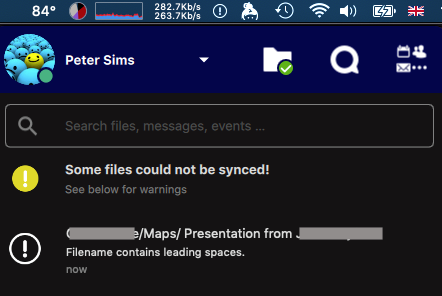
I've checked and the folder definitively doesn't appear in the web interface, so isn't just being renamed. It therefore isn't being downloaded again with a different name. This appears to have removed the many to one relationship that was causing duplicate to be created before, at least with this combination to sync client and server versions.
This bug report did not receive an update in the last 4 weeks. Please take a look again and update the issue with new details, otherwise the issue will be automatically closed in 2 weeks. Thank you!
I ran into the same issue today. After updating my NC Instance to 24 and updating my NC Desktop Client to 3.5.4 from an 3.4 release.
Before that all was fine, or nothing got reported, but with today a folder which I have touched years ago the last time, was reported to "contain leading spaces". I am using the virtual file system on windows and those files where not available offline, so I decided to change the files on the linux system of the server. The NC Web UI shows the right filenames, without the leading spaces, but the client is still complaining about not being able to sync the files because of leading spaces.
This is a little annoying - honestly.

This bug report did not receive an update in the last 4 weeks. Please take a look again and update the issue with new details, otherwise the issue will be automatically closed in 2 weeks. Thank you!
IMO there should be at least an option for autocorrection for the filename or directory name.
actually the same activity which has to be performed manually to overcome this issue.
This bug report did not receive an update in the last 4 weeks. Please take a look again and update the issue with new details, otherwise the issue will be automatically closed in 2 weeks. Thank you!
This bug report is getting automatically closed due to no answer since the issue has been staled. Thank you!