
deck
 deck copied to clipboard
 nextcloud
Due date linked to Nextcloud built-in calendar
IDEA
While creating a card, set the due date/time in the right hand panel and saved it, although it's nice to see it both in the Nextcloud dashboard Deck widget as an upcoming card as well as an upcoming card in the Upcoming cards section in Deck, it would be nice to have this card created in the Nextcloud built-in calendar as an event (based on the due date/completion time already saved).
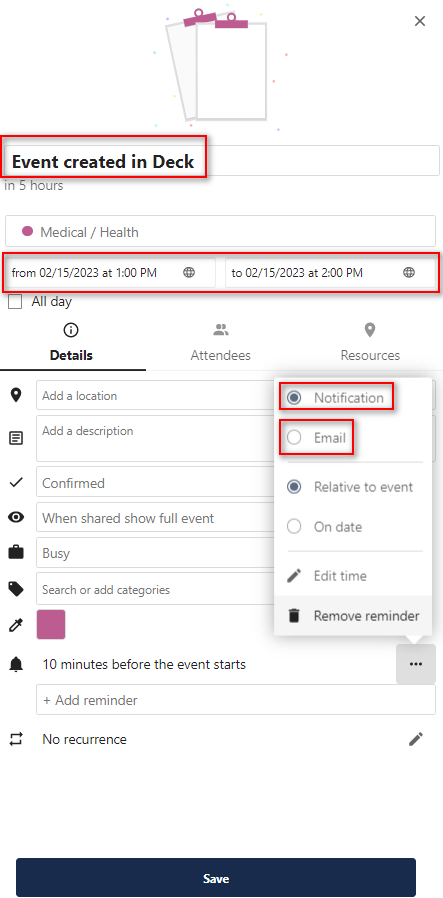
So for instance: I create a card in Deck with all its details and I set a due date as 15/02/2023 and save the card. After that, this card appears as an event in the Nextcloud built-in calendar.
--
Along with that it would be also nice to have the possibility to set a notification via email (in Deck at the time the card is created) which gets saved in the calendar event within the Nextcloud built-in calendar. By doing that, the user will be informed by the Nextcloud calendar and that will help to complete his task.
I added a screenshot below which shows how this card could appear in the Calendar:
My apologies if this topic was already opened but I couldn't find it.
Thanks in advance.

First part is already possible: You can activate Deck board calendars in the Calendar app, then you see Cards with due dates as events.
About the notifications: IMO it would be better to open a separate issue (unless it already exists). I guess it would make sense to implement notifications about upcoming due cards, and then you could define in user settings > notifications if you want to get push notifications and/or emails for this.
