deck
 deck copied to clipboard
 nextcloud
Ideas for optimized print view
Printing of decks is not working well - there is a issue for this: #752 This issue covers just a small part of the things that could be optimized in a print view - the problem that only the first page can be printed.
I think printing a deck is useful to archive it for example after a project has been finished.
So I think a optimized print view should cover this points:
- print on more than one pages (#752 )
- configurable number of columns for printing
- include descriptions and comments (configurable)
- don't print UI elements that are not useful in prints
- don't print avatars, use usernames insted
- don't print relative dates like "2 days" ago - use fixed date like 10.08.2021 for print.
What do you think about this suggestions?

don't print avatars, use usernames insted don't print relative dates like "2 days" ago - use fixed date like 10.08.2021 for print.
Makes sense to me and could be simply done like this in print view.
print on more than one pages don't print UI elements that are not useful in prints
Should be done by #752
configurable number of columns for printing include descriptions and comments (configurable)
This could be done by having two settings here: image
What do you think @juliushaertl

don't print avatars, use usernames insted don't print relative dates like "2 days" ago - use fixed date like 10.08.2021 for print.
:+1:
This could be done by having two settings here: image
I don't think we should have settings for such a separate feature in this present way. If printing becomes more sophisticated we could offer some pre-print option to allow configuring the output view then i'd say.

If printing becomes more sophisticated we could offer some pre-print option to allow configuring the output view then i'd say.
So what do you suggest? Should there be a print button that shows a dialog. And then displays a separate print view after that?
Hi @juliushaertl I really want to contribute an improvement for the print view.
At the moment a dicision where the print configuration should go prevents me from doing that.
Would be nice if you can give some feedback on that.
I think there are only two places where this makes sense:
- in the left bottom part as settings for the current deck:
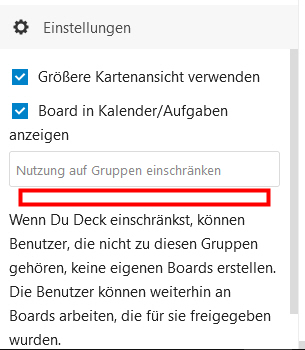
- ins the top bar in the ... menu as a kind of printer icons:
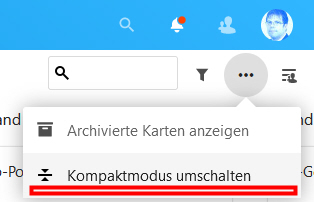
Would be great to get a decision for this.
I personally would be fine with dedicated print setting, but maybe @jancborchardt and @nimishavijay can jump in on the general user experience and design questions of that.
Overall I'd rather argue to introduce a modal dialog for advanced settings like this, similar to how talk does it.
Since this "issue" is on the subject of discussing possibilities, I would like to throw out a suggestion for the ability to print a singular task (or download a printable PDF). The print would contain relevant information such as the card title, tags, assignees, projects, description, etc.... This would be very helpful for generating physical work-orders, particularly in hybrid work environment where some of the staff are not at workstations but rather are out working in a shop or in a yard.
OpenProject, a similar FOSS project, offers the ability to download a task to a PDF with a predetermined format. Its basic, but it gets the job done.

I like to push this issue once more :smiley:
My personal usecase is to print a deck set to work with (my family) offline on discussing and arranging decks (that I collected during the past months) on a table. This lowers the digital barriers and makes it more easy, esp. for elderly people. Later on I sync the deck manually with the NC and my family has a much better idea of how decks work online and is able to work on it in my cloud :+1:
For the printing feature at the top menu makes sense (global context, its a feature - not a setting). Personally I would be happy, if the rendering is close to the Android App card rendering (preview images, title) but would also include description. I'm sure it's not nessesary to implement a complete WYSIWYG Report generator so everybody can customize fields rendering and layout? How about a list to en/disable fields and default setting for formating /layout?