

 nextcloud
Allow recipes retrieved from URL to be edited before save
This is a minor grievance I have with an otherwise excellent tool - so first of all I must say thanks a lot for providing this to the community for free!
Is your feature request related to a problem? Please describe. The recipe URL extractor is good, but often adds keywords and categories that I don't want. Currently I have to always edit these recipes after retrieving them to remove/reclassify these.
Describe the solution you'd like It would be good if there were a new step introduced between retrieving the recipe and saving it, allowing the user to edit what was retrieved. The URL retriever would essentially just pre-fill the fields on the standard "Add Recipe" form, but it would still be up to the user to hit "Save".
Describe alternatives you've considered Editing the already-saved recipe works, it's just not as slick.


When you import from a URL, currently Nextcloud Cookbook saves the scraped recipe without giving you the chance to rename it, re-tag it, etc. I'd like an intermediate page to let me modify what the recipe scraper has extracted from the HTML.
Yes, I can click "Edit" immediately after scraping the page to make the modifications, but this isn't as slick as being able to edit it before the first save. As I said, it's only a minor grievance!
I think what Christian is saying is: The implementation of such a feature is done in the frontend code and doesn’t require touching the backend code :)

Questions that need to be clarified here are:
What should be the happy path? Would you always want to immediately end up in the editor after clicking the import button?
I see multiple problems with this:
- This is not the current behavior, current users might be confused and see this as a bug.
- If you just want to quickly add something you might be annoyed by the additional step you’d have to take to save the recipe
- When #288 is implemented this won’t be possible in a sensible way, I guess.
We could think of adding an entry in the settings which allows the user to change the default behavior.
I think automatically saving recipes as-is for the batch import mode would be expected behaviour. For the normal approach (i.e. the import URL field on the main page), maybe there could be a checkbox (or second submit button) next to the URL input field that says "Edit before saving" or similar?
In general, I don't find the automatic saving behaviour helpful. Some recipe sites have no tags for a recipe, some have dozens. After a short time this leads to lots of similar but not identical tags unless actively managed (deleted) by me. I'd much rather manage my own tags, which involves me immediately clicking "Edit" and fixing it up after every successful import. Same goes for normalising measurements, units, times, etc. It just seems a bit clunky to me that the external URL's data is immediately inserted into the database without the user getting a chance to first check it's how they wanted it to be. I actually expected to find a pre-populated form when I first used the URL scrape feature, and was surprised when it actually just saved it directly, so I'd wager a change of behaviour towards what I describe here would not be perceived as a bug by most.
I guess an alternative solution could be a way to configure what parts of the imported recipe get saved. I would for example be happy to switch off saving of tags and categories.
We could think of adding an entry in the settings which allows the user to change the default behavior.
I'd be fine with that too!
Aside: wow, I've written a lot for this very minor issue already. If no one else seems to care about my minor gripe here, I'm happy to continue just clicking the edit button after import...
Aside: wow, I've written a lot for this very minor issue already. If no one else seems to care about my minor gripe here, I'm happy to continue just clicking the edit button after import...
Don’t worry, I see your issue and although it never bugged me enough to think of opening an issue here, I was at least annoyed of nearly duplicate tags and new categories popping up after importing a recipe.
We just don’t want to scare people away by changing the workflows they are used to too often, so a small discussion is valuable, imho. If there is a demand and it makes total sense to change something, however, I’m all for it!
That said, even if there is a decision, it might still take some time to get implemented due to a lack of manpower ;)
I know this is a bigger change but let me explain my idea, how this could be implemented visually together with #288:
The current add URL is replaced by a straight button. The button will open a model dialog.
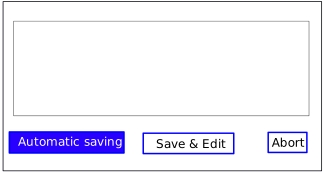
As soon as multiple lines are inserted into the text area, the second button (Save & Edit) is disabled. When the user clicks on Automatic save the current behavior is used and the recipe is downloaded, saved, and opened. The dialog is closed as well. Clicking on Abort the dialog is closed.
When clicking on Save & Edit, the recipe is downloaded (via the backend, so there might be a backend part involved) and parsed. The parsed recipe is not yet saved. Instead, it is sent to the client for editing. The typical RecipeEdit Vue component can be reused I think but this time inside a dialog (almost full-screen). When clicking on save in the dialog, the recipe is stored in the backend.
Would that be a solution?
@christianlupus
A dedicated import dialog could be a solution and will be necessary for #288 anyway, so we could already use it here.
If I understood you correctly, clicking the "Save & Edit" button would only create a temporary recipe object that is used to prepopulate the recipe-editor fields. However, I would expect the recipe to be saved and then opened for edit (like the button says) - which would be fine from my perspective! Also this would require minimal effort on our end, since we can simply use the default editor and API endpoints available.
Edit: I just looked at the API documentation and noticed that the import endpoint does not return the recipe id. This might be a problem for my suggestion
This sounds good to me.
Regarding the id of the new recipe. I think the id is provided in the answer. I have to check it out but this can for sure be extended as it is a pure backward-compatible addition if it is not yet available.