
contacts

contacts copied to clipboard
 nextcloud
Left sidebar: "Contacts settings" button and sidebar header don't align
Describe the bug
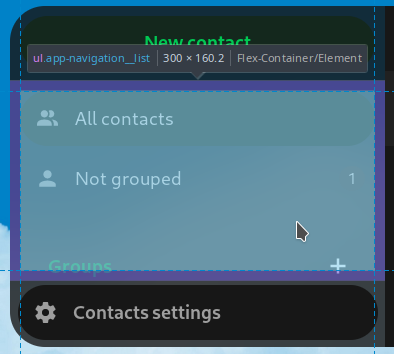
The "Contacts settings" button at the bottom is not as wide as the buttons on the top of the sidebar.
This could be caused by 2 different things:
- The header is too narrow (most likely).
- The "Contacts settings" button at the bottom is a bit too wide.
Steps to reproduce
- Open the Contacts app.
- Observe the left sidebar.
Expected behavior
The buttons at the top and the bottom should have the exact same width.
Actual behavior
The button on the bottom is a bit too wide.
Contact version
main
