
calendar

calendar copied to clipboard
 nextcloud
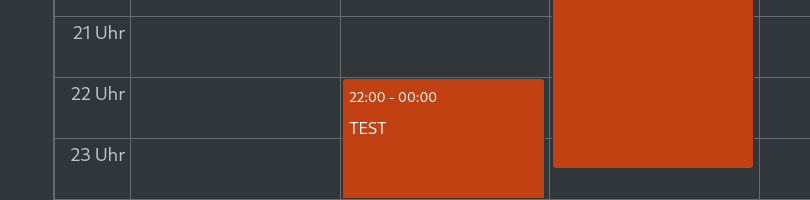
Webinterface: Event over Midnight states end-time 00:00
Steps to reproduce
- Create an event that lasts over midnight (e.g. evening to next morning)
- Look at the weekly calendar (webinterface)
- On the first evening it states the event does end at 00:00
Expected behavior
it should show the real, actual end-time (maybe with a date in case it lasts for several days)
Actual behaviour
The first part of the event shows an end-time of midnight, i.e. 00:00
Calendar app version
3.4.3
CalDAV-clients used
Webinterface
Browser
Firefox 103
Client operating system
Manjaro Linux
Server operating system
Raspberry OS
Web server
Apache
Database engine version
MySQL
PHP engine version
PHP 7.4
Nextcloud version
24.0.4
Updated from an older installed version or fresh install
Updated from an older version
List of activated apps
- breezedark: 24.0.2
  - calendar: 3.4.3
  - cloud_federation_api: 1.7.0
  - comments: 1.14.0
  - contacts: 4.2.0
  - contactsinteraction: 1.5.0
  - dashboard: 7.4.0
  - dav: 1.22.0
  - federatedfilesharing: 1.14.0
  - federation: 1.14.0
  - files: 1.19.0
  - files_pdfviewer: 2.5.0
  - files_rightclick: 1.3.0
  - files_sharing: 1.16.2
  - files_trashbin: 1.14.0
  - files_versions: 1.17.0
  - files_videoplayer: 1.13.0
  - logreader: 2.9.0
  - lookup_server_connector: 1.12.0
  - nextcloud_announcements: 1.13.0
  - notes: 4.5.0
  - notifications: 2.12.0
  - oauth2: 1.12.0
  - password_policy: 1.14.0
  - photos: 1.6.0
  - privacy: 1.8.0
  - provisioning_api: 1.14.0
  - recommendations: 1.3.0
  - serverinfo: 1.14.0
  - settings: 1.6.0
  - sharebymail: 1.14.0
  - systemtags: 1.14.0
  - text: 3.5.1
  - theming: 1.15.0
  - twofactor_backupcodes: 1.13.0
  - updatenotification: 1.14.0
  - user_status: 1.4.0
  - viewer: 1.8.0
  - weather_status: 1.4.0
  - workflowengine: 2.6.0
Disabled:
  - accessibility: 1.7.0
  - activity: 2.9.1
  - admin_audit
  - bruteforcesettings: 2.4.0
  - carnet: 0.24.5
  - circles: 22.1.1
  - encryption
  - files_external
  - firstrunwizard: 2.5.0
  - support: 1.0.0
  - survey_client: 1.4.0
  - user_ldap
Nextcloud configuration
{
    "system": {
        "instanceid": "***REMOVED SENSITIVE VALUE***",
        "passwordsalt": "***REMOVED SENSITIVE VALUE***",
        "secret": "***REMOVED SENSITIVE VALUE***",
        "trusted_domains": [
            "localhost",
            "127.0.0.1",
            "***REMOVED SENSITIVE VALUE***"
        ],
        "overwrite.cli.url": "***REMOVED SENSITIVE VALUE***",
        "memcache.local": "\\OC\\Memcache\\APCu",
        "htaccess.RewriteBase": "\/",
        "trashbin_retention_obligation": "auto,90",
        "datadirectory": "***REMOVED SENSITIVE VALUE***",
        "dbtype": "mysql",
        "version": "24.0.4.1",
        "dbname": "***REMOVED SENSITIVE VALUE***",
        "dbhost": "***REMOVED SENSITIVE VALUE***",
        "dbport": "",
        "dbtableprefix": "oc_",
        "mysql.utf8mb4": true,
        "dbuser": "***REMOVED SENSITIVE VALUE***",
        "dbpassword": "***REMOVED SENSITIVE VALUE***",
        "installed": true,
        "mail_smtpmode": "smtp",
        "mail_smtphost": "***REMOVED SENSITIVE VALUE***",
        "mail_smtpauthtype": "LOGIN",
        "mail_smtpsecure": "ssl",
        "mail_smtpport": "465",
        "mail_domain": "***REMOVED SENSITIVE VALUE***",
        "mail_from_address": "***REMOVED SENSITIVE VALUE***",
        "mail_smtpauth": 1,
        "mail_smtpname": "***REMOVED SENSITIVE VALUE***",
        "mail_smtppassword": "***REMOVED SENSITIVE VALUE***",
        "maintenance": false,
        "loglevel": 0,
        "has_rebuilt_cache": true,
        "updater.release.channel": "stable",
        "theme": ""
    }
}
Web server error log
No response
Log file
No response
Browser log
No response
Additional info
No response

Attached a screenshot which might help to understand what the issue is about - the example Test-event is starting at 22:00 until the next day 23:30:
This is very confusing and already caused me quite some trouble at work as I was assuming an event ends at midnight whereas it was ongoing until early morning in face