

 nextcloud
cannot import data into default calendar created by calendar app
How to use GitHub
- Please use the 👍 reaction to show that you are affected by the same issue.
- Please don't comment if you have no relevant information to add. It's just extra noise for everyone subscribed to this issue.
- Subscribe to receive notifications on status change and new comments.
Steps to reproduce
- make fresh install LAMP + Nextcloud on server use notebook with firefox to access server
- activate calendar and carddav app
- import carddav data successfully into contacts
- Calendar app left column shows 2 calendars : Persönlich(personal) and Geburtstage(Birthdays,immutable)
- Import data from ics file (created with thunderbird, when NC Server was already down.)
- Menu pops up with choice indicated, but limited to a new calendar
Expected behaviour
Tell us what should happen It should be possible to select the "Persönlich" calendar to import, because this is the shared and mutable resource
Actual behaviour
Tell us what happens instead Result : selection of calendar Persönlich ist not possible in pop up menu, new calendar is forcibly created
Server configuration
Operating system: cat /etc/debian_version 10.0 cat /etc/devuan_version beowulf
Web server:
apache2 -v
Server version: Apache/2.4.38 (Debian)
Server built: 2020-08-25T20:08:29
Database:
/usr/bin/aptitude show mariadb-server :(
Package: mariadb-server
Version: 1:10.3.25-0+deb10u1
State: installed
de show mariadb-server :(
Package: mariadb-server
Version: 1:10.3.25-0+deb10u1
State: installed ......
PHP version:
php -v
PHP 7.3.19-1~deb10u1 (cli) (built: Jul 5 2020 06:46:45) ( NTS )
Copyright (c) 1997-2018 The PHP Group
Zend Engine v3.3.19, Copyright (c) 1998-2018 Zend Technologies
with Zend OPcache v7.3.19-1~deb10u1, Copyright (c) 1999-2018, by Zend Technologies
Nextcloud version: (see Nextcloud admin page) grep version /var/www/html/nextcloud/config/config.php 'version' => '20.0.2.2', Updated from an older Nextcloud/ownCloud or fresh install: fresh install
Where did you install Nextcloud from: nextcloud-20.0.2.tar.bz2
Signing status:
Signing status
Login as admin user into your Nextcloud and access
http://example.com/index.php/settings/integrity/failed
paste the results here.
No errors have been found.
</details>

**List of activated apps:**
<details>
<summary>Enabled:
  - accessibility: 1.6.0
  - activity: 2.13.3
  - admin_audit: 1.10.0
  - bruteforcesettings: 2.0.1
  - calendar: 2.1.2
  - cloud_federation_api: 1.3.0
  - comments: 1.10.0
  - contacts: 3.4.2
  - contactsinteraction: 1.1.0
  - dav: 1.16.1
  - federatedfilesharing: 1.10.1
  - federation: 1.10.1
  - files: 1.15.0
  - files_fulltextsearch: 2.0.0
  - files_pdfviewer: 2.0.1
  - files_rightclick: 0.17.0
  - files_sharing: 1.12.0
  - files_trashbin: 1.10.1
  - files_versions: 1.13.0
  - files_videoplayer: 1.9.0
  - firstrunwizard: 2.9.0
  - logreader: 2.5.0
  - lookup_server_connector: 1.8.0
  - nextcloud_announcements: 1.9.0
  - notifications: 2.8.0
  - oauth2: 1.8.0
  - password_policy: 1.10.1
  - photos: 1.2.0
  - privacy: 1.4.0
  - provisioning_api: 1.10.0
  - recommendations: 0.8.0
  - serverinfo: 1.10.0
  - settings: 1.2.0
  - sharebymail: 1.10.0
  - support: 1.3.0
  - survey_client: 1.8.0
  - systemtags: 1.10.0
  - text: 3.1.0
  - theming: 1.11.0
  - twofactor_backupcodes: 1.9.0
  - updatenotification: 1.10.0
  - user_status: 1.0.1
  - viewer: 1.4.0
  - workflowengine: 2.2.0
Disabled:
  - dashboard
  - encryption
  - files_external
  - fulltextsearch_elasticsearch
  - user_ldap
  - weather_status
App list</summary>
If you have access to your command line run e.g.: sudo -u www-data php occ app:list from within your Nextcloud installation folder
</details>

**Nextcloud configuration:**
<details>
<summary>Config report
{
    "system": {
        "passwordsalt": "***REMOVED SENSITIVE VALUE***",
        "secret": "***REMOVED SENSITIVE VALUE***",
        "datadirectory": "***REMOVED SENSITIVE VALUE***",
        "dbtype": "mysql",
        "version": "20.0.2.2",
        "dbname": "***REMOVED SENSITIVE VALUE***",
        "dbhost": "***REMOVED SENSITIVE VALUE***",
        "dbport": "",
        "dbtableprefix": "oc_",
        "mysql.utf8mb4": true,
        "enable_previews": false,
        "dbuser": "***REMOVED SENSITIVE VALUE***",
        "dbpassword": "***REMOVED SENSITIVE VALUE***",
        "instanceid": "***REMOVED SENSITIVE VALUE***",
        "installed": true,
        "log_type": "file",
        "logfile": "\/var\/log\/nextcloud\/nextcloud.log",
        "loglevel": 2,
        "logfilemode": 416,
        "logdateformat": "F d, Y H:i:s",
        "mail_domain": "***REMOVED SENSITIVE VALUE***",
        "mail_from_address": "***REMOVED SENSITIVE VALUE***",
        "mail_sendmailmode": "smtp",
        "mail_smtpauth": 1,
        "mail_smtpauthtype": "LOGIN",
        "mail_smtphost": "***REMOVED SENSITIVE VALUE***",
        "mail_smtpmode": "smtp",
        "mail_smtpname": "***REMOVED SENSITIVE VALUE***",
        "mail_smtppassword": "***REMOVED SENSITIVE VALUE***",
        "mail_smtpport": "587",
        "mail_smtpsecure": "tls",
        "memcache.local": "\\OC\\Memcache\\APCu",
        "trusted_domains": [
            deleted
            "
        ],
        "updater.release.channel": "stable",
        "overwrite.cli.url": "https:\/\/example.com\/nextcloud",
        "maintenance": false
    }
}
</summary>
If you have access to your command line run e.g.: sudo -u www-data php occ config:list system from within your Nextcloud installation folder or Insert your config.php content here. Make sure to remove all sensitive content such as passwords. (e.g. database password, passwordsalt, secret, smtp password, …)
</details>

**Are you using external storage, if yes which one:** local/smb/sftp/...
no
**Are you using encryption:** yes/no
no
**Are you using an external user-backend, if yes which one:** LDAP/ActiveDirectory/Webdav/...
no
With access to your command line run e.g.: sudo -u www-data php occ ldap:show-config from within your Nextcloud installation folder There are no commands defined in the "ldap" namespace.
Client configuration
Browser: Firefox 78.5.0esr (64-Bit) Operating system: debian buster 10.6
Logs
Web server error log
Web server error log
Insert your webserver log here
Nextcloud log (data/nextcloud.log)
Nextcloud log
Insert your Nextcloud log here
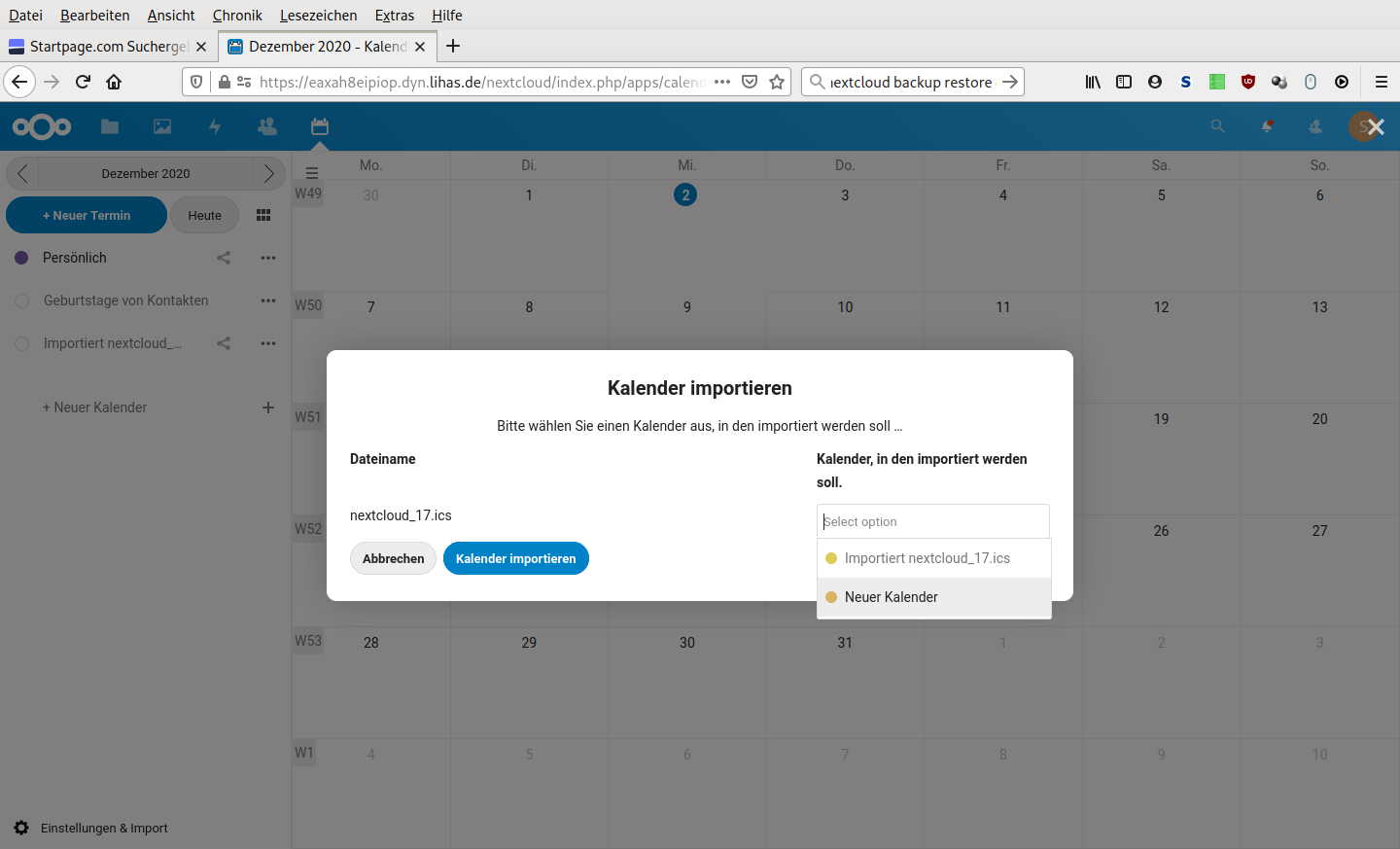
Update itself into the wrong calendar is possible. But this data will not be propagated to the clients.
Browser log
Browser log
Insert your browser log here, this could for example include:

a) The javascript console log
b) The network log
c) ...
