

 neutralinojs
Support for "native" Drag&Drop
Is your feature request related to a problem? Please describe. I'd like to receive "native" Drag&Drop events where I can access the files' path.
Describe the solution you'd like I'd like to receive an event when files are dropped into the window, in which I can access the files' path.
Describe alternatives you've considered
- Using the javascript Drag&Drop API I can read the contents but can't edit because there's no path
- Making the selection through the modal mandatory The modal works perfectly but being able to drop a file into the program is more user friendly
Additional context
I'm making a comic book reader that keeps the reading history/progress and edits the metadata of the file. A comic book file is a Zip Archive that contains the pages and a json/xml for metadata.
For the reading history/progress I use the path of the file as key (so it can differentiate files with the same name. Ex: C:\spiderman\1.cbz and C:\batman\1.cbz)
And I can only edit the metadata of the archive if I know its path
Current Behavior
Currently If you drop a file into the window the program will download a copy of it in the Neutralino.os.getPath('downloads') folder


Not sure if this will help but may be a workround - I have just been looking around the upstream webview repo and there has been a fix for an issue where the standard 'Choose File' HTML dropdown was not working for Mac. Since the Neutralino webview.h is based on older code and customised this will probably not appear in Neu any time soon however as it happens even if the choose file clicked does nothing if a file is dragged onto it the file details will be captured and can be used accordingly. I will use this as a DnD drop zone and should be able to change the label or use an overlay to do it. I suspect the dropdown should also work as standard for Windows as well.
Test code from webview / webview PR#814 -
    window.addEventListener("DOMContentLoaded", () => {
      const fileElement = document.getElementById("file");
      const contentElement = document.getElementById("content");
      fileElement.addEventListener("change", e => {
        const file = e.target.files[0];
        if (!file) {
          return;
        }
        // do something ....
      });
    });
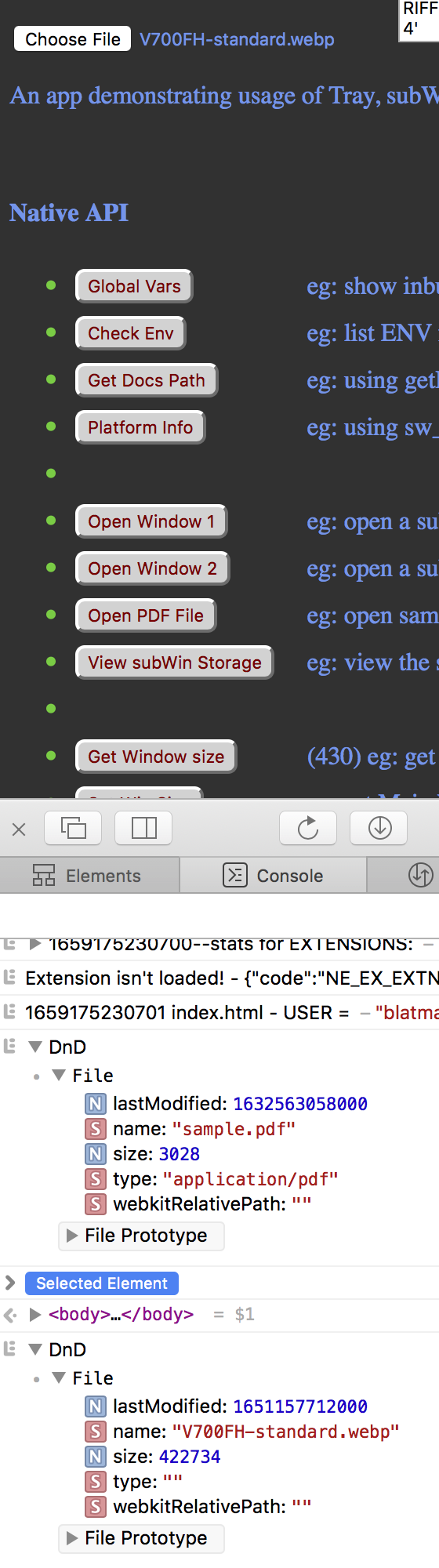

Thanks for your help @Blatman, I've forgotten about the file input for a moment. Unfortunately the problem persists, I can't access the files' path, only the name
@Blatman The web native drag and drop API encapsulates and abstracts the dropped files. Even the latest File System Access API can't help because it also abstracts the app from the actual file system.
They work fine for the web but for a standalone app they feel lacking. It would be great if the Neutralinojs runtime can be configured to handle and emit dropped files (edit: emit alone would be great enough already).

@UnKnoWn-Consortium - yup I agree the full path returned would be highly desirable and I find the DnD is only really usable if the folder path dragged from is known - I'm used to using NW.js and it allows the full path. As it stands it looks from above that it has been referred as a Feature Request to the design team.

DnD is only really usable if the folder path dragged from is known
This is the also the solution I had to implement. User can select a folder via OpenFolder dialog and then can d/d any files they want as long as they exist in that folder, OR they can choose a file via the OpenFile dialog and I then also set the folder at the same time for any future d/d events.
Native d/d is really a vital feature for what is meant to be analogous to a native app.

Missing native Drag & Drop is a show-stopper for many modern app scenarios. It would be really really nice to see this feature on the roadmap.

Maybe this approach will simplify implementation:
I assume, that the Neutralino app runs in a webview inside a native window. You could turn the whole native window into a drop area for external files. So if the user drags a file over the native window, its native path can be catched from the drop objeact and forwarded to the webview.