

 networkupstools
Support of Huawei UPS2000-*-1/2/3KRT*
Background
Product of UPS2000 series are online (double conversion) UPSes manufacturered by Huawei. They come with two different form factor: UPS2000-A (tower factor) and UPS2000-G (rack-mount factor). They are all equipped with a standard DB9 RS232 serial communication port, and a USB port that emulates virtual serial port. The software protocol is based on Modbus RTU and the protocol document can be downloaded on their official webisite (~~all in Chinese~~). I have a UPS2000-G-3KRTS on hand. I will attempt to translate the most important part of the protocol document, and try to implement the driver based on the existing Modbus driver phoenixcontact_modbus.c.
Note
Devices of this series also have an "intelligent slot" for their extension cards. That includes the SNMP network card, and RS485 card which also runs on Modbus RTU protocol but comes with changeable slave addresses and more functionalities. However currently I don't have any intelligent cards on hand so I am focusing on the on-device serial port.

Querying Registers
Note:
- All values are stored as U16
- Gain: the value read out must divide this value
- Type: the data type AFTER applying the gain
- e.g. Voltage reading from the register is 2262
- Gain is 10
- Type is Real
- -> Voltage = 226.2
- All register address may add UPS ID multiplied by 10000. However when using on-device serial port, the UPS ID is 1 fixed. Querying only with register address without the UPS ID also works when there is only one device.
- e.g. Address of Input Voltage register is 1000
- UPS ID is 1
- -> Register ID used to send request is 11000 (0x2AF8), or 1000 (0x03E8)
- All reserved bits in bit flags shall be 0 unless noticed otherwise.
| Name | Gain | Type | Unit / Range | Address | Length (in U16) | R/W |
|---|---|---|---|---|---|---|
| Input Voltage | 10 | Float | V | 1000 | 1 | R |
| Input Frequency | 10 | Float | Hz | 1003 | 1 | R |
| Bypass Voltage | 10 | Float | V | 1004 | 1 | R |
| Bypass Frequency | 10 | Float | Hz | 1007 | 1 | R |
| Output Voltage | 10 | Float | V | 1008 | 1 | R |
| Output Current | 10 | Float | A | 1011 | 1 | R |
| Output Frequency | 10 | Float | Hz | 1014 | 1 | R |
| Output Active Power | 10 | Float | kW | 1015 | 1 | R |
| Output Apparent Power | 10 | Float | kVA | 1018 | 1 | R |
| Output Load Percentage | 10 | Float | % | 1021 | 1 | R |
| Output Route State | 1 | Enum | 0=No Power 1=On Bypass 2=On Mains 3=On Battery 5=On Mains ECO |
1024 | 1 | R |
| Input Method | 1 | Enum | 0=Single Phase | 1025 | 1 | R |
| Output Method | 1 | Enum | 0=Single Phase | 1026 | 1 | R |
| Temperature | 10 | Float | ℃ | 1027 | 1 | R |
| UPS Status | 1 | Bit Flag | Bit 7=Mains Abnormal (0=Normal/OL 1=Abnormal/OB) Bit 6=Low Battery (0=Normal 1=Low/LB) Bit 5=Reserved Bit 4=Internal Error (0=Normal 1=Error) Bit 3=UPS Type (0=Offline/Backup 1=Online/Double Conversion) Bit 2=Battery Self-Checking (0=Not checking 1=Self checking) Bit 1=Reserved Bit 0=Reserved Other Bits=Reserved |
1043 | 1 | R |
| Battery Voltage | 10 | Float | V | 2000 | 1 | R |
| Battery Status | 1 | Enum | 2=Sleeping 3=Trickle Charging 4=Balanced Charging 5=Discharging |
2002 | 1 | R |
| Battery Remaining Capacity | 1 | U16 | % | 2003 | 1 | R |
| Battery Estimated Remaining Time | 1 | U32 | Seconds | 2004 | 2 | R |
| Battery Cells | 1 | U16 | Cells | 2007 | 1 | R |
| Battery Capacity | 1 | U16 | Ah | 2033 | 1 | R |
| UPS Rated Power | 10 | Float | kVA | 9009 | 1 | R |
Controlling Registers
Note:
-
Type Bool means write 0 to disable the function and write 1 to enable unless noticed otherwise.
-
Type Exec means write 1 to execute the function unless noticed otherwise.
| Name | Gain | Type | Unit / Range | Address | Length (in U16) | R/W |
|---|---|---|---|---|---|---|
| Startup State | 1 | Enum | 0=Powered Off (Can be turned on) 1=Powering On (processing, front control panel is blocked) 2=Power On Failed (Can be turned on) 3=Powered On (Can be turned off) |
1028 | 1 | R |
| Power On | 1 | Exec | 1029 | 1 | W | |
| Power Off | 1 | Exec | 1030 | 1 | W | |
| ECO Mode | 1 | Bool | 1030 | 1 | W | |
| Auto Power On After Mains Attached | 1 | Bool | 1044 | 1 | R/W | |
| Bypass Output | 1 | Bool | 1045 | 1 | R/W | |
| Mute Buzzer | 1 | Bool | 1046 | 1 | R/W | |
| Delayed Restart (By 0.1 minutes) | 10 | Float | 0.1 minutes (0.1min ~ 99.0min) | 1047 | 1 | R/W |
| Delayed Restart (By 1 minutes) | 1 | U16 | 1 minutes (1min ~ 9999min) | 1048 | 1 | R/W |
| Delayed Power Off (By 0.1 minutes) | 10 | Float | 0.1 minutes (0.1min ~ 99.0min) | 1049 | 1 | R/W |
| Cancel Delayed Powered Off | 1 | Exec | 1050 | 1 | W | |
| Deep Battery Self Check (Until Low Battery) | 1 | Exec | 2021 | 1 | W | |
| End Battery Self Check | 1 | Exec | 2023 | 1 | W | |
| Shallow Battery Self Check | 1 | Exec | 2028 | 1 | W |
Now that the driver became part of NUT master branch, may I ask people watching this issue to try a build and report if it works for them? :)

Now that the driver became part of NUT master branch, may I ask people watching this issue to try a build and report if it works for them? :)
Ohhhhhh finally merged, time to whip out my Raspberry Pi to try it out!
@whc2001 Make sure to read the manual before trying. It contains several important steps that must be followed. https://github.com/networkupstools/nut/blob/master/docs/man/huawei-ups2000.txt Most importantly, USB is only supported on Linux 5.12+. When I tested on a Raspberry Pi, I had to install an unstable kernel.

@whc2001 Make sure to read the manual before trying. It contains several important steps that must be followed. https://github.com/networkupstools/nut/blob/master/docs/man/huawei-ups2000.txt Most importantly, USB is only supported on Linux 5.12+. When I tested on a Raspberry Pi, I had to install an unstable kernel.
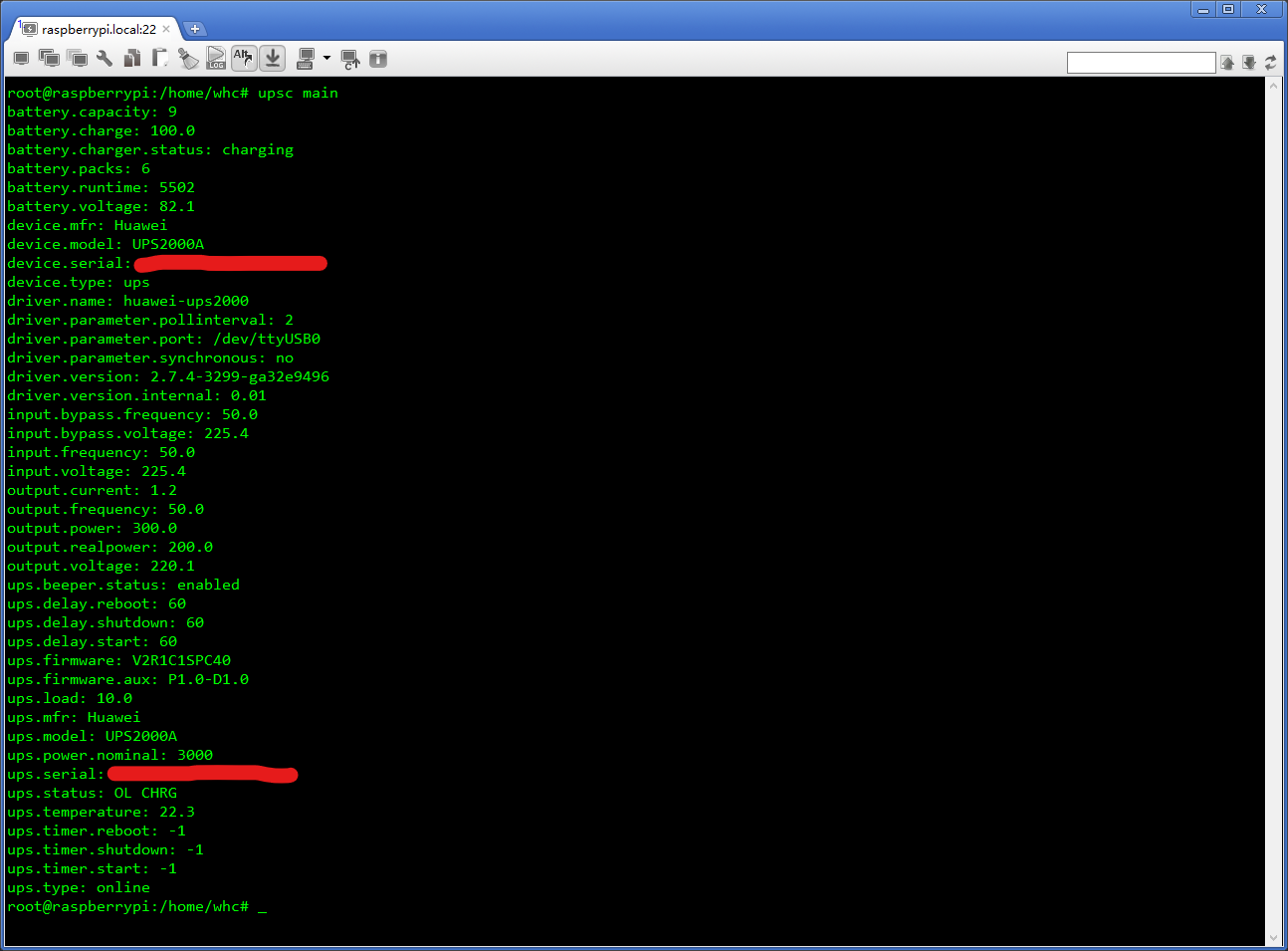
Got it. I am gonna use USB to RS232 adaptor based on FT232 chip to carry on the test and hardware RS232 transceiver on the motherboard in production usage. So I don't think the USB to RS232 adaptor inside the UPS will bother me that much.
Tested for a week and seems like data acquisition works correctly. This weekend maybe I'll shutdown my rack and perform a full function test.
Great to hear that. For documentation purpose, what is the full model number of your UPS (UPS2000-A-3K???)? I need to add your model to the tested list.
BTW, a small correction to the original post for future readers.
the protocol document can be downloaded on their official webisite (all in Chinese).
There's an English version on the official website too. One can find the link in the code comment or at the end of the man page.
Great to hear that. For documentation purpose, what is the full model number of your UPS (
UPS2000-A-3K???)? I need to add your model to the tested list.
It's actually the standard (built-in battery) rack model. The full model number is UPS2000-G-3KRTS. I am not sure why the model field is reporting UPS2000A (maybe a firmware issue?) but I believe it has nothing to do with the driver since it only transparent-transmits the data received from serial port.

BTW, a small correction to the original post for future readers.
the protocol document can be downloaded on their official webisite (all in Chinese).
There's an English version on the official website too. One can find the link in the code comment or at the end of the man page.
Thanks, already corrected.
It's actually the standard (built-in battery) rack model. The full model number is UPS2000-G-3KRTS.
Thanks. You're the first beta tester with a UPS2000-G model. The man page currently states that UPS2000-G is untested, I'll update the document to reflect your results.
I am not sure why the model field is reporting UPS2000A (maybe a firmware issue?) but I believe it has nothing to do with the driver since it only transparent-transmits the data received from serial port.
You're right, it's a protocol and firmware limitation. According to the Modbus protocol (Table 1-21 Attribute definitions in the datasheet), the only possible model number reported by the device is UPS2000, UPS2000A, UPS5000, or SUN2000, without additional information. I suspect the A and G series are basically the same hardware in a different chassis.
Just tried almost everything on my device, seems like everything is working!
-
upscDisplay Info- [x] Info
- [x] Stale & Recover from Stale
- Flags Test
- [x] OL
- [x] OB
- [x] ECO
- [x] BYPASS
- [x] OFF
- [x] CAL
- [x] DISCHRG
- Buzzer
- [x] On
- [x] Off
- [x] Toggle
- Bypass
- [x] Start
- [x] Shall ignore
load.onwhen in bypass- In
2.7.4-3515-gad84d9d2,upscmdstill returnsOKwhen executingload.onduringBYPASS, but in syslog there actually isload.on error: UPS is already on, and is in bypass mode. To enter normal mode, use bypass.stop.
- In
- [x] Shall ignore
- [x] Stop
- [x] Start
- Load
- [x] On
- [x] Off
- Test
- [x] Quick
- [x] Deep
- [x] Stop
- Shutdown
- [x] Stay Off
- [x] Return
- [x] Reboot
- [x] Graceful Reboot
- Parameters
- [x] OnDelay=60
- [x] OnDelay=180
- [x] OffDelay=RebootDelay=6
- [x] OffDelay=RebootDelay=30
- [x] RebootDelay=60
Thanks for the report. At this point, I think the only unimplemented feature for this UPS is enabling or disabling ECO mode, because there's currently no standard command in NUT to do that. I opened an issue (#1201) for that. Perhaps also worth discussing on the mailing list.
For ECO, mailing-list discussion initiated with https://alioth-lists.debian.net/pipermail/nut-upsdev/2021-December/007616.html
In 2.7.4-3515-gad84d9d2, upscmd still returns OK when executing load.on during BYPASS
As a side note, this is actually a limitation in upscmd, not the driver. The driver really returns a failure. But currently upscmd does not check whether the command is successful due to architectural limitation.
Man page for upscmd says:
BUGS
   There is currently no way to tell the user when the driver requires
   confirmation to invoke a command such as load.off. Similarly, there is
   not yet a way to tell the user if a command succeeds or fails.

   This is on the list of things to fix in the future, so don’t despair.
   It involves magic cookies.
Coincidentally, this is related to another unimplemented feature in the driver. Theoretically, UPS startup may fail due to hardware issues. So in the ideal world, load.on should busy-wait for the UPS to physically perform a startup and check the failure/success flag, rather than returning a success immediately after the command is sent. But at the current stage, it does nothing for the user and only locks up the driver for several seconds, so I decided against it.
In 2.7.4-3515-gad84d9d2, upscmd still returns OK when executing load.on during BYPASS
As a side note, this is actually a limitation in upscmd, not the driver. The driver really returns a failure. But currently upscmd does not check whether the command is successful due to architectural limitation.
Man page for upscmd says:
BUGS
   There is currently no way to tell the user when the driver requires
   confirmation to invoke a command such as load.off. Similarly, there is
   not yet a way to tell the user if a command succeeds or fails.

   This is on the list of things to fix in the future, so don’t despair.
   It involves magic cookies.
That's interesting. It does not affect the normal usage though so I think it's alright.
Why my UPS2000-G-3KRTS usb port is a CH341 chip. 😭
And the driver does not work. The output of command upsc ups is:
Init SSL without certificate database
Error: Driver not connected
and /etc/nut/ups.conf:
[ups]
        driver = huawei-ups2000
        port = /dev/serial/by-id/usb-1a86_5523-if00-port0
        desc = ""
the output of lsusb is:
Bus 002 Device 004: ID 12d1:0003 Huawei Technologies Co., Ltd. HUAWEI Keyboard/MouseKVM
Bus 002 Device 005: ID 1a86:5523 QinHeng Electronics CH341 in serial mode, usb to serial port converter
Bus 002 Device 002: ID 8087:0024 Intel Corp. Integrated Rate Matching Hub
Bus 002 Device 001: ID 1d6b:0002 Linux Foundation 2.0 root hub
Bus 001 Device 003: ID 30de:6544 KIOXIA TransMemory
Bus 001 Device 002: ID 8087:0024 Intel Corp. Integrated Rate Matching Hub
Bus 001 Device 001: ID 1d6b:0002 Linux Foundation 2.0 root hub
I just copied the driver of ups from nut v2.8.0, and truenas installed nut 2.7.3.
Truenas use Linux 5.10.
I tried the test program, ups2000_test, written by [email protected], and got an error: fatal error: Unknown UPS model UPS2000G.
The serial output includes: D1=UPS2000G;2=V2R1C1SPC50;3=P1.0-D1.0
I'm using truenas scale 22.02.0.1.

@Qinka: I tried the test program, ups2000_test, written by [email protected], and got an error: fatal error: Unknown UPS model UPS2000G. The serial output includes: D1=UPS2000G;2=V2R1C1SPC50;3=P1.0-D1.0
Thanks for reporting!
Don't worry. The driver doesn't work, but you still get serial output, it means at least the driver is able to perform a handshake with the UPS via the serial port. Furthermore, you even have a firmware version V2R1C1SPC50, which is the same as a previously-tested UPS model.
All I need to do is adding your UPS model ID to the driver, then you can try again. In the best case scenario, it should work just fine.
I'll post the instructions later, please make sure to follow the issue and report your test results.
@Qinka: Open your ups2000_test directory, you should see ups2000.c file. Open it with a text editor and you should see the following code snippet at the beginning of the file:
 10 /*
 11  * Known UPS models. We only attempt to load the driver if
 12  * the initial communication indicates the UPS is a known
 13  * model of the UPS2000 series.
 14  */
 15 static const char *supported_model[] = {
 16         "UPS2000", "UPS2000A",
 17         NULL
 18 };
Change
"UPS2000", "UPS2000A",
To
"UPS2000", "UPS2000A", "UPS2000G",
run make to rebuild the program and try again. Don't forget to report the results at here.
@biergaizi In a word, the only differences are the USB-to-serial chip and model name.
I tried to modify the driver and test it on my UPS. It seems to have worked. I just addedUPS2000G.
I think Huawei changed the USB-to-serial chip to CH341, which does not need Linux kernel 5.12+.
The output of upsc ups:
battery.capacity: 9
battery.charge: 100.0
battery.charger.status: charging
battery.packs: 6
battery.runtime: 10080
battery.voltage: 82.0
device.mfr: Huawei
device.model: UPS2000G
device.serial: xxxx
device.type: ups
driver.name: huawei-ups2000
driver.parameter.pollinterval: 2
driver.parameter.port: /dev/ttyUSB0
driver.parameter.synchronous: auto
driver.version: 2.8.0
driver.version.internal: 0.02
input.bypass.frequency: 50.0
input.bypass.voltage: 216.1
input.frequency: 50.0
input.voltage: 216.1
output.current: 1.3
output.frequency: 50.0
output.power: 300.0
output.realpower: 100.0
output.voltage: 219.7
ups.beeper.status: enabled
ups.delay.reboot: 60
ups.delay.shutdown: 60
ups.delay.start: 60
ups.firmware: V2R1C1SPC50
ups.firmware.aux: P1.0-D1.0
ups.load: 7.0
ups.mfr: Huawei
ups.model: UPS2000G
ups.power.nominal: 3000
ups.serial: xxxxx
ups.status: OL CHRG
ups.temperature: 25.3
ups.timer.reboot: -1
ups.timer.shutdown: -1
ups.timer.start: -1
ups.type: online
Congrats. I'll update the driver and documentation to reflect your reported case. It's clear that there are at least two hardware variants in existence by now.
P.S: I wonder whether your UPS comes with a production date label to allow us guessing the approximate time that they made the switch. Perhaps they did so due to chip shortage? The MaxLinear chip is rare meanwhile there are billions of CH341 in China.
2021-12-04
I don't quite understand why they didn't use the CH34x chip from the beginning.
发件人: biergaizi 发送时间: 2022年6月18日 14:56 收件人: networkupstools/nut 抄送: Johann Li; Mention 主题: Re: [networkupstools/nut] Support of Huawei UPS2000--1/2/3KRT(#1066)
Congrats. I'll update the driver and documentation to reflect your reported case. It's clear that there are at least two hardware variants in existence by now. P.S: I wonder whether your UPS comes with a production date label to allow us guessing the approximate time that they made the switch. Perhaps they did so due to chip shortage? The MaxLinear chip is rare meanwhile there are billions of CH341 in China. — Reply to this email directly, view it on GitHub, or unsubscribe. You are receiving this because you were mentioned.Message ID: @.***>
@Qinka: Last question. What does dmesg report when you attach the USB? I need to know what kind of serial driver is loaded by the kernel. I need this information for documentation.
My guess is:
ch341 1-1.2:1.0: ch341-uart converter detected
usb 1-1.2: ch341-uart converter now attached to ttyUSB0
Could you please confirm it?
@biergaizi
[   19.692817] usbcore: registered new interface driver ch341
[   19.701813] usbserial: USB Serial support registered for ch341-uart
[   19.711720] ch341 2-1.2:1.0: ch341-uart converter detected
[   19.721906] usb 2-1.2: ch341-uart converter now attached to ttyUSB0
tested on UPS2000-G-1KRTS ,firmware shows UPS2000A ,working fine, thx for developing

@sumsethan Hi, please report your ups.firmware & ups.firmware.aux too, so I can add them to the manual. Also, does it use a CH341 or a RX21V1410 chip? Thanks.