
cli
 cli copied to clipboard
 netlify
netlify-watch: remove spinner by default or via option
Which problem is this feature request solving?
As a developer living in a terminal shell most of the time,
I want $ netlify watch to be silent unless there is progress on the deployment,
so that I know when to return to this terminal window/tab/tmux-window for progress updates.
https://user-images.githubusercontent.com/175286/206479201-d38a1f81-d121-4d6c-bd06-0d52acead91f.mov
Currently the watch command have a pretty cool spinner (video) while waiting. However I find that I usually switch away from the terminal where I ran the netlify-watch in and would expect that it only prints something when there is some useful progress to watch (most likely deployment finished).
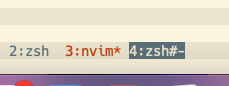
Many terminal emulators have some way to show that something has happened since last time it was in the foreground. For example tmux marks windows that has new output (screenshot: window 4 has new output from netlify watch : the spinner moved)
Describe the solution you'd like
Possible solutions
- Remove the spinner and replace with a static icon/char/text
- Possibly allow with with an option
--with-spinner
- Possibly allow with with an option
- Add an option
--no-spinner

Looks like the spinner is used in a few CLI outputs, and uses ora. I think ora's inEnabled option could be leveraged to hide the spinner in response to a flag.

We do have a --silent flag (and --json might work here too), but it looks like neither of these suppresses the loading spinner for ntl watch. Should be an easy fix if anyone wants to send a PR.

Hi @serhalp, I'd like to work on this! Just a quick question:
It seems the watch command doesn't currently define a --json option. Should I add it to also suppress the spinner, or just focus on checking for --silent?
