
build
 build copied to clipboard
 netlify
Add a structured log system
In an effort to support future UI work in app.netlify.com, we need to allow for plugins to output logs.
These logs will:
- Be consumed by netlify UI
- Be shippable to third party logging systems
- ...
The idea is to capture console.log and any other output returned from plugins and save them to a structured log file.
Those structured log objects should:
- be converted to human-friendly console output. I.e. the user does not see them, they are under the hood.
- be output to files
- be passed to plugins such as log shipping plugins

I am guessing this will allow log shipping plugins (e.g. redirect logs to specific services/servers).
Is this the main purpose or do we have other business ideas behind this?

Thanks. So the main thing we want is to be able to redirect the logs to an external provider (our web UI, log shipping providers or alert systems)?
Basically creating log events which contain the raw text plus some additional metadata (timestamp, context, etc.)?
A raw text file will work but can be brittle if format changes
We can store:
- Raw stdout/ster text
- and a structured json log
There is a-lot of stuff out there on structured logging but I've never found a canonical "best practice" approach.
Raw text logs like: 'DD-MM-YYYY THING - Message - Other thing' that needs to be regexed is too brittle
What about this: plugins can have a log() method that takes that object as input. This allow for plugins to do log shipping, alerts, etc.
module.exports = function myLogPlugin() {
  async log({ event }) {
    await redirectToRollbar(event)
  }
}
Example of a single log event:
{
  // Output of plugin `one` `init` method
  "name": "plugins.one.init",
  "message": "\e[33mhello world\e[0m",
  // Same without color sequences
  "rawMessage": "hello world",
  "timestamp": "2019-10-11T17:59:51.294Z",
  "level": "warn",
  // Machine/system information. Should not contain security-sensitive informationz
  "system": { ... },
  // If this logs an error. This allows plugins to do error handling with providers like Rollbar or Sentry
  "error": "..."
}
What do you think?
To keep it simple to start. Lets just write it out to a .netlify/logs.json file for now and expose that path as a constant.
The logs file should probably be written to right before finally
something like Pino would make this fairly straightforward to implement
https://github.com/pinojs/pino
I rolled this little util for a side project and it gives me the benefit of human readable logs in the console with structured logging for machines
https://github.com/stream-blitz/stream-blitz/blob/2f6dec547462d2e33b3459d3ac3b5dd12eb99754/packages/core/server/logger.mjs#L1-L14
Initialization could be done automatically to namespace logs:
const logger = getLogger(netlify.pluginName);

Fluentd uses the following format for it's log:
{
    "time" : "2017-07-27",
    "level":"info",
    "message":"fluentd worker is now running worker=0",
    "worker_id":0
}
The level can be one of: fatal, error, warn, info, debug, trace. I think if we just replace worker_id with plugin id/name, it should be good enough for a first iteration. It is simple for now but it supports all of the required functionality and can be extended later on. What do you guys think?

As for the implementation, we can either hijack the global console variable, e.g.
console.log = (...args) => {
    /* our logic */
}
Or we can provide our own logging class that extends Console, this way the users will have to do
class Log extends Console {
    log(...args) {}
    warn(...args) {}
    error(...args) {}
}
And users will use it like so:
const logger = require('utils/logger');

logger.warn('Something might be wrong');
I prefer the first one because it doesn't require user's to do anything special and catches all logs.
If we want to catch all the logs, we don't need to monkey patch console.log(): we can just redirect the process stdout/stderr.
Do we want to catch all the logs? Or do we want to separate the commands/plugins "normal" output from the structured logs? @DavidWells
@RaeesBhatti @ehmicky monkey-patching or capturing are tricky — providing an explicit output API and ignoring console logs is what I'd love to see instead
there's no way to be sure whether another library is monkey-patching console, and if someone installs a noisy package we don't necessarily want that in the log output
people are already learning how to create build plugins, so telling them that "the way to print a message in Netlify's build log is to import the logger util" doesn't seem unreasonable or overly cumbersome
I agree with @jlengstorf about avoiding monkey patching.
I can see the convenience for the user to re-use console.log() since they already know those methods. However as @jlengstorf points out, this would prevent separating structured logs from other logs, which is probably not good.
@RaeesBhatti What are your thoughts about this?
Since we want to capture all logs even if they're not using structured logging methods we provide, we can do a hybrid approach. Provide a logger class that plugin authors can use, like so:
const logger = require('our/logger')

logger.warn('Something is not right')
This will capture their logs with the correct log levels and other features of the API.
But the console.log statements in their imported libraries can also be captured if we redirect stderr and stdout of the plugin child processes to handlers that bind to our logger class. This way, when they do console.error they'll actually be calling logger.error and it won't matter if they're hijacking console.log or not. And since we know which plugin it is when we're redirecting the stdio, we can decorate the structured logs correctly.
@RaeesBhatti would it make sense to add a non-breaking warning?
Warning: using console.error is discouraged — please use the logger utility to return errors
I think this is important because it points back to https://github.com/netlify/build/issues/711 — if messages are sent using an API that's well defined, it's much easier for us to pass those back up to the app UI and expose them on the dashboard
Yes, we can add that warning to the logs but I still think that we should capture the logs from stdout and stderr (console.log and console.error) because when something breaks, there's more chance of that error coming from a third-party library than the script written by plugin author. And as I said, the messages from console.log and console.error won't be sent in their raw form, they will be structured logs just like the one created manually by plugin authors, so we can show them in the UI. Perhaps we can attach some special property to their objects that tells the UI that these logs came from console.log and not our library, that can be used to show the warning. Or we can set their log levels to lower one, for example, console.log can be info level.
I'd very much like to see if we can implement this without adding any additional utilities for users to learn & make sure they use.
If you look at AWS lambda for inspiration, they simply patch console.log/etc and all output flows directly into their logging system under the hood. It just works™
This is increasingly important to ensure all logs flow into the UI for users to see & debug with. Additionally, If we are excluding console.logs/warns/etc from the output from third party modules not using a utility, the logs won't have all the information to see what is actually happening.
Ideally plugin authors are just writing console.log('thing happened') vs remembering to use util.logger('thing happened') (or whatever it might be).
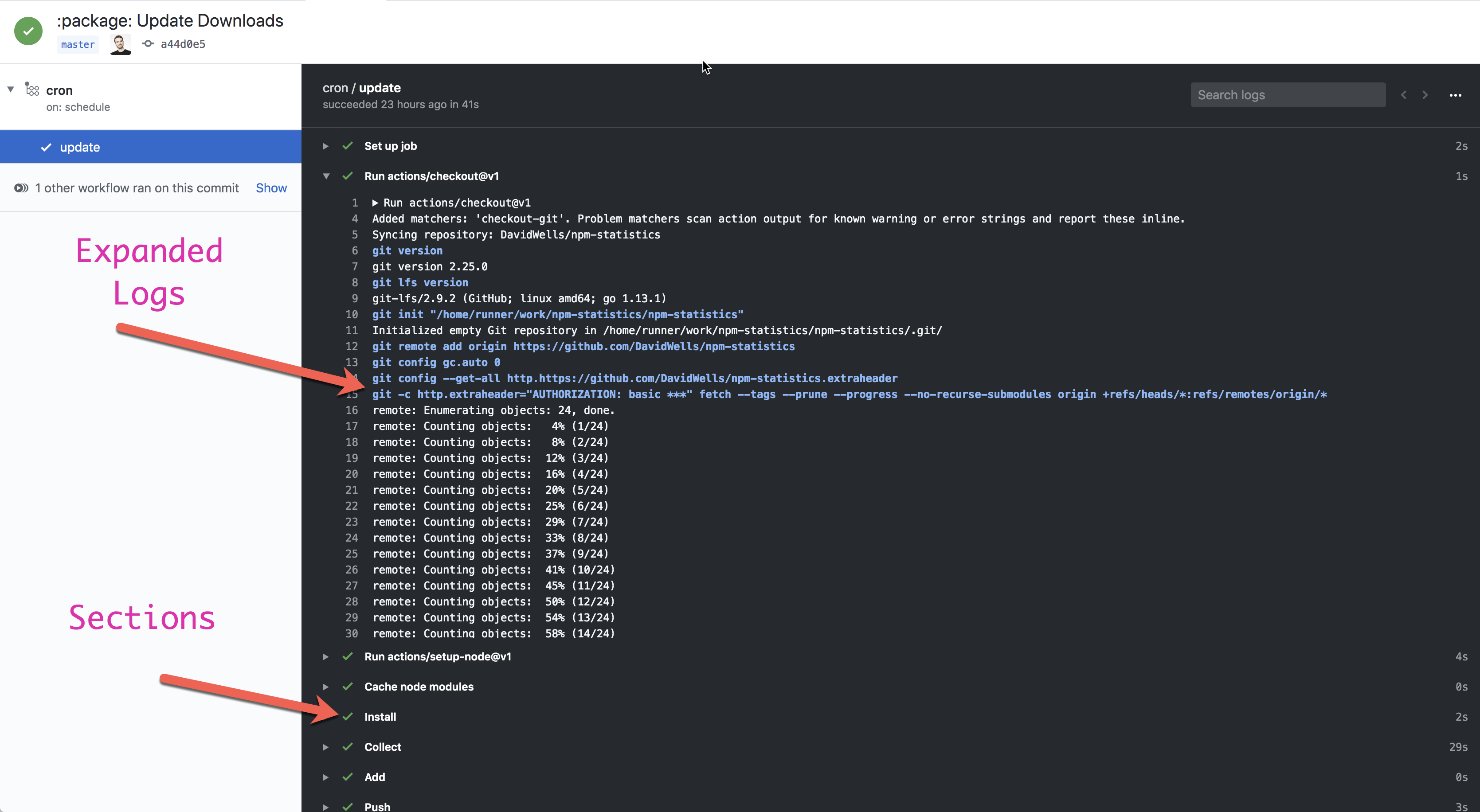
If we patch logs (previously implemented via proxies) and pipe stdout/stderr we have the ability to segregate logs in the UI, much like github actions.
You can imagine something like below, in netlify UI, except the sections are the individual lifecycle events that could* be segregated/sorted/viewed by plugin.
Related: https://github.com/netlify/build/issues/735 mechanism for reporting back to UI. E.g. deploy stats etc
I think what you are describing @DavidWells is how things are currently setup. At the moment, any output from a plugin (including from console.log('thing happened')) is shown in the build output under that plugin's section. We are currently redirecting all plugin output. So third-party logs are currently not missing.
The main question I am wondering about is whether we want to distinguish between two different types of plugin output:
- Output coming from third party / dependencies
- Output explicitly logged by the plugin itself
We currently show both and we all seem to agree we want to keep it that way.
What I am wondering is whether those two types should be shown differently or not to the users. For example, do we want to highlight 2. so it's more visible than 1.? It seems to me this question should be answered first before discussing implementation strategies (console.log() monkey patching, etc.).
@DavidWells @RaeesBhatti What are your thoughts: should those two types of output be presented the same way or not to the users?
I say that we do distinguish between the two types.
And if we go that route, it requires that the plugin authors use our logger library. The logs from our library will have a property that indicates that this is a first-party log. This will allow plugin authors fine-grained control over the logs and will result in more level precise logs (e.g. info, debug, warning, etc). And allow us to extend the logs functionality later on.
We can create and attach Transform Streams for both stdout and stderr of the plugin process. With a _transofrm method that checks for the decoration by our library. If it exists, it lets the log pass as is, otherwise it transforms the normal log into structured one with a property that indicates it was a third-party log.
Since we're handling the process stdout and stderr, it's a catch-all solution. I don't think there's any other reliable way to do this.
From an implementation standpoint, we are already redirecting stdout and stderr streams, so we could transform the normal log into a structured one directly inside the plugin process when user is calling the logger library?
I agree that if we want to distinguish in the UI between first-party and third-party outputs, it might be difficult to monkey patch console.log() since third-party dependencies use it too. @DavidWells what are your thoughts about this question?
This is a tricky one. There are many things to consider here
- There are scenarios where users would like noisy third party logs from dependancies to be excluded from sectioned logging
- On the flip side, There are also scenarios where this would not be desired & would result in an incomplete view of what is actually happening in the build.
It's likely not possible to know which scenario logs would fall into. For this reason, likely, the safest option would be to include all logs sectioned by plugin/lifecycle like this.
If the users wants cleaner logs, they can choose other dependancies, fork the deps, or enable silent flags in their libs etc.
Another thing to consider is, if we do exclude logs from normal console.log (etc), plugins might still use console.log & the output would be hidden. This can lead to user confusion/frustration. E.g. they forget they need to include utils.logger (or whatever util is called).
Ideally logging should just work out of the box with no additional effort on the developers part.
For messages reporting back into the UI, there is an issue open about that here https://github.com/netlify/build/issues/735
We just had a Slack discussion with @DavidWells and concluded that first-party and third-party outputs in plugins should not be distinguished. I.e. they should be presented the same way to the end users.
Thanks to that, the current implementation already works. In particular console.log() will just work as intended inside plugins. We can just use stdout and stderr from each plugin child process as is, and store it into variables.
We then backtracked into the feature we're actually trying to achieve: exposing logs in a structured format (JSON) so that the following features become available:
- shipping logs to external providers (dashboards, alerts, etc.)
- grouping logs per plugin in the UI (folding, filtering, etc.)
We then came back to the initial implementation idea proposed by @DavidWells: simply persisting those structured logs to .netlify/logs.json.
For the format itself, I agree with @RaeesBhatti that we should use some well-known format such as Fluentd.
So the implementation would just be:
- get each plugin child process
stdout/stderr - format it into a structured format (JSON)
- persist it to
.netlify/logs.jsonat the end of the build
Some of the implementation challenges would be:
- we need to stream this in case the logs are huge
- we currently stream the logs to the terminal so they are available right away and so that the DX feels snappy. However we would need to also redirect the logs to a separate location here. From personal experience, doing both can be sometimes challenging.
- determining when streams have been drained is difficult. Just listening to the
close,drain,finishorendevents just does not seem to work when logs are huge. It works locally, but in production, there seems to be some issue when run within the buildbot. This requires further investigation.
@DavidWells Could you confirm whether this summarizes the discussion we had? @RaeesBhatti What are your thoughts about this?
Looks good to me. Curious to see the format 😃
One other note from the convo:
Because we will have a valid Netlify API key, we do have the ability to fetch the raw logs at the very very end of the build or afterwards via another service. I'd consider this a fall back plan if there are stream/buffer issues with LARGE site deployments or any noticeable performance regressions from running this during the build.
Created a bitballoon issue to track access: https://github.com/netlify/bitballoon/issues/5468 We should distinguish between buildbot's log lines and those from build plugins.

My (very opinionated) two cents:
Logging is a part of the core infrastructure right now. It will not be easy to offer to netlify-build in a flexible way
Easy win: just output any logs to stdout, buildbot will ship them to firebase, UI can consume from there, like it does now.
If there needs to be structured logging (e.g. for dividing by sections) there needs to be a system that can understand and store those structured logs. Right now we don't have such a system.
- Firebase could be used for it, but we are planning on moving off of it, because it does not scale.
- It should not be bitballoon, because that would put too much pressure on the database.
Previous attempts at a logging system have shown that this is hard to do at scale. The kafka cluster that is being built might make this easier. I suggest checking in with @rybit or the platform team in general around future plans for deploy logs.

I agree with @mraerino on not trying to reinvent all of logging. Added thoughts features on what we are trying to support near/longer term here https://github.com/netlify/bitballoon/issues/5468#issuecomment-584904782 to discuss in private repo 😃
@mraerino At the moment, we are just outputting @netlify/build logs to stdout (and also stderr). To summarize the current proposal: we're thinking of also outputting those in a structured file at .netlify/logs.json in order to (for example) divide its sections.
If I understand your comment correctly, you are suggesting that we should start by thinking this at the platform-level instead of just @netlify/build? This makes sense to me as well :+1:. Especially with things like log shipping. Please let me know if I misunderstood what you meant.
Since logs might contain security-sensitive information that Build plugins should not access, I have opened a separate issue for that at #844.