

 nesrak1
Game become slow in loading after replace a files
i tried to replace mesh file in this game, the game files is in .unity3d format. I managed to uncompressed the data.unity3d file, then export the files i need (resource.assets). After importing/replacing the files i wanted, i import the files (resource.assets) back to the uncompressed data.unity3d. Modding process have no issue and no error, but when the files applied to the game, it become slow when loading a files and need about 1-2 min to just load another stuff (e.g change and choosing car in garage menu), but it works, the game read the files, just become so slow.
original

modified

this only happen when using the modified files. When i tried using original files (compressed and not compressed) the game works flawlessly.
the game uses Unity 2020.3.43f1c1, platform Android.
There's some difference when i compare the original uncompressed data.unity3d with the one that i modified
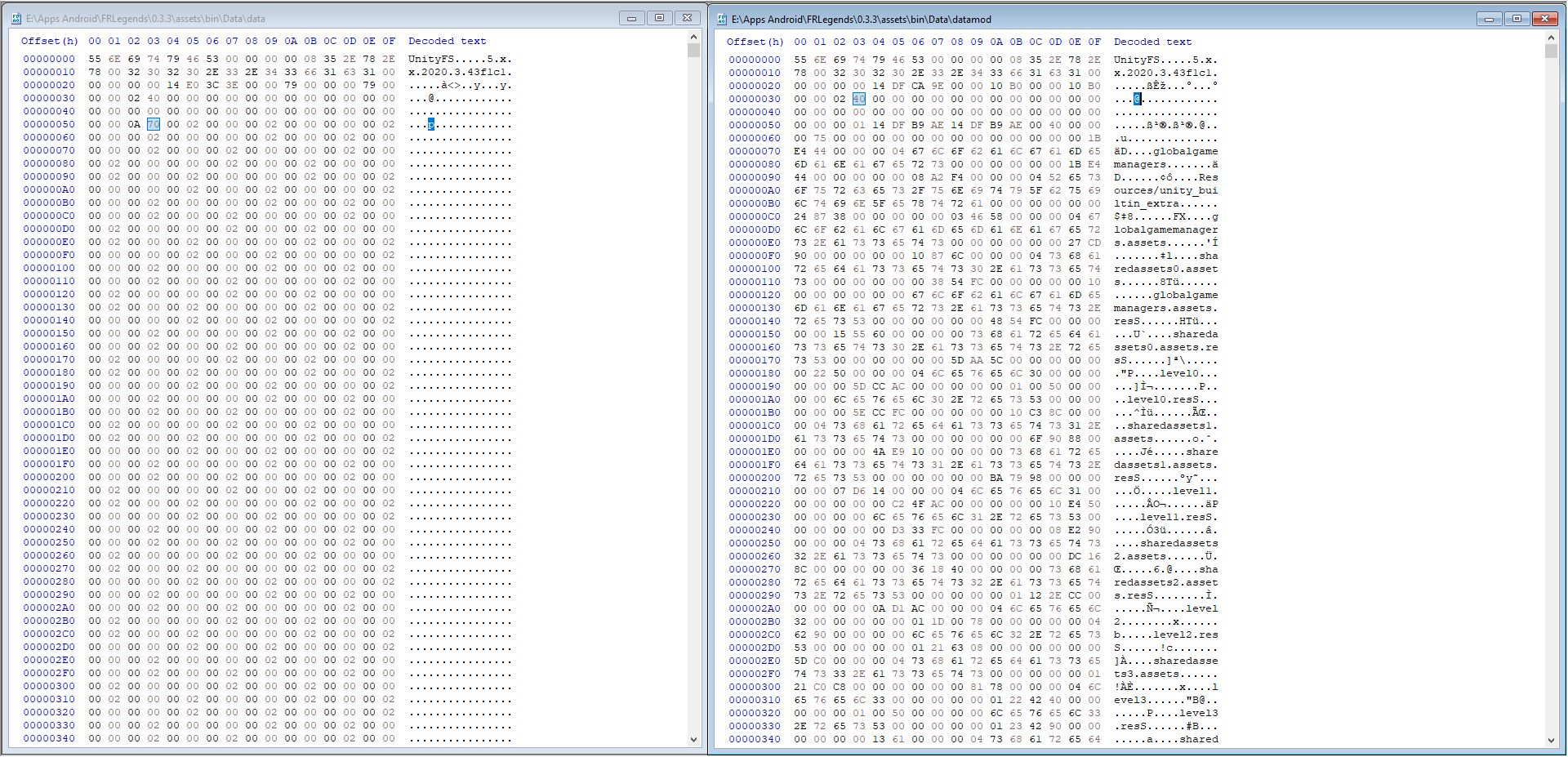
original uncompressed data.unity3d size = 342.032 kb modified uncompressed data.unity3d size = 342.003 kb

Modding process have no issue and no error, but when the files applied to the game, it become slow when loading a files and need about 1-2 min to just load another stuff (e.g change and choosing car in garage menu), but it works, the game read the files, just become so slow.
Is the game lagging all the time or just taking long to load certain screens? I haven't had anyone report that, although if you change a Texture2D, I still don't support mipmaps yet, so you could have poorer performance all the time (although that game looks to have simple graphics so I'm not sure). I can't really tell by your screenshots what you want me to see, nor do I know what you changed, so it's hard to help you diagnose the problem.
There's some difference when i compare the original uncompressed data.unity3d with the one that i modified
The original uncompressed version is showing a file where all of the LZ4 blocks converted into multiple uncompressed blocks (what UABEA does during decompression.) The modified bundle shoes a file where there's a single uncompressed block. There's no real difference on how it behaves other than how it looks in the hex editor and maybe a slight performance hit in the blocked version.

Is the game lagging all the time or just taking long to load certain screens? I haven't had anyone report that, although if you change a Texture2D, I still don't support mipmaps yet, so you could have poorer performance all the time (although that game looks to have simple graphics so I'm not sure). I can't really tell by your screenshots what you want me to see, nor do I know what you changed, so it's hard to help you diagnose the problem.
the game is not lagging (drop fps), just taking long time to load every scene, not just scene but also when loading a gameobject, i only try to change a Mesh asset in this case.
I haven't heard of this one, but since you said the non-compressed file worked fine but only loaded slow when rewritten, it could be that the engine tries to load the whole file at once instead of the individual blocks. Maybe if you recompress the modified bundle to LZ4, it will speed back up? That would put the block chunks back.
But again, I've not heard of it taking significantly longer to load in game, so I'm not entirely sure.
I have tried to recompress the modified bundle to LZ4, and the result still the same.
I tried to re-import the extracted file (without modify it) to the bundle, recompress, and apply it to the game, and the result is the same, took long time to load a scene.
Here's the step i did :
- Open data.unity3d
- Extract it to file/memory
- Export a file from the bundle (in this case, i extract resource.assets from the data.unity3d bundle)
- Import the extracted file back to bundle
- Save the bundle into different file name
- Open the new saved bundle file
- Compress it with LZ4
- Copy and apply the compressed bundle to the game
With this step, although i didn't change any mesh or any assets, the game would still take long time when loading.
You said the bundle uncompressed is totally fine. I want to see if the game is doing something extra if the bundle's data CRC doesn't match (unaffected by decompression). In UABEA, look for any asset with a recognizable name. Make sure that whatever name it is does not appear elsewhere. Next, in HxD with the unmodified, uncompressed bundle, find the string (double check there aren't multiple matches for the string) and overwrite one of the characters with anything you want (don't insert). If you do this, the CRC should change but since name fields are largely ignored, you shouldn't see any difference in-game. If the game still takes too long to load, then any kind of modification, no matter what tool, will always have this loading screen. In that case, it may be worth looking into the game's code to figure out what it's doing extra (redownloading the bundle from the internet, for example)

https://github.com/SeriousCache/UABE/issues/548 There's something to it, I couldn't figure out what it is
I still don't have a solution to the problem. Anyone is welcome to investigate and play around with it. I wrote something up here but no one has followed it yet to my knowledge: https://github.com/nesrak1/UABEA/issues/222#issuecomment-1433341657
Update: In my case, this was related to the APK Signer I was using after putting everything back together after modification. After switching to another APK signer, it improved massively
Update: In my case, this was related to the APK Signer I was using after putting everything back together after modification. After switching to another APK signer, it improved massively
What APK Signer do you use?
