

 nervosnetwork
Allow Neuron Wallet to accept sUDT assets on Neuron addresses?
I had used NexisDAO to mint dCKB on their platform and I accidentally transferred my dCKB to my Neuron address. The asset is there, however, there is no way to access it. This has also happened to others in the Nervos community and we would love it if this can be implemented so others can not have the same issue as we are having. Not only would it help, but it'll make it future-proof to where others can't make the same mistake we've made.
You can see the asset here: https://explorer.nervos.org/address/ckb1qyq08w7ustegc63wd85x9u6rzlmntsjnxuasefafvq

I also have this same issue. I was under the impression it was treated the same as CKB and sent it to the neuron wallet not knowing after getting it stuck in Yokaiswap and not being able to send it back to NexisDAO. Thanks for any help in the matter. It can be seen here:
https://explorer.nervos.org/address/ckb1qyqfvdfhwu0t27ykc6yn6mzlszdpw3gnyq5qt5cgev

Hi @VISQonSpotify and @blockchainRick
We've got several feedbacks about this annoying problem and had a discussion recently.
The neuron is kind of conservative and follows all well-ground RFCs, so it won't handle the unofficial assets until they are included in RFC.
To unlock these unrecognized assets in neuron, we're going to make a new tool featuring full interoperability that can handle UDT mentioned above.
An alpha version will be released by 2022/05/20 and I'll update in this issue.

Hi @VISQonSpotify and @blockchainRick
We've got several feedbacks about this annoying problem and had a discussion recently.
The neuron is kind of conservative and follows all well-grained RFCs, so it won't handle the unofficial assets until they are included in RFC.
To unlock these unrecognized assets in neuron, we're going to make a new tool featuring full interoperability that can handle UDT mentioned above.
An alpha version will be released by 2022/05/20 and I'll update in this issue.
I really appreciate this! Thank you for working on it.
Hi @VISQonSpotify and @blockchainRick
We've got several feedbacks about this annoying problem and had a discussion recently.
The neuron is kind of conservative and follows all well-grained RFCs, so it won't handle the unofficial assets until they are included in RFC.
To unlock these unrecognized assets in neuron, we're going to make a new tool featuring full interoperability that can handle UDT mentioned above.
An alpha version will be released by 2022/05/20 and I'll update in this issue.
This is great news. Thank you so much!
I have the same problem. I bridged some ETH from Ethereum network to Nervos, but I can't see them in Neuron wallet. I do see them in explorer.nervos.org though.

Hi there!
Is this still planned and on the way?
I got 4.2 bnb stuck as sUDT which I cannot access 😩
Hi @VISQonSpotify and @blockchainRick
We've got several feedbacks about this annoying problem and had a discussion recently.
The neuron is kind of conservative and follows all well-grained RFCs, so it won't handle the unofficial assets until they are included in RFC.
To unlock these unrecognized assets in neuron, we're going to make a new tool featuring full interoperability that can handle UDT mentioned above.
An alpha version will be released by 2022/05/20 and I'll update in this issue.
I really appreciate this! Thank you for working on it.

Hi there!
Is this still planned and on the way?
I got 4.2 bnb stuck as sUDT which I cannot access 😩
Hi @VISQonSpotify and @blockchainRick
We've got several feedbacks about this annoying problem and had a discussion recently.
The neuron is kind of conservative and follows all well-grained RFCs, so it won't handle the unofficial assets until they are included in RFC.
To unlock these unrecognized assets in neuron, we're going to make a new tool featuring full interoperability that can handle UDT mentioned above.
An alpha version will be released by 2022/05/20 and I'll update in this issue.
I really appreciate this! Thank you for working on it.
We've started the technical design of the new product last week.
Hi @VISQonSpotify @blockchainRick @jimsrc @E-Coder1987
We have delivered this feature in [email protected] with this PR
The simplest workflow is as follows,
https://user-images.githubusercontent.com/7271329/167488244-15ae0b8d-7e8e-4c1a-a192-9f87da2d173b.mov
This video shows how to turn a sudt/secp256k1 asset into an sudt asset account in neuron.
Also, we support migrating the entire asset into an existing acp asset account with the second tab.
BTW, the new tool I mentioned above is hung :(
Thanks so much I got bnb stuck there as an sudt
Can I send it to my metamask address after I do that what is seen in the video?
There's an undetected bug in v0.101.3 that check for updates in settings does not work, you may update neuron from menu -> neuron -> check for updates
Ref: https://github.com/nervosnetwork/neuron/issues/2372
Thanks so much I got bnb stuck there as an sudt
Can I send it to my metamask address after I do that what is seen in the video?
It's possible if you are using portal wallet https://ckb.pw/ , the pw address(portal wallet address) is allowed in sudt transfer and each pw address has a corresponding eth address so you can transfer them with metamask.
But this feature has been implemented by PR two years ago, and the test environment of pw address is not available for now. I need some days to double check this function.
Damn that's all so complicated for me sorry!
I bridged them into the wrong address the bnb and now they are an sudt.
Could you maybe be so very very kind as to guide me how I get those bnb out of my wallet and into my bsc metamask address?
On ckb.pw I don't see them when I connect:
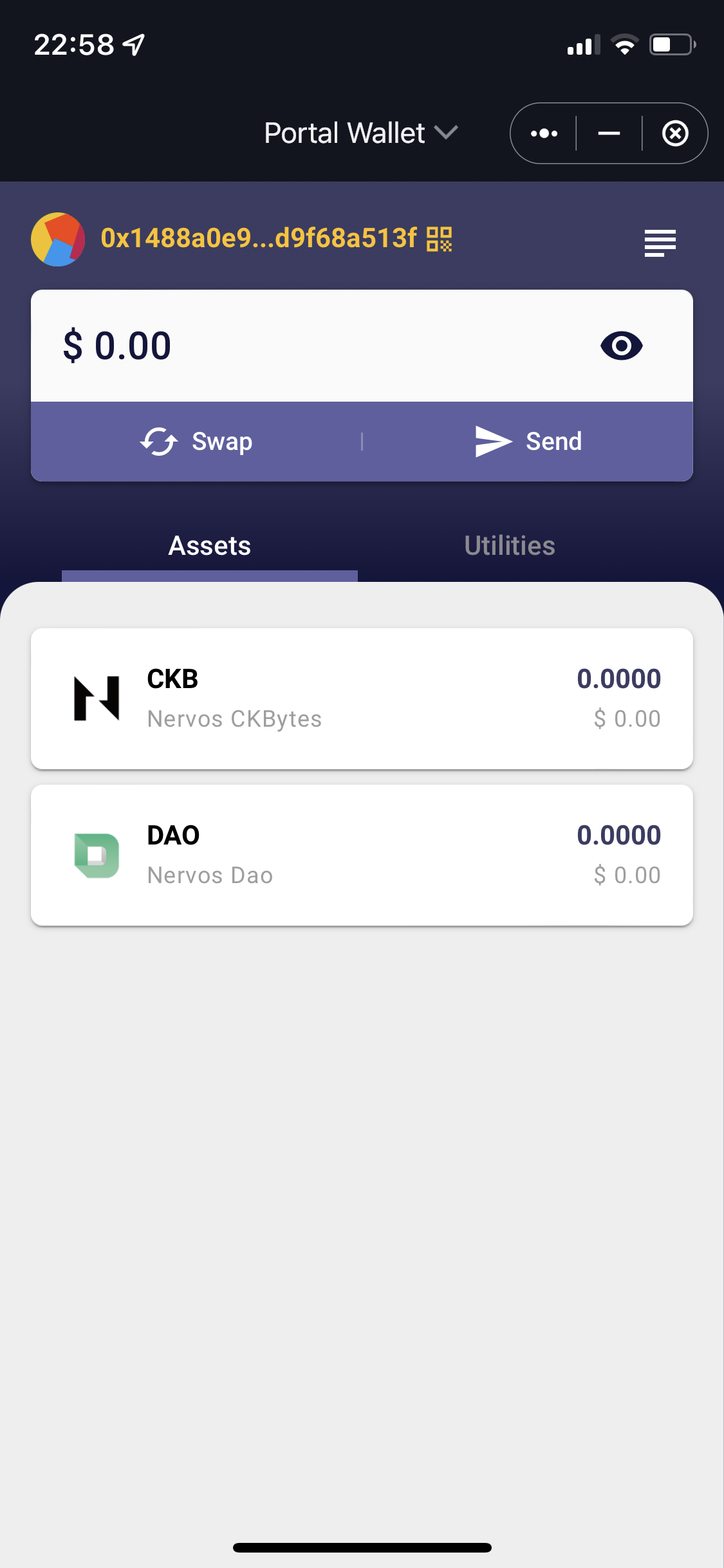
Damn that's all so complicated for me sorry!
I bridged them into the wrong address the bnb and now they are an sudt.
Could you maybe be so very very kind as to guide me how I get those bnb out of my wallet and into my bsc metamask address?
On ckb.pw I don't see them when I connect:
I believe if you send your bnb to your YokaiSwap L1 Address, that should work and then you can use the bridge to correct it. I'm double checking on my end first to see if my dckb will.
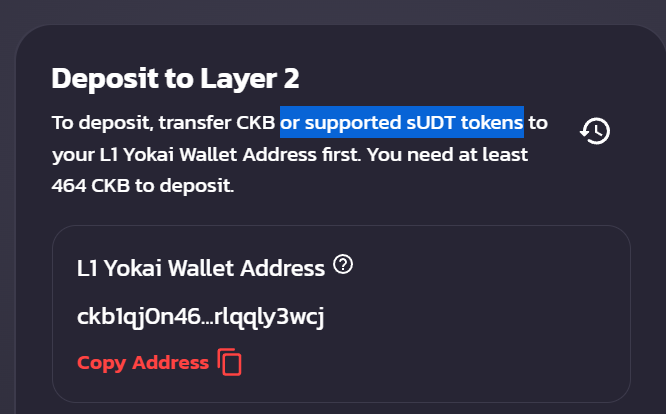
@Keith-CY thank you so much! Worked great and I got my assets unstuck and send to NexisDAO so I could unlock my funds there. Thanks again!
Hey guys. I had a customized asset in Neuron. I added a new SUDT [dCKB*] as per the video above.
Now when I try to send the asset, I get an error to state that "There isn't an account wallet associated with this address"
The address I'm trying to send my dCKB to is my Yokaiswap L1 address. Can anyone help?
*Token ID: 0xe5451c05231e1df43e4b199b5d12dbed820dfbea2769943bb593f874526eeb55 and I used Decimal = 8 when creating

Damn that's all so complicated for me sorry!
I bridged them into the wrong address the bnb and now they are an sudt.
Could you maybe be so very very kind as to guide me how I get those bnb out of my wallet and into my bsc metamask address?
On ckb.pw I don't see them when I connect:
I believe if you send your bnb to your YokaiSwap L1 Address, that should work and then you can use the bridge to correct it. I'm double checking on my end first to see if my dckb will.
Did you maybe get a chance to verify how to do it? Here is the explorer link to my wallet... I need to get out those bnb into my metamask wallet again:
https://explorer.nervos.org/address/ckb1qyqgk6nz7hezdj670xzqpjjewktw0nta76aqtalv9p
Thanks in advance for your help!
Hey guys. I had a customized asset in Neuron. I added a new SUDT [dCKB*] as per the video above.
Now when I try to send the asset, I get an error to state that "There isn't an account wallet associated with this address"
The address I'm trying to send my dCKB to is my Yokaiswap L1 address. Can anyone help?
*Token ID: 0xe5451c05231e1df43e4b199b5d12dbed820dfbea2769943bb593f874526eeb55 and I used Decimal = 8 when creating
I get this too, added my BNB in a new Asset Account with decimal 18 When I try to send them to L1 Address it says the same:
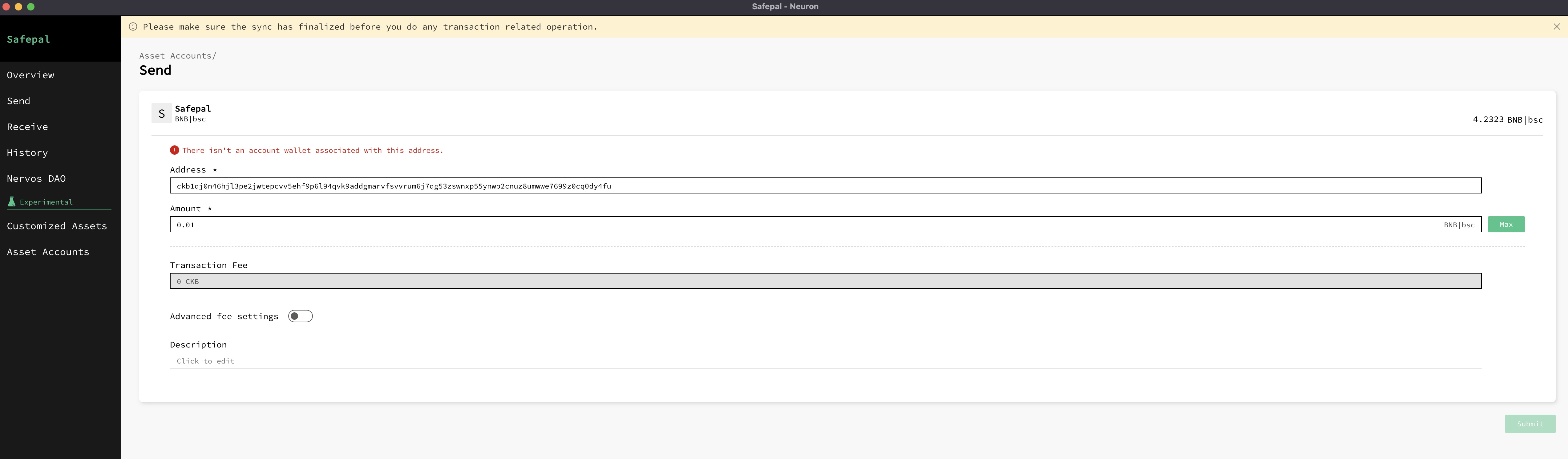
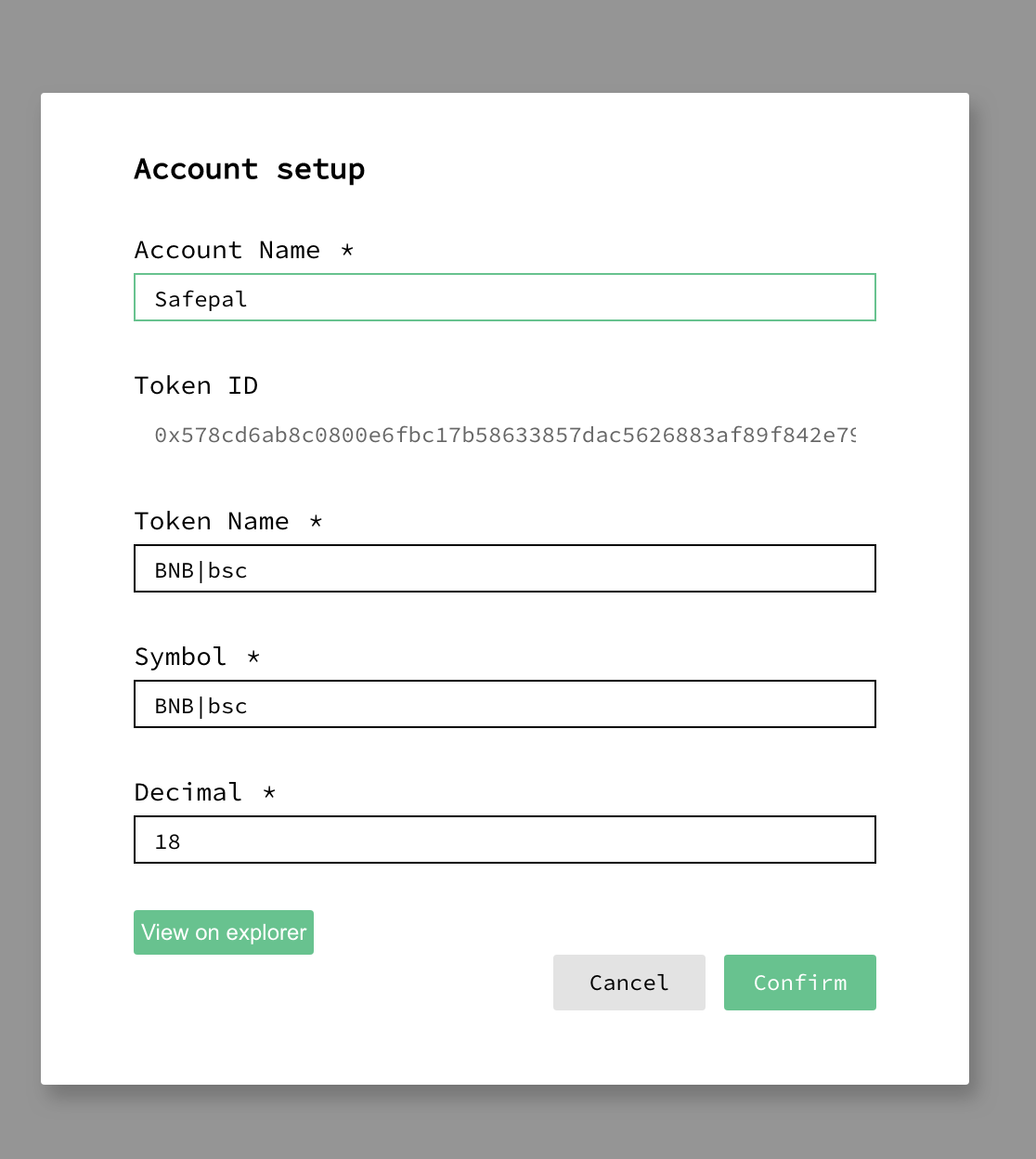
Asset Account config is as follows:
Hey guys. I had a customized asset in Neuron. I added a new SUDT [dCKB*] as per the video above. Now when I try to send the asset, I get an error to state that "There isn't an account wallet associated with this address" The address I'm trying to send my dCKB to is my Yokaiswap L1 address. Can anyone help? *Token ID: 0xe5451c05231e1df43e4b199b5d12dbed820dfbea2769943bb593f874526eeb55 and I used Decimal = 8 when creating
I get this too, added my BNB in a new Asset Account with decimal 18 When I try to send them to L1 Address it says the same:
Asset Account config is as follows:
A sudt account can transfer to a ckb address or the same sudt type address.
Is the transfer address a ckb address? I can't see the tips like this.
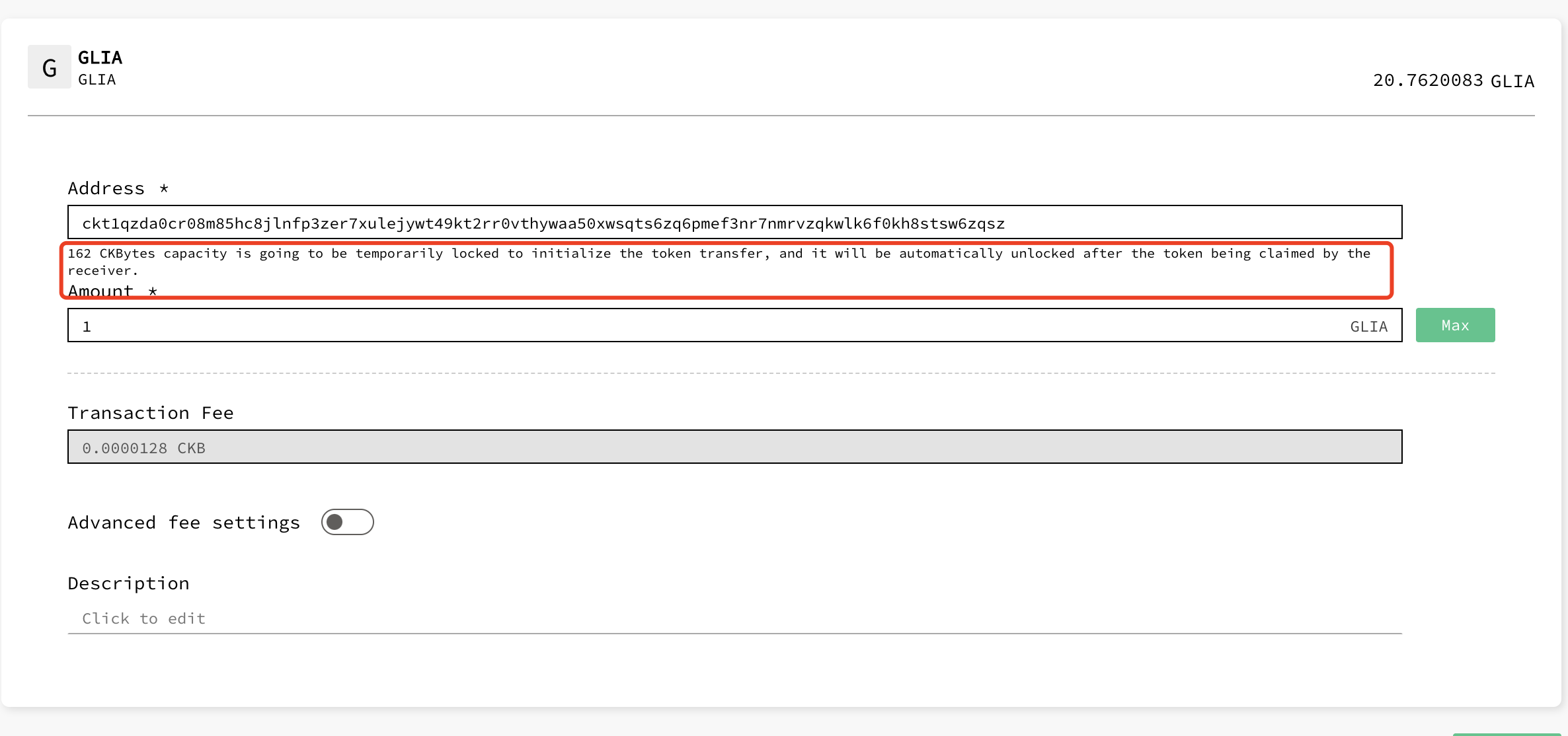

Hey guys. I had a customized asset in Neuron. I added a new SUDT [dCKB*] as per the video above. Now when I try to send the asset, I get an error to state that "There isn't an account wallet associated with this address" The address I'm trying to send my dCKB to is my Yokaiswap L1 address. Can anyone help? *Token ID: 0xe5451c05231e1df43e4b199b5d12dbed820dfbea2769943bb593f874526eeb55 and I used Decimal = 8 when creating
I get this too, added my BNB in a new Asset Account with decimal 18 When I try to send them to L1 Address it says the same:
A sudt account can transfer to a ckb address or the same sudt type address. Is the transfer address a ckb address? I can't see the tips like this.
Hi!
The Address I entered is my yokaiswap L1 Address (NOT Deposit Address) from when I connect with my Safepal app to Yokaiswap -> shall I input a different one?
The Tip like in you Screenshot doesn't show (Running on Mac OS). As soon as I enter an amount the Error Shows up: There isn't an account wallet associated with this address.
Hey guys. I had a customized asset in Neuron. I added a new SUDT [dCKB*] as per the video above. Now when I try to send the asset, I get an error to state that "There isn't an account wallet associated with this address" The address I'm trying to send my dCKB to is my Yokaiswap L1 address. Can anyone help? *Token ID: 0xe5451c05231e1df43e4b199b5d12dbed820dfbea2769943bb593f874526eeb55 and I used Decimal = 8 when creating
I get this too, added my BNB in a new Asset Account with decimal 18 When I try to send them to L1 Address it says the same:
A sudt account can transfer to a ckb address or the same sudt type address. Is the transfer address a ckb address? I can't see the tips like this.
Hi!
The Address I entered is my yokaiswap L1 Address (NOT Deposit Address) from when I connect with my Safepal app to Yokaiswap -> shall I input a different one?
The Tip like in you Screenshot doesn't show (Running on Mac OS). As soon as I enter an amount the Error Shows up: There isn't an account wallet associated with this address.
Same goes for me. I've managed to convert the customized asset into an Account Asset for dCKB in Neuron. When I try to transfer it to Yokai L1 address I get the error message. I've played around with a few different addresses, it has the same error
Hey guys. I had a customized asset in Neuron. I added a new SUDT [dCKB*] as per the video above.
Now when I try to send the asset, I get an error to state that "There isn't an account wallet associated with this address"
The address I'm trying to send my dCKB to is my Yokaiswap L1 address. Can anyone help?
*Token ID: 0xe5451c05231e1df43e4b199b5d12dbed820dfbea2769943bb593f874526eeb55 and I used Decimal = 8 when creating
Hi @finnj7 , you're facing the same problem @E-Coder1987 is suffering.
How to transfer sudt from neuron to yokaiswap
It cannot be done directly because neuron is more conservative and only lock scripts verified by time will be allowed. Specifically, only secp256k1/blake160, anyone-can-pay and pwlock-acp lock scripts are allowed to transfer sudt assets.
I've done some investigation and there're two solutions
The first one is a little complex and not suggested:
- You need some balance of the same sudt in force bridge of previous version(using pwlock)
- Send sudt from Neuron to the ckb address(pwlock) shown in force bridge
- use the tool(https://github.com/homura/pw-up) to migrate ckb address(pwlock) to ckb address(yokai)
The second one:
yokai and force bridge of current version are both using a new lock script introduced with this hardfork, named omni lock(also mentioned in pw-up above), its strongly suggested now but not listed in RFC yet so neuron does not support it. I'll check in today's meeting that can we add it to the whitelist so neuron can send sudt to omni lock, including yokai address. If yes, we'll try our best to support yokai address in neuron and deliver it in the next version(should be in a month).
Hey guys. I had a customized asset in Neuron. I added a new SUDT [dCKB*] as per the video above.
Now when I try to send the asset, I get an error to state that "There isn't an account wallet associated with this address"
The address I'm trying to send my dCKB to is my Yokaiswap L1 address. Can anyone help?
*Token ID: 0xe5451c05231e1df43e4b199b5d12dbed820dfbea2769943bb593f874526eeb55 and I used Decimal = 8 when creating
Hi @finnj7 , you're facing the same problem @E-Coder1987 is suffering.
How to transfer sudt from neuron to yokaiswap
It cannot be done directly because neuron is more conservative and only lock scripts verified by time will be allowed. Specifically, only
secp256k1/blake160,anyone-can-payandpwlock-acplock scripts are allowed to transfer sudt assets.I've done some investigation and there're two solutions
The first one is a little complex and not suggested:
You need some balance of the same sudt in force bridge of previous version(using pwlock)
Send sudt from Neuron to the ckb address(pwlock) shown in force bridge
use the tool(https://github.com/homura/pw-up) to migrate ckb address(pwlock) to ckb address(yokai)
The second one:
yokai and force bridge of current version are both using a new lock script introduced with this hardfork, named
omni lock(also mentioned in pw-up above), its strongly suggested now but not listed in RFC yet so neuron does not support it. I'll check in today's meeting that can we add it to the whitelist so neuron can send sudt to omni lock, including yokai address. If yes, we'll try our best to support yokai address in neuron and deliver it in the next version(should be in a month).
Thanks for you reply again!
Option 2 lets my assets be stuck one more month 😩
Could you elaborate how to do option one exactly?
Hey guys. I had a customized asset in Neuron. I added a new SUDT [dCKB*] as per the video above.
Now when I try to send the asset, I get an error to state that "There isn't an account wallet associated with this address"
The address I'm trying to send my dCKB to is my Yokaiswap L1 address. Can anyone help?
*Token ID: 0xe5451c05231e1df43e4b199b5d12dbed820dfbea2769943bb593f874526eeb55 and I used Decimal = 8 when creating
Hi @finnj7 , you're facing the same problem @E-Coder1987 is suffering.
How to transfer sudt from neuron to yokaiswap
It cannot be done directly because neuron is more conservative and only lock scripts verified by time will be allowed. Specifically, only
secp256k1/blake160,anyone-can-payandpwlock-acplock scripts are allowed to transfer sudt assets. I've done some investigation and there're two solutions The first one is a little complex and not suggested:
- You need some balance of the same sudt in force bridge of previous version(using pwlock)
- Send sudt from Neuron to the ckb address(pwlock) shown in force bridge
- use the tool(homura/pw-up) to migrate ckb address(pwlock) to ckb address(yokai)
The second one: yokai and force bridge of current version are both using a new lock script introduced with this hardfork, named
omni lock(also mentioned in pw-up above), its strongly suggested now but not listed in RFC yet so neuron does not support it. I'll check in today's meeting that can we add it to the whitelist so neuron can send sudt to omni lock, including yokai address. If yes, we'll try our best to support yokai address in neuron and deliver it in the next version(should be in a month).Thanks for you reply again!
Option 2 lets my assets be stuck one more month 😩
Could you elaborate how to do option one exactly?
Hi @E-Coder1987 , I posted this issue in meeting and discussed with other teams, they all disagreed with the first option strongly, because pwlock is not recommended and no one is going to deploy a force bridge working with pwlock.
The option 2 (supporting omnilock in neuron) also does not help, because yokaiswap is not using an official omnilock lock script.
To enable sending sudt to yokaiswap or addresses other than secp256k1, anyone-can-pay, pwlock, we're going to add a dev mode(temporarily named) to loosen restriction of verification. It takes about 2 weeks to develop and 1 week to test.
BTW, are you going to deposit your sudt into godwoken via yokaiswap? If yes, we also suggest you to do this one month later, because godwoken will upgrade to v1 after a month and v0, v1 are incompatible, so users have to withdraw their assets from godwoken v0 to ckb, and then deposit them to godwoken v1 again.
osit your sudt into go
Hey thanks for that, good to hear. I am not too bothered about when this is available as I know my assets are safe. It sounds complicated at the moment to resolve so I am happy to wait!
Hey guys. I had a customized asset in Neuron. I added a new SUDT [dCKB*] as per the video above.
Now when I try to send the asset, I get an error to state that "There isn't an account wallet associated with this address"
The address I'm trying to send my dCKB to is my Yokaiswap L1 address. Can anyone help?
*Token ID: 0xe5451c05231e1df43e4b199b5d12dbed820dfbea2769943bb593f874526eeb55 and I used Decimal = 8 when creating
Hi @finnj7 , you're facing the same problem @E-Coder1987 is suffering.
How to transfer sudt from neuron to yokaiswap
It cannot be done directly because neuron is more conservative and only lock scripts verified by time will be allowed. Specifically, only
secp256k1/blake160,anyone-can-payandpwlock-acplock scripts are allowed to transfer sudt assets. I've done some investigation and there're two solutions The first one is a little complex and not suggested:
- You need some balance of the same sudt in force bridge of previous version(using pwlock)
- Send sudt from Neuron to the ckb address(pwlock) shown in force bridge
- use the tool(homura/pw-up) to migrate ckb address(pwlock) to ckb address(yokai)
The second one: yokai and force bridge of current version are both using a new lock script introduced with this hardfork, named
omni lock(also mentioned in pw-up above), its strongly suggested now but not listed in RFC yet so neuron does not support it. I'll check in today's meeting that can we add it to the whitelist so neuron can send sudt to omni lock, including yokai address. If yes, we'll try our best to support yokai address in neuron and deliver it in the next version(should be in a month).Thanks for you reply again! Option 2 lets my assets be stuck one more month 😩 Could you elaborate how to do option one exactly?
Hi @E-Coder1987 , I posted this issue in meeting and discussed with other teams, they all disagreed with the first option strongly, because pwlock is not recommended and no one is going to deploy a force bridge working with pwlock.
The option 2 (supporting omnilock in neuron) also does not help, because yokaiswap is not using an official omnilock lock script.
To enable sending sudt to yokaiswap or addresses other than
secp256k1,anyone-can-pay,pwlock, we're going to add a dev mode(temporarily named) to loosen restriction of verification. It takes about 2 weeks to develop and 1 week to test.BTW, are you going to deposit your sudt into godwoken via yokaiswap? If yes, we also suggest you to do this one month later, because godwoken will upgrade to v1 after a month and v0, v1 are incompatible, so users have to withdraw their assets from godwoken v0 to ckb, and then deposit them to godwoken v1 again.
Hm ok so i will have to wait again than :(
I Dont know what version or chain? I open up yokaiswap on my Safepal app and then click on wallet and search for the L1 Yokai Wallet address -> Is this godwoken or ckb ?
@E-Coder1987 I didn't have any luck. Same issues as everyone else. I guess we will have to wait until the tool comes out.
Well then I'll wait - what else can I do :)
@Keith-CY : did the development start already? Is there an issue already created that i can track? Thanks for the good work!
Hi @E-Coder1987 @VISQonSpotify @finnj7 Sending sudt to yokai is supported in https://github.com/nervosnetwork/neuron/releases/tag/v0.103.1
https://user-images.githubusercontent.com/7271329/173234404-ad50cd60-56f1-4cde-9121-b77bb766acd2.mov
Cheers Mate that worked, I see them now ! Thanks very very much - waited too long and finally got my bnb back :D