

 nelenkov
Get an Error
Hello when i run the command i get this error: requests.exceptions.HTTPError: 403 Client Error: Forbidden for url: https://android.clients.google.com/auth
Is it still working ? or do I something wrong..?

Looks like Google has deprecated some of these APIs and they are only available for Google apps.

@nelenkov I think this project has a working implementation of something similar. Could you look into it?
I believe this is the relevant part:
def get_master_token(account, password, device_id, target_package, target_package_sig):
    b64_key_7_3_29 = (b"AAAAgMom/1a/v0lblO2Ubrt60J2gcuXSljGFQXgcyZWveWLEwo6prwgi3"
                      b"iJIZdodyhKZQrNWp5nKJ3srRXcUW+F1BD3baEVGcmEgqaLZUNBjm057pK"
                      b"RI16kB0YppeGx5qIQ5QjKzsR8ETQbKLNWgRY0QRNVz34kMJR3P/LgHax/"
                      b"6rmf5AAAAAwEAAQ==")

    android_key_7_3_29 = google.key_from_b64(b64_key_7_3_29)
    encpass = google.signature(account, password, android_key_7_3_29)
    payload = {'Email':account, 'EncryptedPasswd':encpass, 'app':target_package, 'client_sig':target_package_sig, 'parentAndroidId':device_id}
    request = requests.post('https://android.clients.google.com/auth', data=payload)
    token = re.search('Token=(.*?)\n', request.text)

    if token:
        return token.group(1)
    else:
        quit(request.text)`

Thanks, that seems to work, please try it out. Could be made cleaner, but for now, pretty much copy-pasted from whapa
@nelenkov The updated code seems to work on Journey but not on WhatsApp. I get this error:
Traceback (most recent call last):
  File "get-gdrive-appdata.py", line 355, in <module>
    main()
  File "get-gdrive-appdata.py", line 278, in main
    master_token = get_master_token(args.account, args.password, device_id, target_package)
  File "get-gdrive-appdata.py", line 208, in get_master_token
    r.raise_for_status()
  File "/usr/lib/python2.7/site-packages/requests/models.py", line 844, in raise_for_status
    raise HTTPError(http_error_msg, response=self)
requests.exceptions.HTTPError: 403 Client Error: Forbidden for url: https://android.clients.google.com/auth
Is there a workaround? I cant use Whapa for the same because it spoofs the WhatsApp app, and WhatsApp itself cannot find my data. Take a look at the attached images.
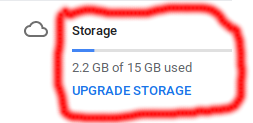
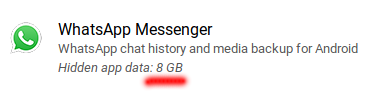
How are you calling the script? You have to specify the package name and signature of WhatsApp or use packages.xml from your phone for this to work.
Is it necessary that I have the app installed on the phone? The Journey app tried and succeeded with was uninstalled years ago.
I had recently uninstalled WhatsApp. I had specified the package and signature earlier. The same combination of package and signature had worked on Whapa. In case it is required that I have it installed, need I necessarily be logged in on WhatsApp? I am asking because I am afraid that doing so will cause loss of the very data I am trying to retrieve. Kindly look at this issue for details, the later messages have additional info.
Any help would be greatly appreciated. Neither Google nor WhatsApp is helping me. Thanks in advance.
(Should we have a private conversation instead? This seems off-topic now.)
Not sure what your problem is, but it seems WhatsApp saves the backup to a different folder, which is not included in the API result. You can try for yourself using the Try this API feature here:
https://developers.google.com/drive/api/v3/reference/files/list
Just type 'appDataFolder' in the 'spaces' field
Using the same request as whapa I am able get my own WhatsApp files, so whapa should work too. Not sure what the problem is, show me the parameters you used with both (sans passwords, etc.) Whasapp's signature is below:
Getting package [com.whatsapp] with hash [38a0f7d505fe18fec64fbf343ecaaaf310dbd799]
The problem is, WhatsApp messed up my backed up data, and my 8 GB backup was reduced to less than 1 GB. Both WhatsApp and Whapa are able to access the <1 GB data. I was searching for a way to get my 8 GB data somehow. It seems from the screenshots that it might be still accessible, but I have no idea how. I tried contacting both Google and WhatsApp, but no help from either so far. I was hoping your code might get the job done.
I was using the same package name and hash as you mentioned, and the same had worked with Whapa.
python get-gdrive-appdata.py --account [email protected] --password XXXXXXXX --device-id XXXXXXXXXXXXXXXX --target-package com.whatsapp --target-package-sig 38a0f7d505fe18fec64fbf343ecaaaf310dbd799
And the API explorer returned just this:
{
  "kind": "drive#fileList",
  "incompleteSearch": false,
  "files": []
}
I have no idea how to solve this issue.
My code is based on Whapa, so I doubt it will let you access more data. Not merged yet, but I was able to access my own WhastsApp backup data with code like below. The items map includes the ids and download URLs so you should be able to just paste in your browser and try to download (if logged in with the same account):
You might be able to get a list in your browser with the long URL below too, haven't tried it though.
celnumbr = '<your phone number here>'
u = "https://www.googleapis.com/drive/v2/files?mode=restore&spaces=appDataFolder&maxResults=1000&fields=items(description%2Cid%2CfileSize%2Ctitle%2Cmd5Checksum%2CmimeType%2CmodifiedDate%2Cparents(id)%2Cproperties(key%2Cvalue))%2CnextPageToken&q=title%20%3D%20'"+celnumbr+"-invisible'%20or%20title%20%3D%20'gdrive_file_map'%20or%20title%20%3D%20'Databases%2Fmsgstore.db.crypt12'%20or%20title%20%3D%20'Databases%2Fmsgstore.db.crypt11'%20or%20title%20%3D%20'Databases%2Fmsgstore.db.crypt10'%20or%20title%20%3D%20'Databases%2Fmsgstore.db.crypt9'%20or%20title%20%3D%20'Databases%2Fmsgstore.db.crypt8'"
h = {'Authorization': 'Bearer '+ access_token}
r = requests.get(u, headers=h)
print r
print r.text
jres = json.loads(r.text)
items = jres['items']
print 'items: %s' % items