

 necolas
Warning: Can't perform a React state update on an unmounted Image component.
The problem RNfW performs a React state update on an unmounted Image component.
How to reproduce
Unfortunately, no matter what, I can't extract a failing example from my app. But this error happens as far as I remember. It must be some race condition because it's very hard to predict when it happens. I understand it's no actionable without a failing example, but what else should I do?
Update: It's somehow dependent on the browser cache. When I reload the page with cmd-shift-r, it will never happen. When I reload the page with cmd-r, it happens sometimes.
<Image
  accessibilityLabel="Gravatar"
  style={t.avatar as ImageStyle}
  source={{ uri: src }}
/>


Same for me, I am using a FlatList and Pressable with Modal.
MemberFlatList.js
import React, {useState, useEffect} from 'react';
import {
  View,
  Text,
  StyleSheet,
  FlatList,
  useWindowDimensions,
} from 'react-native';
import MemberItem from './MemberItem';

const MemberFlatList = ({memberList}) => {
  const windowWidth = useWindowDimensions().width;
  const [multiProps, updateMultiProps] = useState({key: 1});
  const numOfCols = windowWidth > 700 ? (windowWidth > 1100 ? 3 : 2) : 1;

  useEffect(() => {
    if (numOfCols > 1) {
      updateMultiProps({
        numColumns: numOfCols,
        columnWrapperStyle: styles.justifyContentSpaceBetween,
        key: numOfCols,
      });
    } else {
      updateMultiProps({key: 1});
    }
  }, [numOfCols]);

  return (
    <View style={styles.flexOne}>
      <FlatList
        data={memberList}
        renderItem={({item, index}) => <MemberItem item={item} key={index} />}
        keyExtractor={member => member.name.split(' ').join('')}
        ListEmptyComponent={
          <Text style={{textAlign: 'center', padding: 30}}>
            No Data: Click above button to fetch data
          </Text>
        }
        {...multiProps}
      />
    </View>
  );
};

const styles = StyleSheet.create({
  flexOne: {
    flex: 1,
  },
});
export default MemberFlatList;
MemberItem.js
import React, {useEffect, useState} from 'react';
import {
  View,
  Text,
  StyleSheet,
  Image,
  Pressable,
  Modal,
  useWindowDimensions,
} from 'react-native';

const popupBaseData = {
  image: {
    width: 100,
    height: 150,
  },
  modal: {
    maxWidth: 600,
    heightPer: 35,
    heightInvertPer: 50,
    minHeight: 250,
    margin: 20,
    padding: 15,
  },
  contentContainer: {
    flexBasisPer: 65,
  },
  imageContainer: {
    flexBasisPer: 35,
  },
};

const MemberItem = ({item}) => {
  const [modalVisible, setModalVisible] = useState(false);
  const windowWidth = useWindowDimensions().width;
  const windowHeight = useWindowDimensions().height;
  const [imageDesign, setImageDesign] = useState({...popupBaseData.image});
  const [modalHeight, setModalHeight] = useState(
    popupBaseData.modal.heightPer + '%',
  );
  const {name, house, wand, actor, image} = item;
  const imageOrig = image.replace(/^http:\/\//, 'https://');
  const roboUrl = 'https://robohash.org/' + encodeURI(name) + '?size=60x60';
  let color = '#000';
  switch (house) {
    case 'Gryffindor':
      color = '#660000';
      break;
    case 'Slytherin':
      color = '#2f751c';
      break;
    case 'Hufflepuff':
      color = '#1f1e19';
      break;
    case 'Ravenclaw':
      color = '#1a3956';
      break;
  }

  useEffect(() => {
    const heightPer =
      windowWidth < windowHeight
        ? popupBaseData.modal.heightPer
        : popupBaseData.modal.heightInvertPer;
    setModalHeight(heightPer + '%');
    const width =
      windowWidth - popupBaseData.modal.margin * 2 <
      popupBaseData.modal.maxWidth
        ? windowWidth - popupBaseData.modal.margin * 2
        : popupBaseData.modal.maxWidth;
    const height =
      (windowHeight * heightPer) / 100 > popupBaseData.modal.minHeight
        ? (windowHeight * heightPer) / 100
        : popupBaseData.modal.minHeight;
    let imgWidth =
      (width - popupBaseData.modal.padding * 2) *
      (popupBaseData.imageContainer.flexBasisPer / 100);
    let imgHeight = height - popupBaseData.modal.padding * 2;

    setImageDesign({width: imgWidth, height: imgHeight});
  }, [windowWidth, windowHeight]);

  return (
    <View style={styles.flexOne}>
      <Pressable onPress={() => setModalVisible(true)}>
        <View style={styles.memberContainer}>
          <View style={styles.noPadding}>
            <Image source={{uri: roboUrl}} style={styles.logoImg} />
          </View>
          <View style={[styles.flexOne, {paddingLeft: 10}]}>
            <View style={styles.flexOne}>
              <Text style={styles.bold}>{name}</Text>
            </View>
            <View style={styles.flexOne}>
              <Text style={{color: color}}>{house}</Text>
            </View>
            <View style={styles.flexOne}>
              <Text>
                <Text style={styles.bold}>Played By:</Text> {actor}
              </Text>
            </View>
          </View>
        </View>
      </Pressable>
      <Modal
        animationType="slide"
        transparent={true}
        visible={modalVisible}
        onRequestClose={() => {
          setModalVisible(!modalVisible);
        }}>
        <View style={styles.centeredView}>
          <View style={[styles.modalView, {height: modalHeight}]}>
            <View
              style={{
                flexBasis: popupBaseData.imageContainer.flexBasisPer + '%',
              }}>
              <Image
                source={{uri: imageOrig}}
                resizeMode="cover"
                style={{
                  height: imageDesign.height,
                  width: imageDesign.width,
                }}
              />
            </View>
            <View style={styles.contentContainer}>
              <View>
                <Text>
                  <Text style={styles.bold}>Name:</Text> {name}
                </Text>
              </View>
              <View>
                <Text>
                  <Text style={styles.bold}>House:</Text> {house}
                </Text>
              </View>
              <View>
                <Text>
                  <Text style={styles.bold}>Played By:</Text> {actor}
                </Text>
              </View>
              <View>
                <Text>
                  <Text style={styles.bold}>Wand:</Text>
                </Text>
              </View>
              <View style={styles.leftPadded}>
                <Text>
                  <Text style={[styles.bold]}>Wood:</Text>{' '}
                  {wand.wood || 'unknown'}
                </Text>
                <Text>
                  <Text style={styles.bold}>Core:</Text>{' '}
                  {wand.core || 'unknown'}
                </Text>
                <Text>
                  <Text style={styles.bold}>Length:</Text>{' '}
                  {wand.length || 'unknown'}
                </Text>
              </View>
              <View>
                <Pressable
                  onPress={() => setModalVisible(!modalVisible)}
                  style={styles.hideModal}>
                  <Text
                    style={[styles.hideModalText, {backgroundColor: color}]}>
                    Hide
                  </Text>
                </Pressable>
              </View>
            </View>
          </View>
        </View>
      </Modal>
    </View>
  );
};

const styles = StyleSheet.create({
  memberContainer: {
    paddingVertical: 10,
    borderBottomWidth: 1,
    borderColor: '#123f63',
    flexDirection: 'row',
  },
  flexOne: {
    flex: 1,
  },
  logoImg: {
    width: 60,
    height: 60,
  },
  noPadding: {
    padding: 0,
  },
  bold: {
    fontWeight: 'bold',
  },
  centeredView: {
    flex: 1,
    flexDirection: 'row',
    justifyContent: 'center',
    alignItems: 'center',
    backgroundColor: '#00000055',
  },
  modalView: {
    margin: popupBaseData.modal.margin,
    backgroundColor: 'white',
    borderRadius: 10,
    padding: popupBaseData.modal.padding,
    alignItems: 'flex-start',
    shadowColor: '#000',
    shadowOffset: {
      width: 0,
      height: 2,
    },
    justifyContent: 'space-between',
    shadowOpacity: 0.25,
    shadowRadius: 4,
    elevation: 5,
    flex: 1,
    flexDirection: 'row',
    maxWidth: popupBaseData.modal.maxWidth,
    height: popupBaseData.modal.heightPer + '%',
    minHeight: popupBaseData.modal.minHeight,
  },
  contentContainer: {
    flexBasis: popupBaseData.contentContainer.flexBasisPer + '%',
    flexDirection: 'column',
    paddingHorizontal: 10,
    justifyContent: 'space-between',
    height: '100%',
  },
  hideModalText: {
    paddingVertical: 8,
    paddingHorizontal: 12,
    borderRadius: 20,
    color: '#fff',
  },
  hideModal: {
    marginTop: 10,
    alignSelf: 'center',
  },
  leftPadded: {
    marginLeft: 20,
  },
});

export default MemberItem;
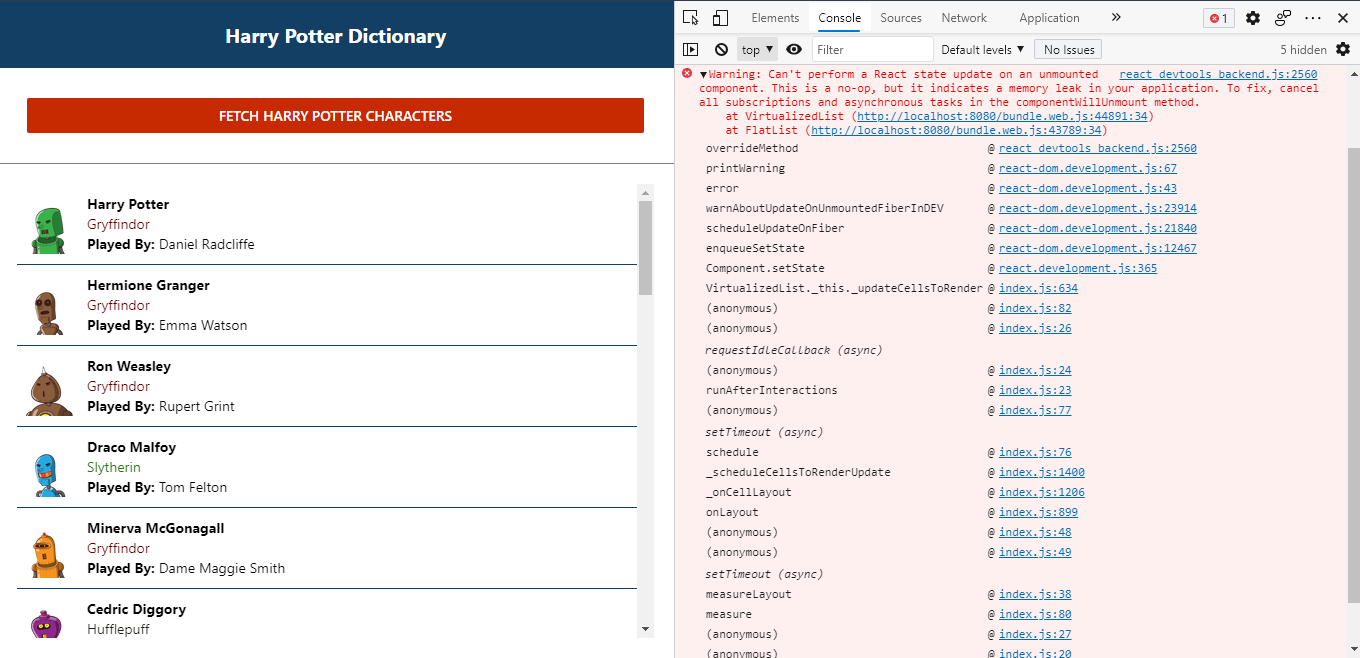
Now, whenever I change the Window size and Number of columns gets changed in FlatList. I get this error.

:warning: This issue is missing required fields. To avoid this issue being closed, please provide the required information as described in the ISSUE TEMPLATE.
![github-actions[bot] avatar](https://avatars.githubusercontent.com/in/15368?v=4 "Published by a pub.dev verified publisher")
@ShivamS136 You're probably getting that error because you're updating component state from useEffect. Instead of doing that, you should just create variables based on your props. If those variables update often, wrap them with useMemo.
There's no reason for you to trigger an extra render like that after prop changes happen. And if you do so after components have unmounted, you will get the issue you see in your logs.
At the very least, you should do this:
const isMounted = useRef(false)

useEffect(() => {
  isMounted.current = true

  return () => {
    isMounted.current = false
  }
}, [])

useEffect(() => {
  if (isMounted.current) {
    // all your state updating can go here
  }
}, [])
But I would still recommend refactoring your code to just generate the variables on the fly.
For example, here is your current code, which isn't efficient for performance, and will cause that error above:
const windowWidth = useWindowDimensions().width
const [multiProps, updateMultiProps] = useState({ key: 1 })
const numOfCols = windowWidth > 700 ? (windowWidth > 1100 ? 3 : 2) : 1

useEffect(() => {
  if (numOfCols > 1) {
    updateMultiProps({
      numColumns: numOfCols,
      columnWrapperStyle: styles.justifyContentSpaceBetween,
      key: numOfCols
    })
  } else {
    updateMultiProps({ key: 1 })
  }
}, [numOfCols])
Instead, write it like this:
const windowWidth = useWindowDimensions().width
const numOfCols = windowWidth > 700 ? (windowWidth > 1100 ? 3 : 2) : 1

return <FlatList
        data={memberList}
        renderItem={({item, index}) => <MemberItem item={item} key={index} />}
        keyExtractor={member => member.name.split(' ').join('')}
        key={numOfCols}
        columnWrapperStyle={numOfCols > 1 ? styles.justifyContentSpaceBetween : undefined}
        numColumns={numOfCols}
        ListEmptyComponent={
          <Text style={{textAlign: 'center', padding: 30}}>
            No Data: Click above button to fetch data
          </Text>
        }
      />
Much simpler, fewer renders, and your errors will go away.
