

 nebari-dev
[BUG] Available envs for dashboards is incorrect
OS system and architecture in which you are running QHub
GCP
Expected behavior
- all the envs should show up as options for deploying dashboards.
Actual behavior
I have a group env on https://quansight-beta.qhub.dev/ that I want to use as my dashboard env, but its not showing up in the list of available envs on the Create a new dashboard page. The environment does show up under store https://quansight-beta.qhub.dev/conda-store/environment/analyst/water_dashboards/
This is the same env that I have on https://quansight.qhub.dev/ as a user env and on that deployment, it does show up in the list of available envs when creating a new dashboard.
How to Reproduce the problem?
- conda-forge
dependencies:
- python
- pip
- jupyterlab
- pandas
- holoviews
- geopandas
- geoviews
- param
- panel
- rich
- cdsdashboards-singleuser >=0.5.6
- jupyter_bokeh
- pip:
  - noaa-coops
- ipykernel
name: water_dashboards
prefix: null
Command output
No response
Versions and dependencies used.
https://quansight-beta.qhub.dev/ - QHub v0.4.1 according to the screen https://quansight.qhub.dev/ - v0.0.1 according to the screen
Compute environment
No response
Integrations
No response
Anything else?
No response
@costrouc I think this should be part of the discussion over qhub/conda-store env management.

@iameskild, @viniciusdc, @costrouc, @dharhas, as I understand it, currently the only available envs for dashboards are the ones that are specified in the config.yaml -- it doesn't see the environments created using <qhub-url>/conda-store.
We had a dashboard notebook that was running in the "users/pangeo" environment, but to make a dashboard from it, we copied the environment.yml for that environment over to the config, and sure enough, it showed up on the picklist:
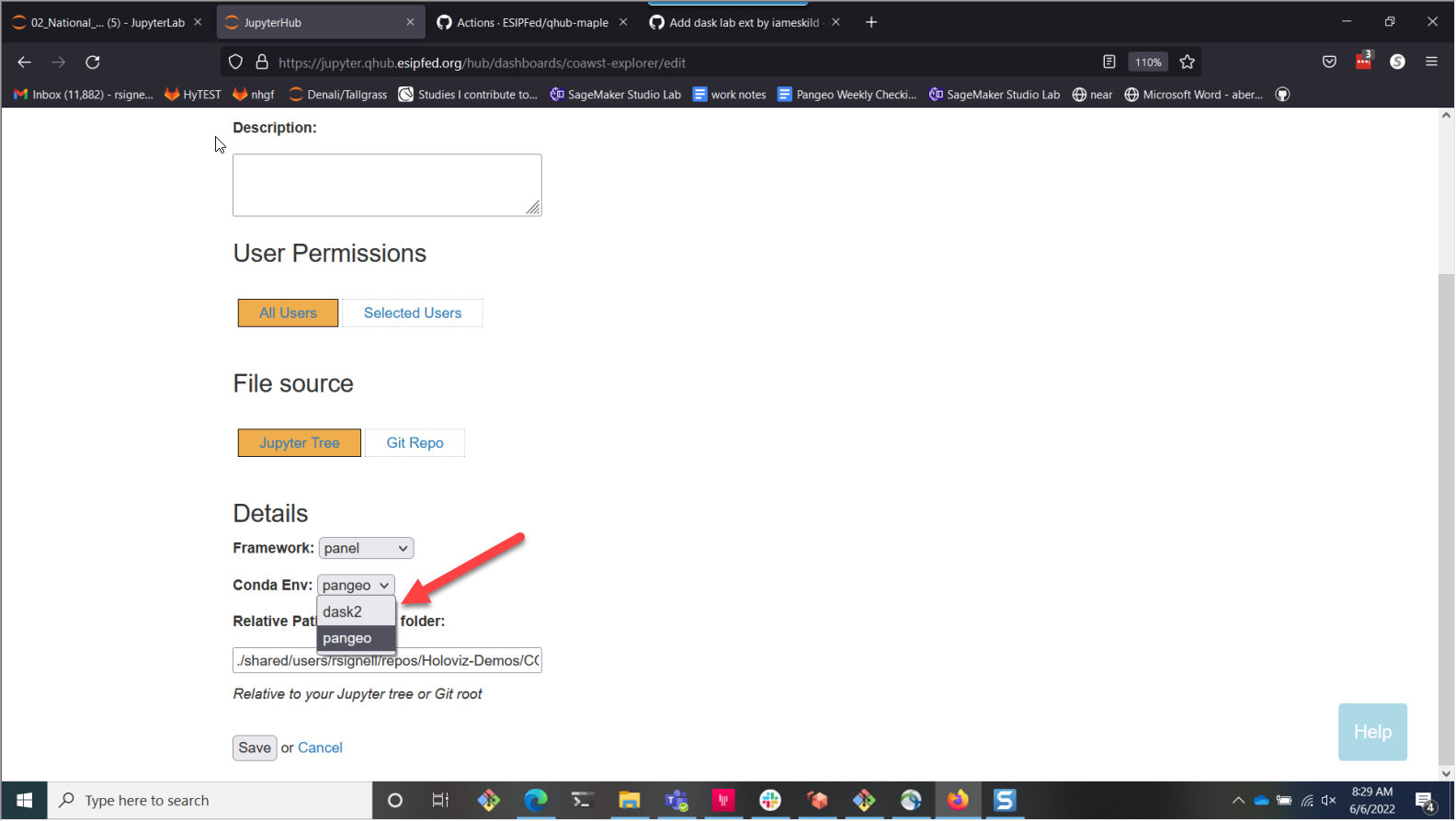
BUT.... that filesystem/pangeo environment didn't show up as available in JupyterLab:

Is that because the environment has the same name "pangeo"?

Also, while the environments show up in jupyterlab as users-pangeo (e.g. with the namespace), they don't show up that way in the dashboard gui, and they don't show up that way if you open a terminal. You just see the environment names without namespaces:
rsignell-usgs@jupyter-rsignell-2dusgs:~$ conda info -e

# conda environments:
#
dask2                    /home/conda/filesystem/envs/dask2
bitinfo                  /home/conda/users/envs/bitinfo
pangeo                   /home/conda/users/envs/pangeo
seppo                    /home/conda/users/envs/seppo
base                  *  /opt/conda
default                  /opt/conda/envs/default
This is all super confusing to me and likely other users.
@rsignell-usgs that is interesting! I wonder if conda-store recognizes that these are identical so saved itself the trouble? If you add another package to the pangeo env in the qhub-config.yaml would that force separation?
@kcpevey, as @rsignell-usgs pointed out, only conda-envs in the qhub-config.yaml appear in the env menu in CDS dashboards. This is definitely a limitation that needs to be addressed.

No conda-store does not recognize that they are the same. This is an issue with us not thinking through the implications of namespaces fully. Looks like on disk we are not using the namespace in the conda env names which means env name clashes are not only possible but actually fairly probably.


See https://github.com/Quansight/qhub/pull/1358 working on a fix. Currently my dilemma is the correct way to do this. Do I mount the pvc for conda-store or use the latest conda-store which does all of this with an api call.
