

 ndeadly
[Controller Request]: G910 Wireless Bluetooth Gamepad
Controller Name
G910 Wireless Bluetooth Gamepad
Current Controller Behaviour
Controller successfully pairs with the console and responds to inputs but control mapping is incorrect
Controller vendor and product ID
05ac:022c Gamepad
Supported Features
- [ ] Rumble/Vibration
- [ ] Motion Controls
- [ ] Player Number Indicator
- [ ] Battery Level Reporting
Input Report Format
L3 07 80 80 80 80 88 04 00 00 00 R3 07 80 80 80 80 88 20 00 00 00
Additional Details
Controller used to disconnect immediately after pairing, until I've tried this. Now all buttons work correctly except for the stick buttons (L3 and R3).

Where did you get the vendor and product ids from? I don't currently support this controller, so if any buttons are working at all it must be getting identified as something else. However, the ids you gave don't appear anywhere in my source code for other controllers, so I don't see how this would be possible.
Could you run my btdb app and show me what it reports for this controller?

That's the app I've used to get the vendor and ID. The controller is an old (~2013) X360 clone with a phone clip. Android games identify it as MOGA Pro in this mode (Home+X), but stick buttons don't work either.
I've typed the vendor id wrong, it's fixed now.
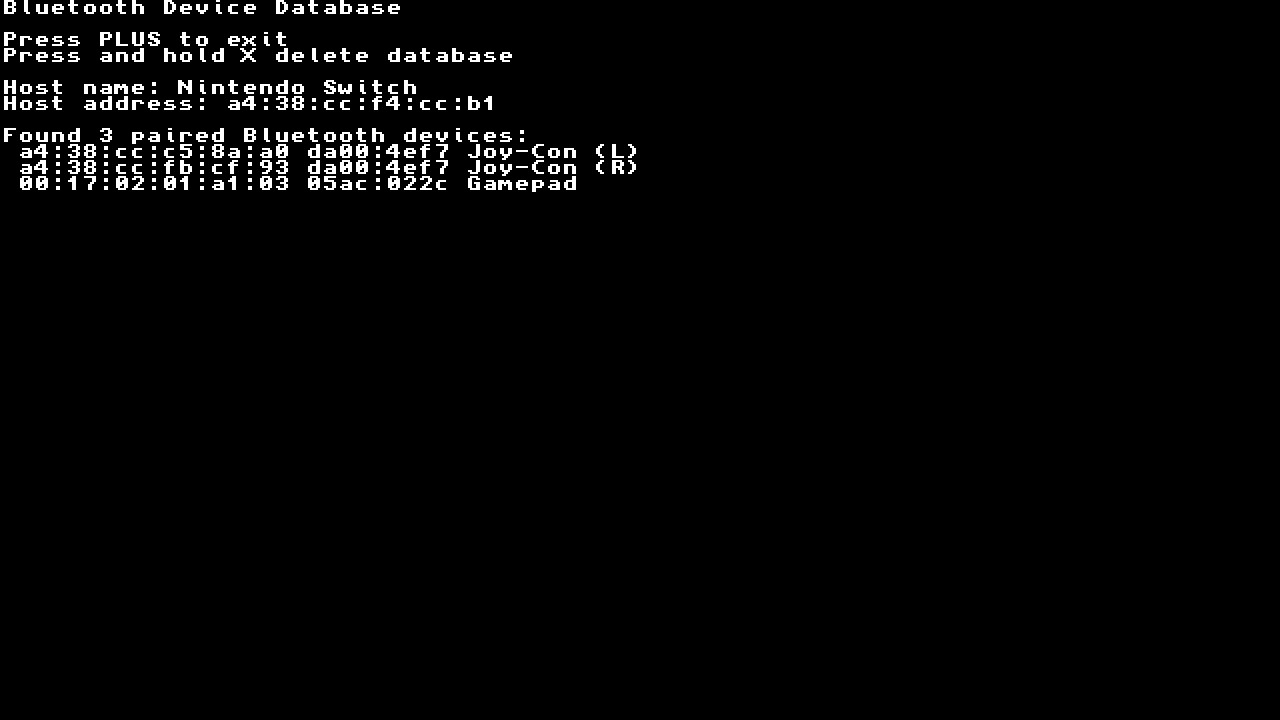
Well, the day has finally come where we have multiple controllers using the same Apple keyboard vendor/product IDs 🎉
https://github.com/ndeadly/MissionControl/blob/0ee33b355b2d8649dddcb754ca928d15778636de/mc_mitm/source/controllers/ipega_controller.hpp#L87
If you re-pair the controller in one of the alternate modes, does it report a different ID? This would be preferable to having to overhaul the ID based controller identification currently in place just to handle this edge case.
I've tried the other modes, two report the same ID, Y+Home doesn't pair at all. I erased paired controllers before trying each mode.
Looks like ipega PG-9017S doesn't have clickable sticks and L3 and R3 inputs on my controller don't overlap with it's other buttons.
You're right, seems like they stuck those buttons into some unused bits by the looks of things. I don't like it, but it's better than the alternative! I think we'll stick with having to use the settsi_disable.flag though.
Try this build and see if it works. MissionControl-0.6.4-g910-7e03082.zip
It works perfectly, thanks! Was puzzled why it stopped working completely after one of the updates.
Nice. I'll add it to the next update.
It stopped working after an update because I changed the default behaviour for allowing the console to send a vendor command (SetTsi) to unofficial controllers after finding that blocking this command can have adverse affects on wifi related features. Now I only block it when strictly necessary. The problem is that many controllers will crash/disconnect when receiving this command (the reason for blocking in the first place) and I don't own them all to test which ones are affected.
Sorry for reopening the issue, but in the newer version the triggers don't work for some reason. I don't use this controller very often so can't say the exact version that broke it. Triggers aren't analog btw. L2 07 80 80 80 80 88 00 01 00 00 R2 07 80 80 80 80 88 00 02 00 00