

 ndeadly
[Solved] icade controller pairing ,but need mapping !
hi , could you add icade controller please, it's appear to be pairing on the switch with your help , now it need a buttons/stick mapping on your code. info here : https://gbatemp.net/threads/missioncontrol-use-controllers-from-other-consoles-natively-via-bluetooth.572645/page-31 thanks in advance

I've created a handler using the info found here and checking the key values from my bluetooth keyboard. Hopefully my qwertz keyboard mapped to US layout hasn't messed anything up.
The only missing piece of information is the vid/pid of the device so I can assign the handler to the controller. Can you post a screenshot of the output of my btdb application?
I have no idea how arcade controllers usually map to controller button presses, or whether there's even any remotely standard layout. I just chose something that seemed reasonable, at least from the point of view of being intuitive enough that your brain doesn't explode trying to set up your own custom remappings in HOS. I am open to suggestions for improvement though if you have any arguments for a different set of defaults.
I'm not sure whether mapping the joystick to the dpad is the best choice either, I just did it because it was easiest for now. Once the handler has been confirmed as working as expected I'll happily switch it to map to the analog stick if that makes more sense.
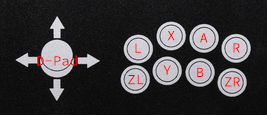

I think I managed to find the vid/pid online, so here's a build you can try. Please post the output of btdb still just so I can confirm.
MissionControl-0.4.1-icade-d9c6485.zip
i'm at work right now , i will test it asap at home. thanks a lot
De : ndeadly @.> Envoyé : dimanche 14 mars 2021 14:33 À : ndeadly/MissionControl @.> Cc : mitcha54 @.>; Author @.> Objet : Re: [ndeadly/MissionControl] icade controller pairing ,but need mapping ! (#211)
I think I managed to find the vid/pid online, so here's a build you can try. Please post the output of btdb still just so I can confirm.
MissionControl-0.4.1-icade-d9c6485.ziphttps://github.com/ndeadly/MissionControl/files/6136749/MissionControl-0.4.1-icade-d9c6485.zip
— You are receiving this because you authored the thread. Reply to this email directly, view it on GitHubhttps://github.com/ndeadly/MissionControl/issues/211#issuecomment-798907624, or unsubscribehttps://github.com/notifications/unsubscribe-auth/ATHAGIFHHYRM6AZQCJKD3V3TDS3MDANCNFSM4ZEQ3YNQ.
here is the btdb[url=https://ibb.co/p3XxtBW][img]https://i.ibb.co/XzJbhry/IMG-20210314-194337.jpg[/img][/url] the icade does not work with the github build , but the buttons are grey.
idk why , nothing works for now , the switch reconized the icade since it paired one's , but i do reboot the console multiple time and it still reconized. i read in one post, if we reboot/shut down ghe switch , the pairing method need to be REperformed.
edit : when in btdb app , i push some icade button and i have a message : device condition event (3times). no message when joycon's are pressed !
Grey buttons means that the vid/pid has been matched and the handler is being applied. If it's not working it either means I've done something wrong, or the controller isn't actually sending its inputs for some reason. Have you checked all the controls using the Test Input Devices menu?
no i don't , i'll try right now and edit this post edit : nothing , no input showing for the stick or buttons !
No need to to keep stating your intentions and then editing your posts, it's getting confusing. Just reply when you have something to report.
nothing , no input showing for the stick or buttons !
Hmm, that's not ideal. Try this build, it's possible there's a field for keyboard modifiers that's zero and causing my input processing loop to bail out early. This one just tries to map every byte as a button where possible. If this doesn't work then it would seem the controller isn't sending updates after connecting.
MissionControl-0.4.1-icade-ead0e7a.zip
this is VashTS from gbatemp - this version is working. buttons are mapped as indicated in this thread

Great! Sounds like my assumptions were right (or at least close) One more to try that should be more efficient if correct. MissionControl-0.4.1-icade-96c92f6.zip
Any comments/complaints about the default mapping I chose?
working well too , i'm playing capcom arcade statium (1943) ,changing the insert coin with (push R pad) to (press L trigger) in option.
for mario 3d world as expected he dosen't move , but he jump ;)
i will test more arcade games as this is what icade is about.
is it possible to do some hotkeys : like pressing simultanusly A+B to get the + (plus) Y+X to get - (minus) and home button if possible ?
for your mapping it's good to play shmups , beat'em all games , for fighting games it's another story ; fighting games most likely use the TOP buttons on the icade for PUNCH's (left button 1 = light punch , B2 = middle punch , B3 = hard punch for kick's you get the idea .
tell me when you want me to close the issue here
Would it make more sense to map the joystick to the analog stick so you can play other games? Or are there arcade games that exclusively use the dpad?
Yeah button combos would be possible, those ones you suggested aren't bad either. They should stack with the global combos too so with those added you could get home via X + Y + Down and capture via X + Y + Up
Yeah, I figure you're never going to find a mapping that suits all games, you're going to want to define some of your own remappings. But the default should at least make some sense to minimise the amount you need to change.
You can close the issue wherever you feel like it's working to your liking. It can always be reopened if any issues pop up.
thats nice, if you can add (plus , minus , home and screenshot ).
for arcade games i'm using retroarch and PFBA , but if you have time one day (take some rest) to change the dpad to analog , i will test it. i think it's a good idea
i just leave you my thought on the combinaison combo i suggested , it's not that good , the good idea is to make it hard to do, cuz some arcade games need to press 2 buttons, even 3 to get what you need in game (like super power , charging ect....)
so 4 buttons combo would be the best solution imho (L+R+A+left for example).
last build not working , it pair's but no botton/stick reconized and yes i rebbot the sxitch every time
i just leave you my thought on the combinaison combo i suggested , i's that good idea , the good idea is to make it hadrd to do, cuz some arcade games need to press 2 buttons even 3 , to get what you need in game (like supers power , charging ect....)
so 4 buttons combo would be the best solution imho (L+R+A+left for example).
Yeah this crossed my mind earlier too, which was why I didn't add combos myself without any input from someone who actually plays arcade games. What about something like ZL + ZR + L or R for minus or plus? Involving the stick would make it impossible to pull off the global combos.
same here - ead0e7a worked, this one does not. it syncs, but no controls
Hmm, maybe my updated version didn't actually work and I just forgot to save the changes. I'll revert to what we had before + the combos.
this combo is a good idea, i don't recall wich arcade game trigger someting with the 3 buttons pushed alone ( charging mode for fighting games for sure), but it can be remapped in game , and there are not so much games who can do this combo. so, let it be
Here's one with the changes reverted and the new combos mentioned above.
MissionControl-0.4.1-icade-1d4a466.zip
button's/stick works , but for the combo nothing, tested on home screen ,input device , in game.
forget to mention i testet zl+zr+L or R
sorry , but for now i can't test (me = sleep mode activated) , you can push your builds if you want , i will test tomorow.
Ahh right I see, combos can't be done the same way that I've been doing them with other controllers because of the way this controller works with sending only the pressed and released state. I think they're being set but then the state is instantly overwritten.
This one might work, at the expense of not being able to disable the individual buttons that make up the combo from being registered. MissionControl-0.4.1-icade-057e66d.zip
could it be possible to add the analog instead of dpad , before you push an update ? or you can do it later , just for testing who has better compatibility with games.
I think I will make the release with the dpad version so that I can get it out tonight. The analog stick stuff will still require some trial and error I think. I'll make a build when I have time and stick it in this thread for you to play with.
this is what i tought too, you did a great job, thank you. i will have a look at this page one time per day , take your time , you did the hard thing , the icade is on the list now. i guess icade's on ebay will be expensive from now lol.