

 ndeadly
Ouya Controller Support

Would be cool to use since it's pretty much laid out like a pro controller already.

Ooh now this is a controller I didn't even think of. I will have a look into its data report format tonight after work.

Here's a build I just knocked up with preliminary ouya support. No idea if it will work or not as I couldn't find much documentation on the data format besides this https://github.com/edmundmk/ouyacontrollerosx/blob/master/OUYAGameController/OUYAGameController.cpp
Let me know what works and what doesn't MissionControl-0.1.0-ouya-experimental.zip
Wow didn't expect to see this so quick, thank you!
ABXY, the sticks, stick button click L+R, and the D-pad are all correctly mapped.
R and ZR are inverted as is L and LR Ouya button(aka x-box/Ps home button) isn't registering any input Trackpad isn't responding(wasn't expecting it to work but thought I'll point out)
It'll be really great if home could be mapped to the ouya button and the LR and ZLZR could be changed then it'll good to call it 100% working and wistfully thinking something like track pad up for + and track pad down for - but I'm sure that'll be a little more difficult.
Oh cool, not bad for a first attempt. What do you mean by inverted here? I need to switch R <-> ZR and L <-> ZL? Or R <-> L and ZR <-> ZL?
Yeah I'm not doing anything with the trackpad at the moment. There's something labelled as centralpress and centralhold in that source I linked above. Can the trackpad be clicked like a ps4 controller, or do you think this is referring to the Ouya button you mention? I mapped home to centralhold, so if you hold something and it acts as the home button then we know what that means.
If the trackpad can be clicked, maybe we could use the click location to determine whether to send + or -. Thoughts?
Could you also test the controller with this, to make sure the sticks are behaving as you would expect and covering the full range of movement?
"R <-> ZR and L <-> ZL" is what needs to be switched.
The trackpad is touch only and cannot be pressed like a button.
Hmm centralpress and centralhold could both be referring to the ouya button possibly? Ouya button held down is for syncing and a single press acts like a home button on the original console and on steam and stuff.
Did the the controller stick test, both of the sticks have good movement and is responsive, half tilts and full tilts and angles are all looking good.
I don't know if it's somehow related at all but after loading the controller test up the Ouya button starting working as the home button.
Ahh ok. I think what I interpreted to mean (B)utton and (T)rigger actually meant (B)ottom and (T)op. See if this build fixes everything. I swapped the shoulder buttons and changed home from center hold to center press.
Can't think of any reason why running the controller test would affect the home button control. Maybe just placebo?
MissionControl-0.1.0-ouya-experimental.zip
Oh that must be it, it didn't seem like it was working because it was on held instead of press.
Tried the latest, shoulder buttons are flipped in the same way, no change
And this time Ouya button doesn't respond at all both pressed and held
Whattt? That makes no sense. Are you sure you didn't accidentally use the old .zip or something? Try this one, I switched them back again...
MissionControl-0.1.0-experimental.zip
Yeah that's what I thought too but they're different the ouya button reacts differently. However, the latest one works now and RL ZRZL are both in the right place and the ouya button also works as the home button.
That's so weird. I really don't understand what happened there. So everything works as expected with this version then?
Only other thing I've got to get figured out is the battery level reporting. But I might leave that for tomorrow. It's getting late here.
Yes everything works as expected in the latest version.
Oh ok so it wasn't my batteries then I did notice something was odd with the battery display.
Maybe if possible +- could be mapped to ouya button held or pressed which ever one that isn't used and the other button set to general trackpad touch. Either way thanks for all the support.
Can you post the .c/.h files you added so the ouya controller starts working? Just tought it might be interesting to take a look at them. Thanks in advance

@Reiism which battery display are you referring to? The one on the controllers screen? Or does the Ouya controller display the battery level itself? Also, does it have any concept of indicating the player number on the controller through LEDs or whatever?
@staringstar the changes have been pushed to the develop branch.
Battery display on the switch in the pairing menu, no the controller itself doesn't have a battery display. The controller shows the battery is full but if I take the same batteries out and put them in a wii remote it shows the gauge at half full.
Yes to the player indicator led, no to it displaying properly, it always shows the first light for player 1 slot whenever connected to the switch even when not connected in slot 1.
Yeah that sounds about right. I default to setting the battery as full until the controller reports otherwise. Currently the battery status report is ignored as I don't know the format. I have a tool for viewing the raw packets from the controller I'll try to recompile later and post here. Maybe you can help me decipher the battery value.
Hmm ok, the player led might have to wait. I haven't seen any info on how to set it. If you know of something let me know and I'll add it.
@Reiism I've made a special build of my hid_report_tool.nro posted in the other ouya issue (#42 ). This one filters everything except reports matching the ID of the ouya battery report. Run this and see if you get any output on the screen. To exit you need to use the home button on the joycon attached to the console.
The report should have the first byte 0x03 followed by the following structure
struct OuyaInputReport0x03 {
        uint8_t battery;
        uint8_t _unk[6];
 } __attribute__((packed));
I'm interested in how often this report gets sent, whether it can be triggered by un/plugging a charging cable etc. and whether the full 0-255 range of the uint8_t is used or not. Any info you can give is appreciated.
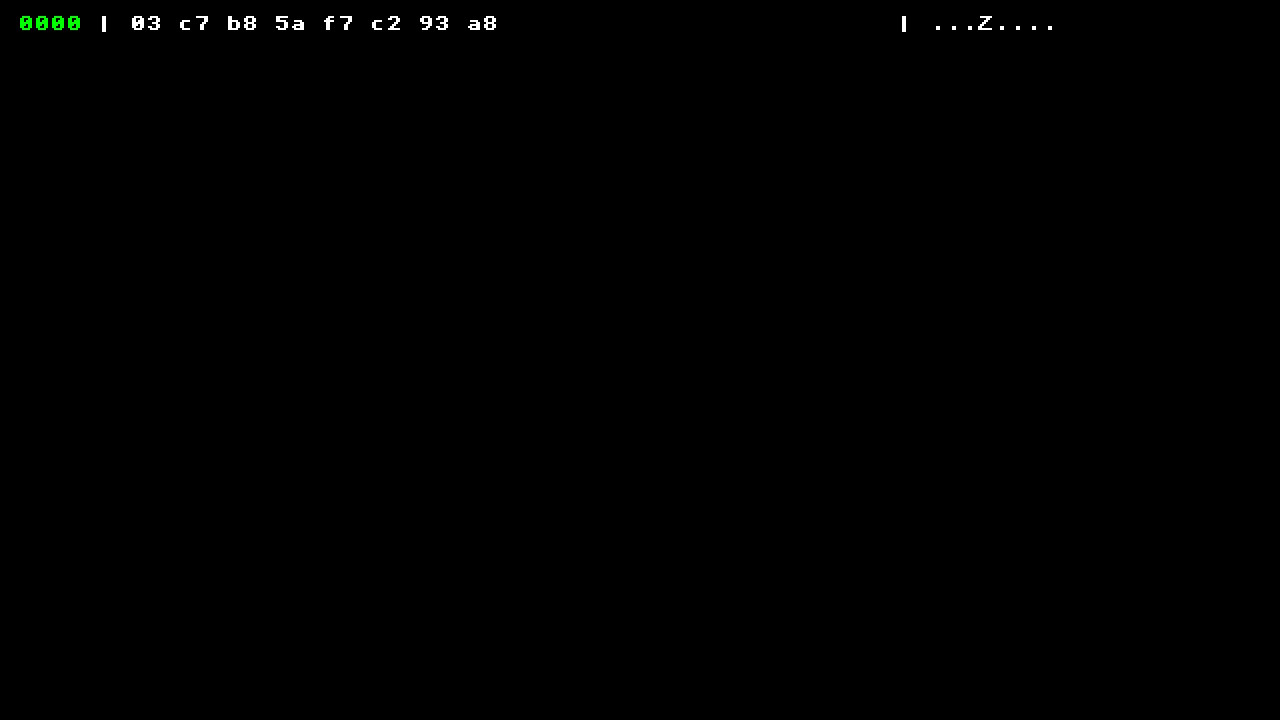
The only response I got was this, it's from turning the controller off then on again. Ouya controller is wireless so it doesn't have a charging cable or anything.
Oh, is the Ouya controller AA battery only? Maybe you could try inserting batteries with different charges eg. brand new, nearly empty etc. and see if that 0xc7 value changes accordingly.


Yeah AA battery only. The first posted unlabeled picture is from medium power battery and low and high is as shown.
Cool thanks. That value for a low battery seems kinda high. Maybe it's not linear. For now I'm going to assume that it uses the full 0-255 range linearly. Let me know how the battery indicator looks with this build.
MissionControl-0.1.0-ouya-battery.zip
Tried the new build with various power states, they're all reported as full battery by the controller.