
binja_explain_instruction
 binja_explain_instruction copied to clipboard
 nccgroup
A plugin that adds a popup window to Binary Ninja that explains in simple English what an assembly instruction does
binja_explain_instruction
This plugin adds a popup window to Binary Ninja that explains in simple English what an assembly instruction does.
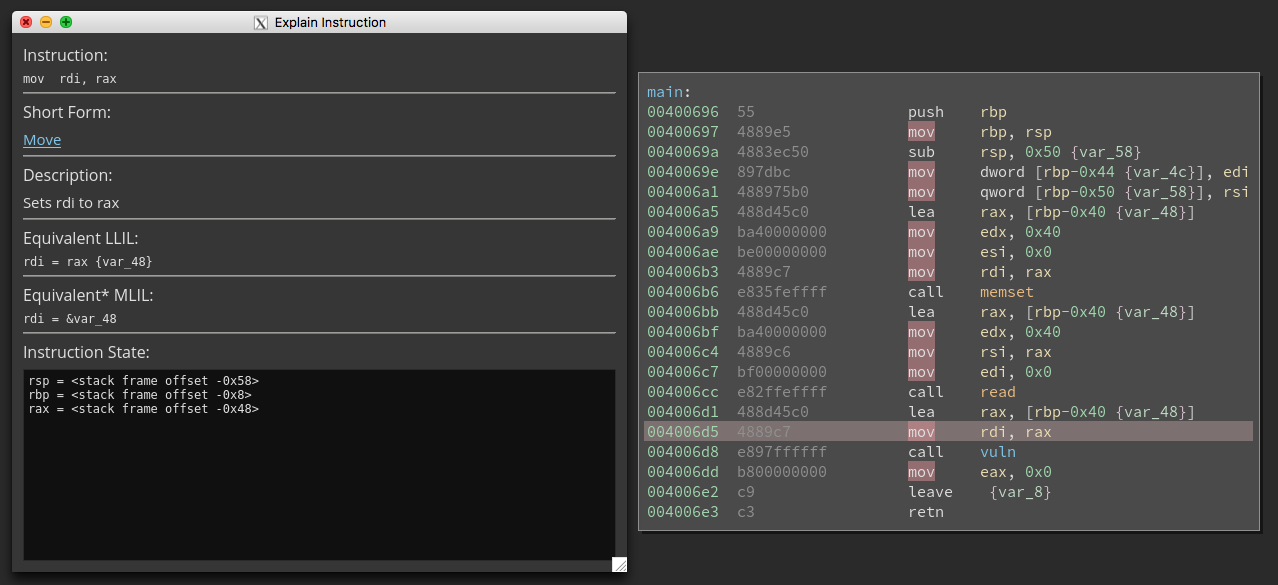
Read the Limitations section in detail before using this plugin, or you may find it confuses you more than it helps you.
Origins
This project is a product of NCC Group's 2017 summer internship program. Further updates will be tracked at https://github.com/ehennenfent/binja_explain_instruction. NCC Group is not responsible for any further changes made to the repository after August 18th, 2017.
Assumed Knowledge Level
The descriptions are intended to be simple enough for a novice to understand. However, there is some previous knowledge assumed, notably that the reader understands the concepts of a register, an instruction, the stack, CPU flags, etc. Consider taking a look at Beginners.re if you need help with the background.
Examples
The explanations are closer to English than the notation used in Binary Ninja, but may sometimes be strangely worded due to the fact that they are programmatically generated.
mov edx, 0x11
----
Sets edx to 0x11
movsx eax, al
----
Sets eax to (4 sign-extended bytes from al)
leave
----
Sets rsp to rbp
Sets rbp to the 8 bytes at the top of the stack, then increments the stack pointer by 8.
add dword [rbp-0x54], 0xa
----
Copies ((the 4 bytes of memory starting at (rbp + -0x54)) + 0xa) into memory at address (rbp + -0x54) (4 bytes)
Limitations
There are over 600 instructions in the current x86 instruction set alone. Rather than attempt to parse them all, the explanations here are generated by reading the corresponding Binary Ninja Low-Level Intermediate Language, which operates at a higher level. Unfortunately, the LLIL does not support corresponding operations for the entire x86 instruction set. A small portion of the x86 instructions with no LLIL equivalent have been added, but nowhere near enough to cover the entire instruction set. This project will aid beginners in understanding what common instructions do, and will hopefully help with some of the "What on earth does that instruction do?" moments, but will certainly not be able to replace consulting the documentation.
For most instructions, this plugin parses the Low-Level IL that you may be used to seeing in the interface (accessed via the i hotkey). However, for some instructions, no Low-Level IL equivalent is available. In those cases, we instead use the Lifted IL (Options > Other IL Forms > Lifted IL), which is a less complicated form of the Low-Level Intermediate Language that corresponds more closely to the assembly instructions. See the IL Manifest for more details.
The Low-Level IL occasionally uses temporary flags and registers to abstract application flow. This plugin takes steps to eliminate these from the explanations as much as possible. The measures taken are documented in the IL Manifest.
On occasion, certain assembly instructions may correspond to multiple LLIL instructions (or vice versa), which may require consulting the LLIL view in order to understand what the explanation means. Additionally, in order to retrieve all the LLIL instructions corresponding to an assembly instruction, we need to iterate over all the instructions in the function. This may cause a temporary slowdown on large functions, depending on how fast your computer is.
Since this project is based on the Low-Level intermediate language, it may provide useful results on architectures other than x86. Rudimentary documentation has been added for MIPS, MSP430, UAL (ARM32 and Thumb-2), ARM64, and 6502. However, these architectures have not been subject to as much testing as x86 - indeed, many of them are completely untested, and thus unlikely to meet any reasonable standard of completeness. Pull requests to improve support for additional architectures are very welcome!
The Medium Level IL functions at a significantly higher level than the Lifted IL, which means that each MLIL instruction is typically the product of several LLIL instructions. The "equivalent" MLIL for an instruction is displayed when available, as it is particularly helpful for understanding what parameters are passed to a function, but don't assume a 1-to-1 equivalency between the MLIL and the assembly. Use it for a helpful cross reference, or consult the MLIL view for a high-level overview of the entire program.
This plugin has only been tested on 64-bit Ubuntu 16.04. However, since it does not rely on any strictly os-dependent code, it will likely work on other platforms.
Installation
If available, this plugin uses PyQt5 to display the explanation window. If no working PyQt5 installation is found, it will fall back to using the show_message_box feature of the Binary Ninja API, which displays a window that behaves more or less the same, but is not resizable, and blocks any other interaction with Binary Ninja.
- [Optional]: Install PyQt5 for your platform (
apt install python-pyqt5on Ubuntu. For other platforms, see this guide.) - Clone this repository into your Binary Ninja Plugins Folder
Contributing
This plugin is designed to make it simple to add support for new LLIL instructions or additional architectures. See CONTRIBUTING.md. If you come across any inaccuracies, feel free to file a pull request or create an issue.
Open Source
This plugin incorporates code by Ryan Stortz (@withzombies) that is used to display information about the CPU state before the selected instruction is executed. See instruction_state.py
Dependencies
- PyQt5 [Optional]
- Binary Ninja
 nccgroup