

 nbsp-team
minSdkVersion is now 19
I note that minSdkVersion for version 1.9 is now 19. The minSdkVersion for my project is 16, so there's now a conflict. I assume the change up to 19 was necessary?

Check my contribution Require API 16 and Android 10 Support
https://github.com/arteaprogramar/Android_MaterialFilePicker

@arteaprogramar looks interesting! For convenience, I'm trying to load this library in using jitpack.io using:
repositories {
    maven {
        url "https://jitpack.io"
    }
    google()
}

implementation "com.github.arteaprogramar:MaterialFilePicker:1666064"
Gradle syncs OK (the above library is apparently found OK). But then in the code when I try to use new MaterialFilePicker() , the library is not being picked up... it is still suggesting only the "official" com.nbsp.materialfilepicker, despite me removing that completely from the gradle file and cleaning project, rebuilding etc. I should be able to import using something like:
import com.github.arteaprogramar.materialfilepicker.MaterialFilePicker;
But for some reason com.github.arteaprogramar isn't recognised. I have another library imported via jitpack so it does/should work.
-
I recommend that you download the repository manually: Material File Picker Unofficial
-
Unzip the archive
-
Copy and paste "library" folder to root path of your project
-
You can change the name of the library (optional)
-
Edit
settings.gradleand and "library" folderinclude ':app', ':library' -
Edit
app/build.gradleand also add library for compiledependencies { . . . implementation project(':library') . . . } -
Now just sync gradle
Will do that, but any idea why the jitpack method doesn't work with your library? It is far more convenient just putting one extra line into the gradle file...
@arteaprogramar any thoughts? As I said, it's a lot more convenient for devs to use your library if it is easy to include in their project... not only when first adding it but also to keep it updated each time you make changes. Making it accessible via the jitpack.io method will be really useful IMHO.
Maybe the error is because I have "gradle" configured as the original project
I fix It!!
Ready!! Read the documentation and if you need help you can consult us https://github.com/arteaprogramar/Android_MaterialFilePicker
Great! I won't be able to try it for a few days but will be sure to after that! Thanks.
@arteaprogramar I still cannot get it to work.
What version are you using in implementation 'com.github.arteaprogramar:MaterialFilePicker:version' in the gradle?
I think it would be better to have an actual release to refer to, but you have none:
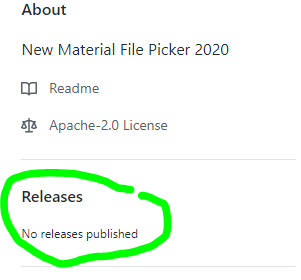
See: https://jitpack.io/#arteaprogramar/MaterialFilePicker
And in the code file, what import statement do you have at the top? For me it cannot find anything starting with import com.github.arteaprogramar.*
@drmrbrewer use implementation 'com.github.arteaprogramar:Android_MaterialFilePicker:edfbf32f54'
https://jitpack.io/#arteaprogramar/Android_MaterialFilePicker/edfbf32f54
Then I just see the following suggestion that there is a newer version available:

Seems to me that the versioning is all a bit messed up.
This https://jitpack.io/#arteaprogramar/Android_MaterialFilePicker/edfbf32f54 is last version.
Jitpack is crazy!!!
I believe that.
Hello!! Now avaible for Jcenter
implementation 'arte.programar:materialfile:1.0'