

 nbgallery
ipyparams.notebook_name does not every time
First of all, great job!
I want to use ipyparams.notebook_name to get the name of my notebook. I found out that it works when the URL looks like this
https://your.jupyter.server/awsome_notebook.ipynb?foo=bar&baz=1
but it does not when the URL looks like this:
https://your.jupyter.server/awsome_notebook.ipynb
Is there any way to get around this?
Thank you!

When I first installed ipyparams, .notebook_name worked. I have just restarted the Jupyter server, now it does not work at all, even when I have query string after the main url.


some more data points:
- it doesn't work for me when running the notebook via, "restart the kernel and run all cells"
- it doesn't work for me when, from a fresh notebook, running "restart the kernel and clear all outputs" and then running the cell [that uses
ipyparams.notebook_name]. but running the cell a second time in a row right away does work.

@micahjsmith,
I have found the exact same issue. I have just started running a Python course where I wrote a function with ipyparams to allow users to automatically submit their notebooks to me by running the function at the end of their notebook.
Several users have contacted me regarding an error that results when they use the "double triangle button" to restart and run all cells. I was baffled but, after an hour of troubleshooting, I found that ipyparams cannot find the notebook path (and thus also the notebook name) when the notebook was run with this command. Instead, only the path to the workbook parent directory is returned, not the path to the .ipynb file.
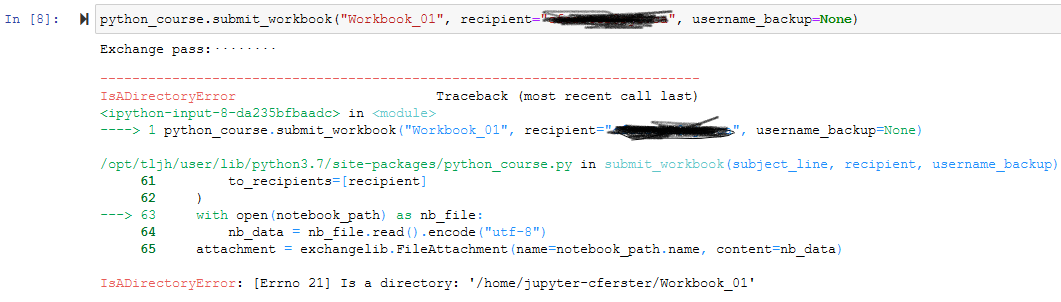
To fix: I just asked the class to use the "Round arrow restart button" and then run their cells "manually" using <shift>+<enter>. When cells are run that way, then ipyparams finds the notebook file name/path and everything works.

When I run Jupyter-lab locally (inside a poetry env) I get this error for notebook_name
Javascript Error: Can't find variable: Jupyter


You could use https://github.com/msm1089/ipynbname. This is confirmed working with Jupyter Hub. I have not checked but it could be the ipyparams uses JavaScript, which is not reliable for getting the name.