

 nativescript-community
Floating button - possible to show font-icon instead of image?
hi @msaelices @NathanWalker
- Android
- emulator
I am using nativescript-material-floatingactionbutton v3.2.19
floating button works but is there any support for font-icon in src? in the documentation its mentioned that, it supports only image as icon.
MDFloatingActionButton (tap)="fabTap()" text="" rippleColor="#f1f1f1" class="fas fab-button" ></MDFloatingActionButton>
.fab-button { height: 40; width: 40; margin: 15; color: #fff !important; background-color: coral; font-size: 9; horizontal-align: right; vertical-align: bottom; }
.fas { font-family: 'fa-solid-900'; font-weight: 900; }

Same for the bottom navigation, I want to use a font icon for the icons but you can't, if you use it as the text you get the issue that you can't set the class on the component.

@aaitken80 @svmashok not supported yet. The way i do it is to use as MDButton as a floatingbutton You can see an example here https://github.com/nativescript-community/ui-material-components/blob/master/demo-vue/app/examples/Buttons.vue#L43
I will need to add this. Sorry i did not do it as i would never use it as it is "slow" (creating a image to apply).
But i will think about it, PR are welcom if you want to have a look at it

@aaitken80 @svmashok,
You can try to add a font-icon to the tab from the ts file.
this.homeTab.icon = ImageSource.fromFontIconCodeSync("\uf015", new Font("Font-Awesome", 48, FontStyle.NORMAL, FontWeight.NORMAL), new Color("white")); this.homeTab.title = this.homeTitle;

I'm successfully using it with fontawesome and https://github.com/Akylas/nativescript-fonticon
<MDFloatingActionButton class="fa floating-action-button"
         :text="'fa-arrow-right' | fonticon"
         rippleColor="#C81F41"
         @tap="goToSelectPlayers"
 />
Just can't change the font color. Apart from that it seems to be working.

@MrSnoozles can you show an example with color? and does it not work on both platforms?
@farfromrefug I changed MDFloatingActionButton to MDButton because the font color works with MDButton.
color didn't work on both Android and iOS with MDFloatingActionButton. I tried setting the color both via XML and via CSS.
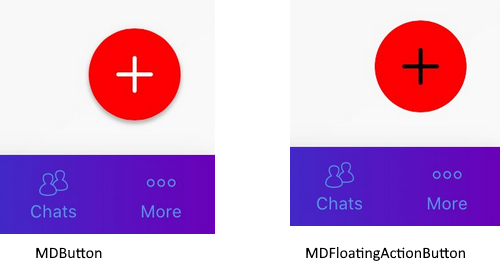
@MrSnoozles Thanks but would be nice to share some code for me to be able to fix it for floating action button
Ah sorry, misunderstood somehow. Here's the file in an example repository: https://github.com/MrSnoozles/nsc-fab-color-bug/blob/master/app/components/Home.vue#L25
The color is set to red but the font icon still appears in white (tested on Android with this repository, tested on both platforms with another repository)
It was no problem however solving it using MDButton.
I think it's a problem with Theme.MaterialComponents since it also affected another FloatingActionButton plugin I was using before coming here.
@MrSnoozles thanks for the hint to use MDButton instead.
What is even the difference between MDFloatingActionButton and MDButton when using a font-icon other than border-radius: 50% on the former?

Using an MDButton as floating action button with font-icon works fine with border-radius: 50% on Android, but not on iOS.
@ray007 what does that mean ? please when you report an issue give details.
It was a very weird render, but I think I just fixed it by changing the border-radius from 50% to the correct pixel-value.