

 naoufal
google pay does not work on device
Hi everyone.
I installed and run library on android emulator and real device with the following code:
METHOD_DATA = [{
    supportedMethods: ['android-pay'],
    data: {
      supportedNetworks: ['visa', 'mastercard', 'amex'],
      currencyCode: 'TRY',
      environment: 'TEST', // defaults to production
      paymentMethodTokenizationParameters: {
        tokenizationType: 'GATEWAY_TOKEN',
        parameters: {
          gateway: 'braintree',
          publicKey: 'PUBLIC KEY FROM BRAINTREE',
        }
      }
    }
  }];

  DETAILS = {
    id: 'basic-example',
    displayItems: [
      {
        label: 'Movie Ticket',
        amount: { currency: 'TRY', value: '1.00' }
      }
    ],
    total: {
      label: 'Merchant Name',
      amount: { currency: 'TRY', value: '1.00' }
    }
  };

  paymentRequest = new PaymentRequest(this.METHOD_DATA, this.DETAILS);

  openPay = () => {
    this.paymentRequest.show()
      .then(paymentResponse => {
        // Your payment processing code goes here
        console.log('paymentResponse', paymentResponse);
        //return processPayment(paymentResponse);
      })
      .catch(err => {
        this.paymentRequest.abort();
        console.log('Payment Error:', err);
      });
  }
I got this screen:

and when I tried to install google pay from play store I got:
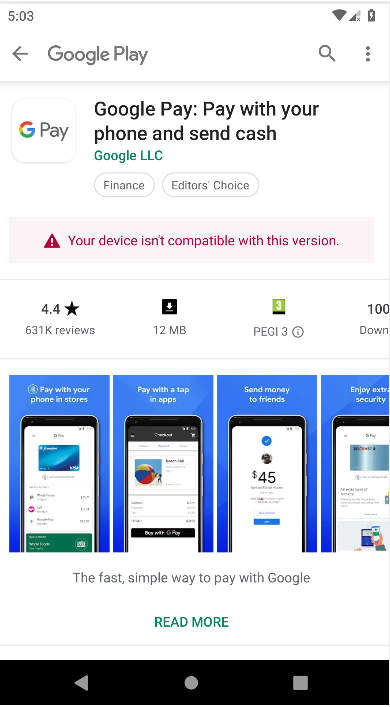
I checked google pay requirements and it supports my country (TR) and androids over 5.0 so I should be able to install it but no chance so far. p.s. I am new to payment systems and need to get mobile payments with credit card inside my app. Besides stripe and braintree is not working in my country <Turkey>. So any advice is appreciated. Thanks for this great library btw.


@afacar It's time for you to purchase a new device which is compatible with google pay and then set up your Google Pay

@afacar I am also facing same issue, did you found any solution?
