nannou

nannou copied to clipboard
 nannou-org
Creating Texture in update() does not work
use nannou::prelude::*;
use nannou::image::RgbImage;
use nannou::image::DynamicImage;

fn main() {
    nannou::app(model).update(update).run();
}

struct Model {
    window_id: window::Id,
    texture: wgpu::Texture,
    texture2: wgpu::Texture,
}

fn model(app: &App) -> Model {
    let window_id = app.new_window().size(512, 512).view(view).build().unwrap();

    // Load the image from disk and upload it to a GPU texture.
    let assets = app.assets_path().unwrap();
    let texture = wgpu::Texture::from_image(app, &DynamicImage::ImageRgb8(RgbImage::from_raw(100, 100, vec![120; 30000]).unwrap()));
    let texture2 = wgpu::Texture::from_image(app, &DynamicImage::ImageRgb8(RgbImage::from_raw(100, 100, vec![1; 30000]).unwrap()));

    Model { window_id, texture, texture2 }
}

fn update(app: &App, model: &mut Model, update: Update) {

    model.texture = wgpu::Texture::from_image(app, &DynamicImage::ImageRgb8(RgbImage::from_raw(100, 100, vec![120; 30000]).unwrap()));
    model.texture2 = wgpu::Texture::from_image(app, &DynamicImage::ImageRgb8(RgbImage::from_raw(100, 100, vec![1; 30000]).unwrap()));
}


// Draw the state of your `Model` into the given `Frame` here.
fn view(app: &App, model: &Model, frame: Frame) {
    frame.clear(DIMGRAY);
    let window = app.window(model.window_id).unwrap();
    let win_rect = window.rect();
    let draw = app.draw();

    // Generate a spiral for the path to follow.
    // Modulate the frequency of the spiral with a wave over time.
    let wave = (app.time * 0.125).cos();
    let freq = map_range(wave, -1.0, 1.0, 2.0, 20.0);
    let spiral_side = win_rect.w().min(win_rect.h()) * 0.5;
    let points = (0..spiral_side as u32).map(|i| {
        let phase = i as f32 / spiral_side;
        let mag = phase;
        let x = (phase * freq * PI * 2.0).sin();
        let y = (phase * freq * PI * 2.0).cos();
        let point = pt2(x, y) * mag;
        // Retrieve the texture points based on the position of the spiral.
        let tex_coords = [x * 0.5 + 0.5, 1.0 - (point.y * 0.5 + 0.5)];
        (point, tex_coords)
    });

    // Scale the points up to half the window size.
    draw.scale(spiral_side)
        .path()
        .stroke()
        .weight(0.9 / freq)
        .points_textured(&model.texture, points)
        .rotate(app.time * 0.25);

    draw.scale(spiral_side)
        .path()
        .stroke()
        .weight(0.9 / freq)
        .points_textured(&model.texture2, vec![([1.0, 1.0], [1.0, 1.0]), ([-1.0, -1.0], [1.0, 1.0])])
        .rotate(app.time * 0.25);

    // Draw to the frame!
    draw.to_frame(app, &frame).unwrap();
}
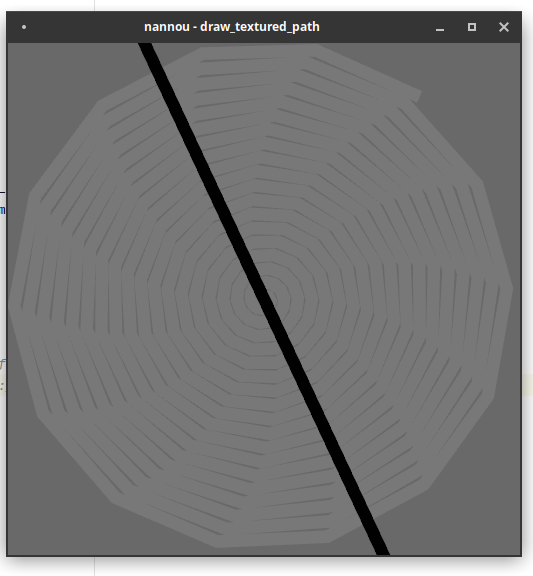
To reproduce, comment / uncomment the lines in update where the model's textures are updated. This should always produce a grey spiral and a black line, however when textures are created in update() - the black texture is ... lost?
Actual:
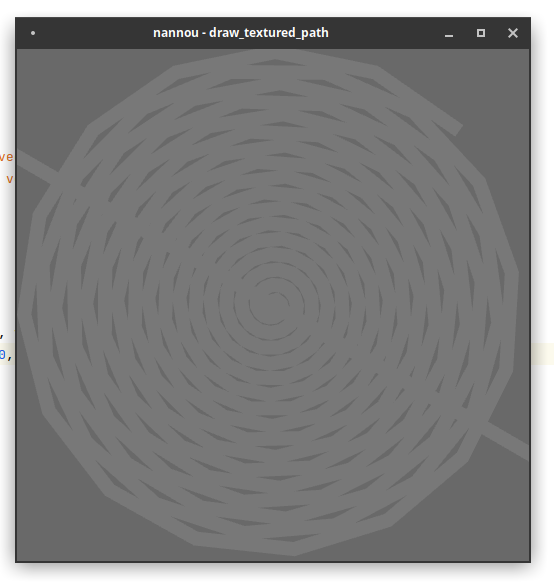
Expected: