
react-datasheet
 react-datasheet copied to clipboard
 nadbm
nadbm
Auto select cell even when the mouse is not click
Below steps leads to unexpected behavior:
- Mouse click on any cell
- Release the mouse
- Move the mouse to hover other cells
- The application will automatically select those hover cell
Codesandbox: https://4jdit.csb.app
Code:
import React, { useState } from "react";
import ReactDataSheet from "react-datasheet";
import "react-datasheet/lib/react-datasheet.css";

export interface GridElement extends ReactDataSheet.Cell<GridElement> {
  value: number | string | null;
}

class MyReactDataSheet extends ReactDataSheet<GridElement> {}

interface MyGridType {
  value: number | string | null;
}

interface Props {}

export const Test: React.FC<Props> = () => {
  const [selected, setSelected] = useState<ReactDataSheet.Selection | null>(
    null
  );

  const [myGrid, setMyGrid] = useState<MyGridType[][]>([
    [
      { value: "" },
      { value: "A" },
      { value: "B" },
      { value: "C" },
      { value: "D" }
    ],
    [{ value: 1 }, { value: 1 }, { value: 3 }, { value: 3 }, { value: 3 }],
    [{ value: 2 }, { value: 2 }, { value: 4 }, { value: 4 }, { value: 4 }],
    [{ value: 3 }, { value: 1 }, { value: 3 }, { value: 3 }, { value: 3 }],
    [{ value: 4 }, { value: 2 }, { value: 4 }, { value: 4 }, { value: 4 }]
  ]);

  const cellRenderer: ReactDataSheet.CellRenderer<GridElement> = props => {
    const backgroundStyle =
      props.cell.value && props.cell.value < 0 ? { color: "red" } : undefined;
    return (
      <td
        style={backgroundStyle}
        onMouseDown={props.onMouseDown}
        onMouseOver={props.onMouseOver}
        onDoubleClick={props.onDoubleClick}
        className={props.className}
      >
        {props.children}
      </td>
    );
  };

  return (
    <MyReactDataSheet
      data={myGrid}
      valueRenderer={cell => cell.value}
      onCellsChanged={changes => {
        const grid = myGrid.map(row => [...row]);
        changes.forEach(({ cell, row, col, value }) => {
          grid[row][col] = { ...grid[row][col], value };
        });
        setMyGrid(grid);
      }}
      cellRenderer={cellRenderer}
      selected={selected}
      onSelect={({ start, end }) => {
        setSelected({ start, end });
      }}
    />
  );
};

sorry @xihaoxiaohao I missed this. You forgot to pass "onMouseUp" to the <td>

Hi @nadbm thanks for replying. I don't see the props has onMouseUp event.
Even after I add onMouseUp={props.onMouseUp} to <td>, it doesn't solve the problem.
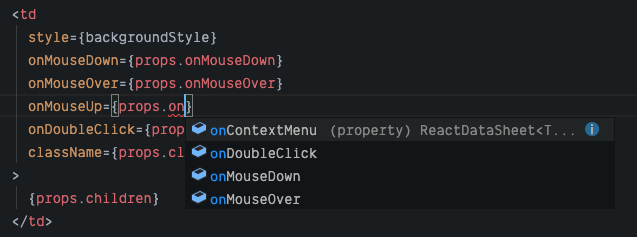
hmm, I'm not exactly sure what is going on, I will get back to you soon. In the meantime could you try not using a custom cell renderer and if the problem still arises?
Having the same issue with custom sheetRenderer. When sheetRenderer removed - everythig works fine.
sheetRenderer = (props) => {
        return (
            <table className={props.className} id="reactDatasheet" style={{ width: this.getTableWidth(props.data) }}>
                <thead>
                    <tr>
                        {this.getHeaders(props.data)} //getting list of <th>
                    </tr>
                </thead>
                <tbody>
                    {props.children}
                </tbody>
                </table>
        );
    }

@Tatabakbak I can't reproduce this with sheetRenderer.
It's working fine with this example below.
const sheetRenderer: ReactDataSheet.SheetRenderer<GridElement> = props => {
    return (
      <table className={props.className + ' my-awesome-extra-class'}>
        <thead>
          <tr>
            <th className='action-cell' />
          </tr>
        </thead>
        <tbody>
          {props.children}
        </tbody>
      </table>
    );
  }

  return (
    <MyReactDataSheet
      data={myGrid}
      sheetRenderer={sheetRenderer}
      valueRenderer={cell => cell.value}
    />
  );

The problem was in my code - replacing sheetRenderer={(props) => this.sheetRenderer(props)} with sheetRenderer={this.sheetRenderer} solved the problem.
I reproduced this issue (what @xihaoxiaohao is saying) on version 1.4.4. I'm trying to investigate it to give more details or maybe to create a PR fo it.
