myrho
myrho
How can I run this project
I try to run this project
I run elm-reactor and open http://localhost:8000/index.html
I get 2 error in developer console
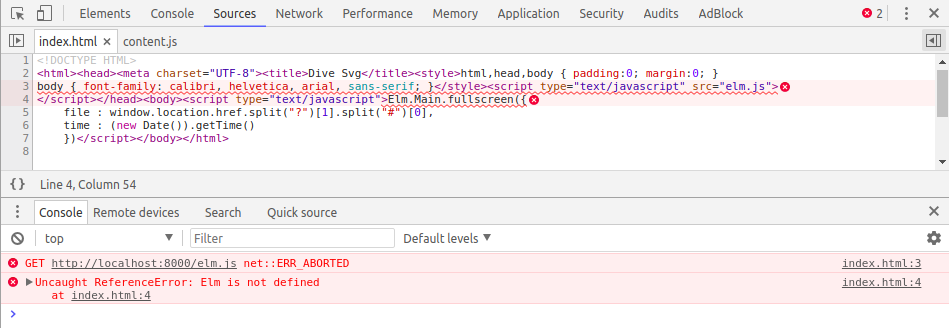
I'm not sure I missing to do some step or not


Build the project as per the instructions in the Readme. Note that elm-install below is elm-github-install, which you can search for and install following the instructions in its Readme.
elm-install
elm make src/Main.elm --output elm.js
Then set up an HTTP server to serve up the directory where index.html is. I suggest using pythons simple http server for this:
python -m SimpleHTTPServer
Now you can use that and pass in the path to one of the samples through the URL. Try opening this URL in your browser:
http://localhost:8000/?samples/demo.svg
===
P.S. I am using this at work to give presentations, as I currently make a lot of diagrams in Inkscape. I usually run it through the online demo, but handy to be able to run it as above in situations where I am offline. Great piece of code thanks for writing @myrho.