



MuYu
Is there any update for this issue? Using reflection is a bit slow for me. If nobody handles it, I can try it. BTW, does this project need to add...
其实 [有 types 字段](https://unpkg.com/browse/[email protected]/package.json),[类型文件也在](https://unpkg.com/browse/[email protected]/declaration/src/index.d.ts),只是这里 `types` 的路径有点问题,少了一个 `src` 吧。 这个锅应该是 `pri` 来背?
有个问题比较奇怪,为啥 `src` 里面的文件叫 `index.tsx` ? :doge:
Just pass the binary data of pdf to the write method, works fine on my printer "Mi All-in-One Laser Printer K200 [0984]". ```golang package main import ( "fmt" "os" "strings"...
title 一共被渲染了三次,多余的两次渲染都是因为 serRef/children 变化导致。 如果不考虑实现与功能,多余的两次渲染是 rc-virtual-list 引起的。 [示例代码](https://stackblitz.com/edit/react-ts-rkktcy?file=App.tsx) 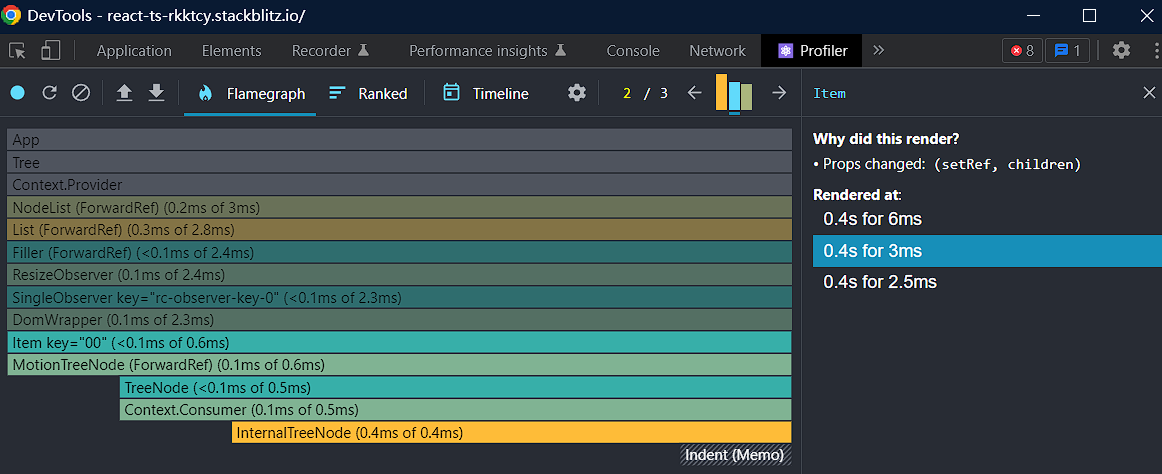 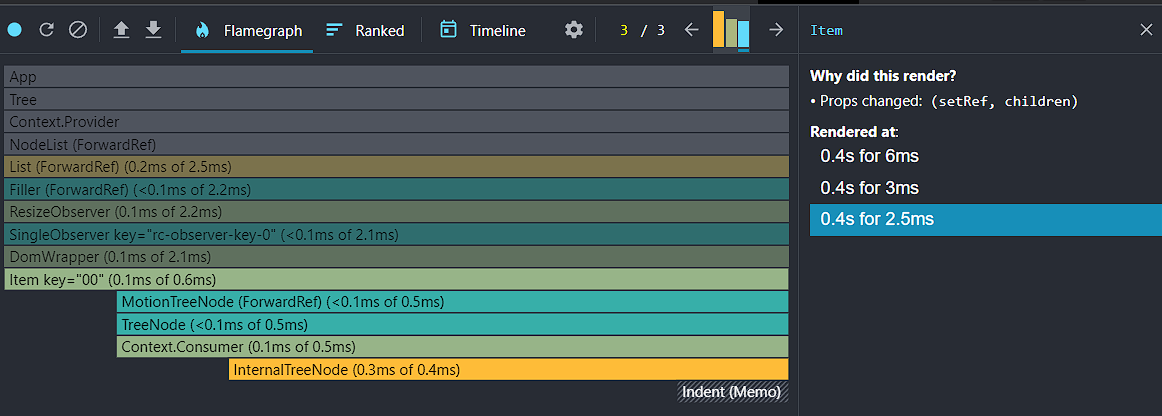 可以从上图中看出,多余渲染的原因是一系列对 resize 的监听操作引起,第一次渲染引起了高度变化,导致了后续两次 "多余" 的渲染。 不过更为尴尬的是,上述示例代码中设置了 virtual false,也会出现一样的问题。 ---- 顺着线索,来看下 rc-virtual-list 的实现。 先看下这个 Filter 的多余渲染是否合理 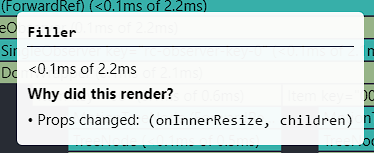 [Filter 中 onInnerResize 参数的来源](https://github.com/react-component/virtual-list/blob/d2bc79268e0573321f5f8651260e79cedcdb5176/src/List.tsx#L351-L359)...
书接上回 [当我们改进上面提到的部分后](https://stackblitz.com/edit/react-ts-ddbaee),会发现还是有一次额外的渲染 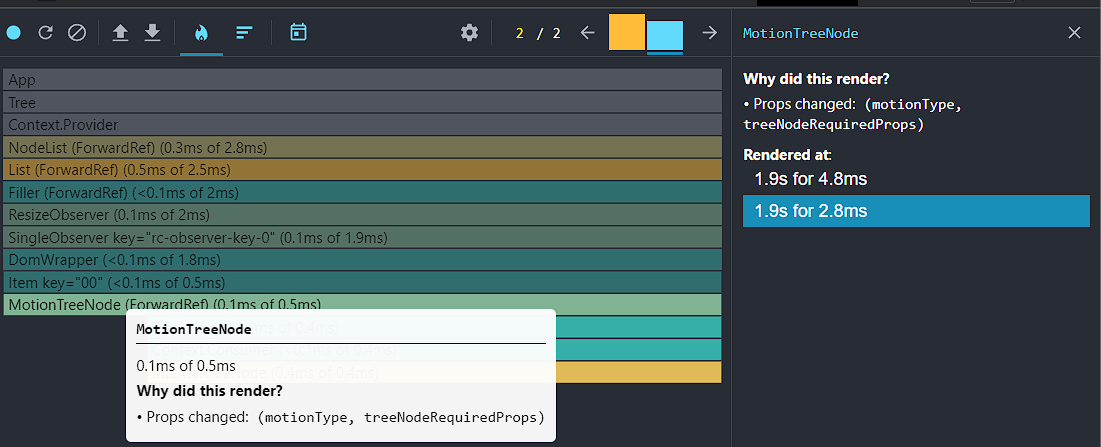 treeNodeRequiredProps 比较好处理,[只是每次创建了一个新对象](https://github.com/react-component/tree/blob/e2da1ce6cdf62bb685254865364f3fec4ed56651/src/NodeList.tsx#L257-L267),简单用 useMemo 包裹一下就能解决。 但 motionType 的问题就比较复杂,需要看一下它为什么会产生变化。 [查阅 rc-tree 中 NodeList 的实现](https://github.com/react-component/tree/blob/e2da1ce6cdf62bb685254865364f3fec4ed56651/src/NodeList.tsx#L202-L246),可以看到是 expandedKeys 变化导致了 motionType 从 null 变成了 show。 [接下来看一下 MotionTreeNode 中是怎么消费 motionType 的](https://github.com/react-component/tree/blob/e2da1ce6cdf62bb685254865364f3fec4ed56651/src/MotionTreeNode.tsx#L67-L73),可以看到对 motionType 有依赖的两个属性 motionAppear/visible,只在...
/ping @afc163 @zombieJ 这个 PR 上还有啥欠缺的东西吗?
https://stackblitz.com/edit/react-lplqxp?file=demo.tsx 感受不到掉帧,开到 100 数据每页也没有掉帧(显示器 60 帧) 阴影可能只是最后一根稻草?性能问题可能是别的东西导致
 [Profile-antd table 1.json.zip](https://github.com/ant-design/ant-design/files/10046365/Profile-antd.table.1.json.zip) 几乎不能复现问题,仅有少数几帧出现了掉帧,大部分时候每帧都是在 16.7ms 内完成渲染的,M1 mbp,外接 4K 显示器  mbp 2015 的核显应该是 Intel® Iris® Pro Graphics 5200 这类,或许是什么硬件加速没有在这个硬件上启用? 可以在这里看看是不是有什么被关闭了 chrome://gpu/
TL;DR You can use rate like this, ``, the performance will be much better. ---- Maybe the performance problem is not caused by rate component. [Let's take a look at...