

 musescore
MuseHub Helper Service will not start after moving installation from C: drive[MU4 Issue]
Describe the bug
After moving the install from the C: drive to
To Reproduce Steps to reproduce the behavior:
- Go to 'Settings'->'Apps'->'Muse Hub'
- Click on 'Move'
- Select desired drive and click on 'Move'
- After move completes, launch Muse Hub
- Muse Hub Helper Service is not running
Expected behavior Functional Muse Hub window
Screenshots
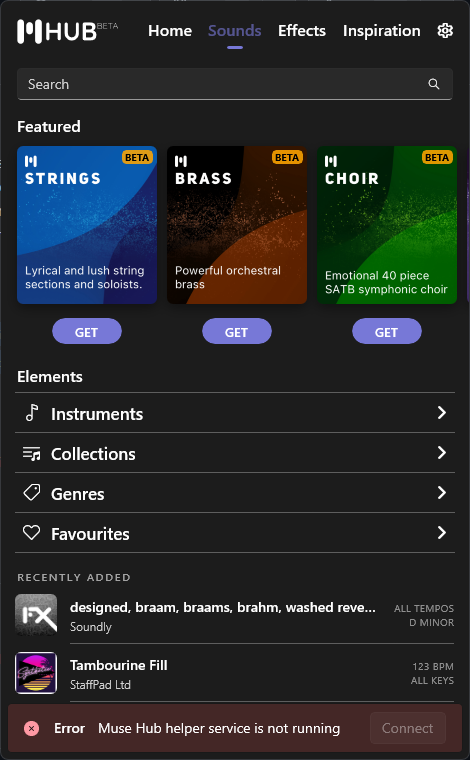 If applicable, add screenshots to help explain your problem.
Platform information
- OS: Windows 10 Enterprise v 21H2
Additional context Add any other context about the problem here.

Unable to repro at the moment (Windows just throws a generic error, so I cannot even move the app), but if this is happening (and the registry keys are not being updated), most likely a bug in Windows itself.
Have you tried restarting your PC to see if that fixes it? Windows could be waiting for an opportunity to finish servicing the package on startup.

Tried manually changing registry entries, same result with or without restart. Also in the registry, manually changed the service 'start' type from 'disabled' to 'automatic'. and restarted windows. Still no luck. At this point was able to issue 'start' command from services app, but still no joy. Is there a 'set-up' or 'settings' file that is involved in the startup that could be issuing a wrong location? Seems to me this whole problem could be avoided by allowing the user to choose the install location initially.
Hmm, unfortunate. I'm not too sure. The installation is all handled by Windows (The Muse Hub exe simply wraps around a MSIX package). Definitely seems like a bug within Windows / the MSIX framework.
Just to check that nothing else broke, if you uninstall and reinstall Muse Hub (which will place it back on the C drive), does everything work correctly? (Service starting, app launching, etc.)
I don't think there is a way to easily install the app to a custom location, but you can change the default locations where apps are installed on Windows: https://pureinfotech.com/change-default-windows-10-apps-games-install-location/
Yes, uninstalling and reinstalling results in application functioning normally.
Just out of curiosity, do Linux and MacOS users get to choose where to install?
Thanks for the tip regarding changing the default windows app install location. I wasn't aware of that feature. After changing the default location as above, Muse Hub installs on my applications drive, but it still installs MuseScore4 on the C drive, and no provision is made on the settings page to change that. My solution was to download the MuseScore4 installer and do it myself. Of course, after doing so, Muse Hub can't find the MuseScore4 installation, so it is unable to launch it or keep it up to date. Ultimately that makes the Muse Hub installation useless. I think this 'Hub' idea is a good one, but not well implemented at this point.
Within the Muse Hub settings file C:\ProgramData\MuseHub\Settings.json there is an ApplicationInstallLocation but this is not exposed to the UI by default (and not much testing has gone into changing this location, so may break things, or not work).
Although taking a quick look, only Audacity currently respects this setting, MuseScore4 still installs to the C drive.
Muse Hub in theory should recognise that MuseScore is installed (and will also update it, but on the top of my head, it may update it to C drive), but it won't be able to launch it. This is due to some technical limitations in Windows (there is no easy way to determine where an application is installed). I can detect that an application is installed fairly easy, but where it is, could be anyones guess.
So I make a few educated guesses where MuseScore (or Audacity) could be installed, then I actually check the start menu shortcuts for valid links. It's a mess, but works for most people. One situation that doesn't currently work, is custom installs to other disk locations.
Might work on a future feature where you can manually specify where applications are installed if Hub cannot find them. Cannot comment on how long that would take though.
Muse Hub issues are now being handled elsewhere, so will be closed here. If this issue is still valid, please raise it here. You can link to this GitHub issue if it provides useful context or discussion.
