

 musescore
Musescore does not detect already installed sounds after an app reset in Windows settings.
Describe the bug After I reset the app in windows settings to fix an issue I faced, Musescore no longer detects my already installed sounds. I reset the app as when I tried installing new sounds, it would say ''Unable to resume download, please try again later.''. The reset fixed that issue, and I can now install new sounds. The sounds I had downloaded before also show as being present. Though in practice, in Musescore, only the newly installed sounds after the reset are shown and I am unable to download the ones that were there before as Musehub sees them as downloaded. As well as that, I'd rather not reinstall everything as I am on a data budget and wasting another 10GB is not in my interest.
To Reproduce Steps to reproduce the behaviour:
- Start the download of 2 Musesounds, pause 1 and let the other finish downloading.
- Restart Windows.
- Paused Musesound is now stuck in ''Unable to resume download, please try again later.''.
- Go to Windows 11 settings, Apps, Installed Apps, MuseHub, Advanced Options, and Reset.
- This fixed the ''Unable to resume download, please try again later.'', but now there is the issue that is in the description.
Expected behaviour After the reset, I expected it to either delete all data including Musesounds and make me redownload them, though I hoped it would just keep them and detect the ones that are actually downloaded and leave behind the bricked downloads. Neither of those happened, instead the opposite, I am able to download new Musesounds but the existing ones I had are now bricked.
Screenshots
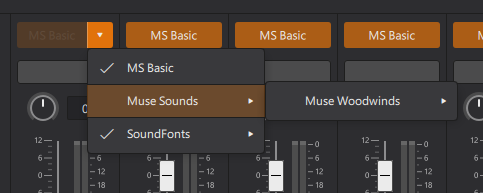
Musesounds Keys - Downloaded previously, now not detected by Musescore.


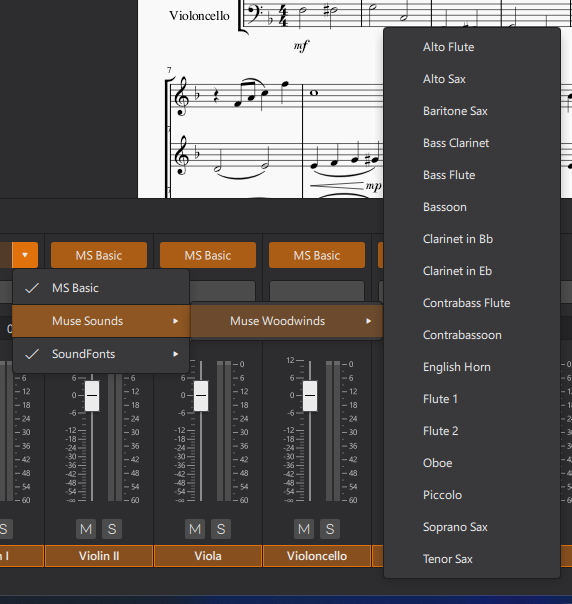
 Musesounds Woodwinds - Downloaded after reset, works fine.

Platform information
- OS: Windows 11

I guess what I am asking for is an automatic detection of already downloaded sounds by Musescore, instead of a file that contains data about what Musesounds have been downloaded previously or however way it works.
So Muse Hub still recognises that you have installed the sounds (or at least it pretends to), but MuseScore not anymore, right?

So Muse Hub still recognises that you have installed the sounds (or at least it pretends to), but MuseScore not anymore, right?
Correct.
Can you do the following: (1) quit Muse Hub (2) go into Windows Services, and quit the "Muse Hub" service (3) go into the directory where you are downloading Muse Sounds, and delete the ".dlcache" file (4) restart the service, then start Muse Hub
Then redownload the packages you want. The parts of the files you have already downloaded should not be redownloaded, so this should not use extra bandwidth.
After this, the packages should be available in MuseScore. Let me know if this solves the problem; we'll get this more stable in the Hub as well so you don't have to jump through these hoops. We're looking into how to handle this "App Reset" better internally.

That worked perfectly. Though you must redownload the packaged one by one, the first time Musesounds Keys got stuck and just wouldn't finish so I redid the process, redownloaded one by one and everything is fine now. Thank you very much for your time, I appreciate your work!
For anyone facing this issue on Linux, I had to use the appImage version of MuseScore4 instead. the sounds are downloaded after having installed and run MuseHub using the deb file provided. The Flatpak doesn't seem to be able to recognise the sounds.
