
MuseScore
 MuseScore copied to clipboard
 musescore
[notation issue] courtesy time signatures not disappearing when unneeded
Describe the bug Extra time signatures can appear in the middle of a page if that time sig used to be at the start of a new page with a courtesy but after it changes to the middle of the page because of a layout change, the courtesy does not always automatically disappear.
To Reproduce
- make a time sig at the start of a page (defauted to courtesy enabled)
- do something to move that bar to the middle of a page
- see the courtesy could still be right beside the time signature
Expected behavior Courtesy time signatures would disappear if that bar is moved to the middle of a page.
Screenshots
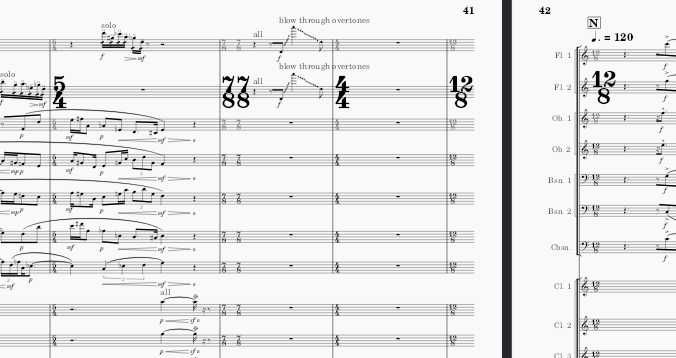
the 7/8 bar used to be at the start of a page, but now it is not
Platform information windows
Additional context It is very easy to manually fix by clicking the disable courtesy button but then if the bar gets moved again to the start of a page, it will have to be manually enabled again which is easy to miss or forget about. It would not be a big problem to most people but when there are hundreds of bars and many time signatures per page, it is time consuming to fix all of them. The mistakes could be hard to find if the number size is not made extra large to show repetitions.

The most annoying thing about fixing it is that removing an extra courtesy on an early page could free enough space to add another bar to that page, but then the rest of the pages now have a different layout because they have different bars, which can cause more unneeded courtesy time sigs to be there in the middle of pages, so it can cause a chain reaction that has to be slowly fixed one at a time.
https://user-images.githubusercontent.com/120861729/208294650-6257cf17-1ae7-4236-abbb-346a2ed47bdf.mp4
this is what happens to those time signatures when courtesy is toggled
I couldn't reproduce this on a new score so far. Could you maybe upload the score where this happens so that we can investigate?
Or do you know whether there are additional steps to reproduce this on a new score?

The scores with the problem were already fixed and I do not know how to break the courtesy again but if I see it, I will post it.
I found another file where this happened and saved that bar:
time sig courtesy mid page.zip
and there is a weird looking beam on that bar for unknown reasons
I thought the weird beam would be fixed by https://github.com/musescore/MuseScore/pull/15155 but apparently not; I have added this case as an additional required fix.

I finally think I managed to reproduce this:
- Create new score
- Add time sig in bar 2
- Add line break before bar 2
- Change scale of the courtesy time sig
- Save the file → The courtesy time sig is now written explicitly in the previous bar in the MSCX file (normally it isn't)
- Reopen the file
- Remove the line break → The issue occurs
When resetting the scale, re-adding the line break, then re-saving/closing-reopening, and removing the line break again, the issue does not fix itself.
@Vykoiazon Does this seem right? Is this approximately what you did to get into this situation?
This was only a 2 staff score so there was no reason to change the scale of the signature here but it still happened.
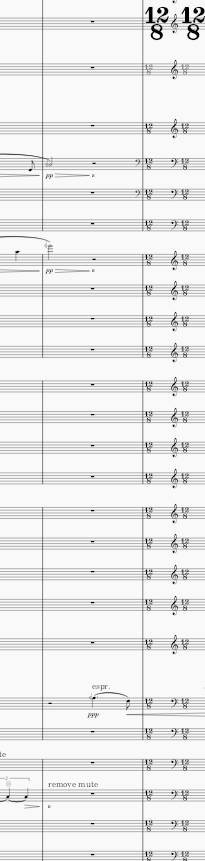 that time the default clef was also duplicated between the time signatures for unknown reasons
Closing as incorporated into https://github.com/musescore/MuseScore/issues/16814