

 musescore
Muse Hub installer gives error
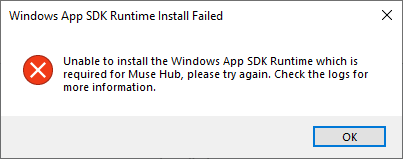
Describe the bug I downloaded the installer from here.. I use Windows 10 so I clicked the Windows download button. After the installer had downloaded, I opened it up and waited until the installer downloads the files. After waiting for the installer to finish, I got an error message saying "Windows App SDK Runtime Install Failed", and the description said "Unable to install the Windows App SDK Runtime which is required for Muse Hub, please try again. Check the logs for more information.".
To Reproduce Steps to reproduce the behavior:
- Open Muse Hub installer
- Recieve crash message
Expected Behavior It should download the files and open Muse Hub as normal.
Platform Information
- OS: Windows 10 Pro
- System type: 64-bit operating system, x64-based processor

Can you let me know which version of Windows you are using? Go to the start/search menu, then "about your pc", and then go to "version" and "OS build" and let me know those numbers?


I'm also getting this issue on Windows 11 ( version 22000.1219). Found the log file in appdata, here it is for your reference. Please let me know if there's sensitive information here that I shouldn't be sharing. Installer.log

What happens if you run the Windows App SDK installer manually?
https://aka.ms/windowsappsdk/1.1/1.1.5/windowsappruntimeinstall-x64.exe

What happens if you run the Windows App SDK installer manually?
https://aka.ms/windowsappsdk/1.1/1.1.5/windowsappruntimeinstall-x64.exe
Sorry for the late reply. I tried this, and got this error message.
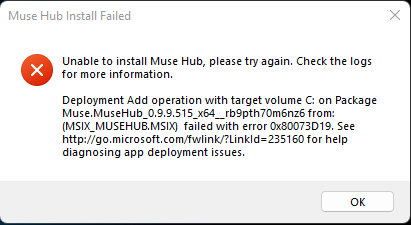
The error code given seems to be this one:

So probably caused by me trying to open MuseScore as administrator while logged into a standard account.
I then logged into my administrator account. Muse Hub opened fine and I was able to install Musescore 4. Now that I've done that, I can use Muse Hub from a standard account (after giving the admin password first). But it would be nice to be able to open it for the first time on a standard account.
But it does look like installing the Windows App SDK manually solved the earlier issue I was having.
I have this same issue, but installing the windows app runtime does not work. When running from administrator powershell, I get:
PS C:\Users\otto\Downloads> & '.\WindowsAppRuntimeInstall(2).exe'
Installing license: MSIX_MAINPACKAGE_LICENSE
Install result : 0x8004e103 One or more install operations failed. Result: 0x8004e103
I'm on OS build 19045.2364, windows 10

@OttoKaaij
Haven't come across that error before, have you tried restarting your PC and trying again?
@DominicMaas
I've restarted my PC, I've updated to a newer version of windows 10, I've redownloaded everything and run again. I've run MuseHub and the installer as admin and as normal user.
I ran from powershell to see the error. If I just normally run it, a cmd prompt shows up for a very brief second and then closes again. I think this is mostly an 'app sdk' (whatever that is) problem, and not a musescore problem, but when I and google for the windows app sdk I get a bunch of visual studio results I don't understand.
@OttoKaaij You're correct, this is not a MuseScore nor a Muse Hub error, but an error of a Muse Hub dependency. I'm working on not needing to install this in a future update.
Just ran that installer with Admin rights and voila. I hope that helps. Win 10 Home.

@iamtesch
I am sorry for the very late reply, but the version is 22H2 while the OS Build is 19045.2364.
The Windows App SDK Runtime is now bundled with Muse Hub itself (so it no longer needs to be installed). Please try the latest version of Muse Hub from https://www.musehub.com/
@DominicMaas
I tried to run the installer and waited for 10-20 minutes but instead of the expected error message, It instead just kept continuously downloading. I ended the task with the task manager and then re-opened it. It then showed the text at the bottom that said "Installing dependencies...", so I got my hopes up until it crashed the very next second.
@gameringguy1
Can you try running this manually and trying again: https://dotnet.microsoft.com/en-us/download/dotnet/thank-you/runtime-desktop-6.0.13-windows-x64-installer
Also can you pleaser send over a copy of your installer logs? They can be located at: %temp%\Muse Installer Temp
Is there a possible fix if i have custom windows build with any microsoft store apps and update center diasbled?
I have this error.
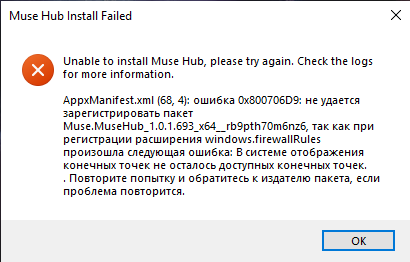 And after pressing OK buttons it opens this log:
|LOG|: [.NET Runtime] Checking to see if .NET Desktop Runtime 6.0.9 is installed... |LOG|: [Resource Extractor] Attempting to extract EXE_NETCORECHECK to a temporary location (C:\windows\temp\Muse Installer Temp\EXE_NETCORECHECK.EXE)... |LOG|: [Process Runner] Executed "C:\windows\temp\Muse Installer Temp\EXE_NETCORECHECK.EXE": Success! |LOG|: [.NET Runtime] .NET Desktop Runtime 6.0.9 is installed! |LOG|: [MSIX] Found Microsoft.VCLibs.140.00.UWPDesktop_8wekyb3d8bbwe. Version: 14.0.30704.0 |LOG|: Installing dependencies... |LOG|: Installing Muse Hub... |LOG|: [Resource Extractor] Attempting to extract MSIX_MUSEHUB to a temporary location (C:\windows\temp\Muse Installer Temp\MSIX_MUSEHUB.MSIX)... |LOG|: [Package Add] Preparing to add package for the current user |LOG|: [Package Add] Failed to add package for current user! Error: AppxManifest.xml (68, 4): |ERROR|: Muse Hub Install Failed - Reason: Unable to install Muse Hub, please try again. Check the logs for more information.
AppxManifest.xml (68, 4):

@BibaSenpai What version of Windows are you running? That area in the AppxManifest sets up the firewall rules, which is very unusual....
Can you attempt to install hub again, and when the error box is open, click on it, hit Ctrl+C, and then paste the content here?
@DominicMaas Thanks for the reply! The version i have has basically cutted out Windows Firewall aside of update service and Metro apps, it's not even in options screen, so it probably should cause troubles in such instances then. Here's the content from an error box:
Muse Hub Install Failed
Unable to install Muse Hub, please try again. Check the logs for more information.
AppxManifest.xml (68, 4): ошибка 0x800706D9: не удается зарегистрировать пакет Muse.MuseHub_1.0.1.693_x64__rb9pth70m6nz6, так как при регистрации расширения windows.firewallRules произошла следующая ошибка: В системе отображения конечных точек не осталось доступных конечных точек.
. Повторите попытку и обратитесь к издателю пакета, если проблема повторится.
ОК
@DominicMaas Is it possible to instal the app on another pc and just copy all the files and let it update if something is missing? Please point out what directories i should copy if yes.
Closing due to inactivity. If there is still an issue with MuseHub feel free to open a new issue.

(Addition: Muse Hub issues should nowadays be logged at https://musehub.zendesk.com/ rather than here on GitHub)
