

 musescore
[MU4 Issue] Muse Hub won't install on Windows
Describe the bug First time I downloaded the Muse Hub installer, it showed up the installation mini-window, then disappeared, but it did not install the program. After the initial attempt, every time I try running the installer it instead throws out this error message:
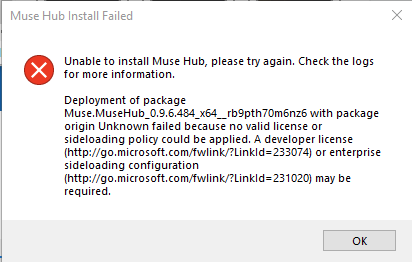
"Unable to install Muse Hub, please try again. Check the logs for more information.
Deployment of package Muse.MuseHub_0.9.6.484_x64__rb9pth70m6nz6 with package origin Unknown failed because no valid license or sideloading policy could be applied. A developer license (http://go.microsoft.com/fwlink/?LinkId=233074) or enterprise sideloading configuration (http://go.microsoft.com/fwlink/?LinkId=231020) may be required."
To Reproduce Steps to reproduce the behavior:
- Download the Windows .zip package for the Muse Hub beta installer
- Run the Muse Hub.exe application
- See error
Expected behavior I expected the installer to install the Muse Hub application without issue.
Screenshots
Platform information
- OS: Microsoft Windows 10 Home
- Version: 10.0.19045 Build 19045
Additional context I had previously used the MS4 Alpha 2 program, but made sure to uninstall it before trying out the Beta. I also still have MS3 installed. Installing just the MS4 Beta seperately without Muse Hub works just fine.
The issue also persists regardless of the hard drive it's on, or how many times I attempt to run the installer.
I'm not very tech-savvy, so if this error is a result of ignorance from my part, I apologize!

Experiencing the same issue! Running Microsoft Windows 11 Home, on version 10.0.22000 Build 22000. Similarly I have MuseScore 3 installed and the standalone beta download for MuseScore 4 works just fine. (No MS4 alpha builds were installed)

having same issue on OS Name Microsoft Windows 11 Home Version 10.0.22621 Build 22621

This is something that should have been resolved with a build released over the weekend; can you verify if this is still an issue or if it is resolved?

Just a ping here to see if the latest version of Muse Hub works for @directormusic , @sillsdog or @petrichxrr ?

Hey there,
All seems to be working well with the latest version. Sorry for a late reply!
Best regards
I have this issue with the latest version.
MuseHub used to work, then this issue started occurring. I uninstalled and reinstalled it for the same results.

@TheVanadium Can you focus on the dialog when it appears (click on it), and copy and paste the contents here (just hit Ctrl+C, it's a hidden feature in Windows that dialogs can be copied)
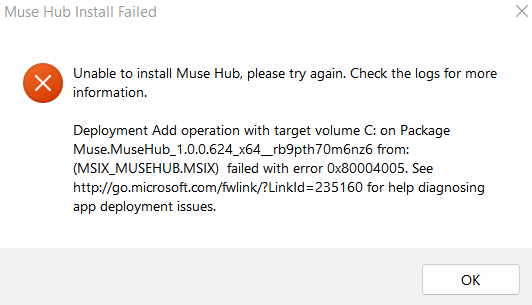
Muse Hub Install Failed
Unable to install Muse Hub, please try again. Check the logs for more information.
Deployment Add operation with target volume C: on Package Muse.MuseHub_1.0.0.624_x64__rb9pth70m6nz6 from: (MSIX_MUSEHUB.MSIX) failed with error 0x80004005. See http://go.microsoft.com/fwlink/?LinkId=235160 for help diagnosing app deployment issues.
OK
@TheVanadium Can you try going through the steps listed in the link, I've copied them below
Click Start on the Windows menu, type Event Viewer, and press Enter. In the left page, expand Event Viewer (Local) > Applications and Services Logs > Microsoft > Windows.
Check for available logs under these categories:
AppxPackagingOM > Microsoft-Windows-AppxPackaging/Operational AppXDeployment-Server > Microsoft-Windows-AppXDeploymentServer/Operational
Unfortunately, the error is rather generic, so I'm unsure just by looking at that error message (especially since it was working before). How did it break? What prompted you to uninstall the app?
Edit: @DominicMaas
There are no errors under Packaging. Under DeploymentServer there are two errors. One is the error message in the pop-up above, and the other is the following:
AppX Deployment operation failed for package Muse.MuseHub_1.0.0.624_x64__rb9pth70m6nz6 with error 0x80073CF9. The specific error text for this failure is: Deployment Add operation with target volume C: on Package Muse.MuseHub_1.0.0.624_x64__rb9pth70m6nz6 from: (MSIX_MUSEHUB.MSIX) failed with error 0x80004005. See http://go.microsoft.com/fwlink/?LinkId=235160 for help diagnosing app deployment issues.
I don't know how the program broke. I simply tried to open it and saw that it was no longer working. I tried uninstalling and reinstalling it as a generic error fix attempt.
Update: MuseHub appears to be working now. I don't know what caused the original issues, but it appears that I botched the uninstallation process which was messing it up.
I now have issues with MuseScore 4 only showing the splash screen then not loading, but that's a different issue.
Overall as far as this issue goes it's fixed.
@DominicMaas I uninstalled it using the Windows settings instead of uninstalling the files.
Muse Hub issues are now being handled elsewhere, so will be closed here. If this issue is still valid, please raise it here. You can link to this GitHub issue if it provides useful context or discussion.
