
MuseScore
 MuseScore copied to clipboard
 musescore
[MU4 Issue] Interface is not scaled correctly on some high DPI systems
I have three different high resolution systems (> 150 DPI). One two of them - the two Linux systems, MU4 displays unusably small by default. On the WIndows system, it seems OK.
This is an extremely common, we get reports about it for MuseScore 3 pretty much every single day. So we provided a command-line option "-D" to workaround it; actually also another "-x". But -x is no longer supported it seems, and -D no longer works (see https://github.com/musescore/MuseScore/issues/10354).
It would be great not to need workaround like -D so much. So I'm submitting this issue as a place to track systems where it doesn't work.
For me, it's two Linux systems, both actually Chromebooks running Linux via the supported "crostini" container mechanism for this. First is a Pixelbook Go, second is a Lenovo Duet. Both display the problem using the default screen resolution.

I should mention that the Chromebook/Linux systems use an odd window manager configuration, it's not really a normal Linux desktop environment but some sort of special "compositor" (?) service that is run to communicate with the native ChromeOS desktop. Never caused any special problem problems for previous versions of MuseScore, but it could be QML doesn't like it as much.
Here's a screenshot showing MU3 next to MU4. I should be clear, this is not for MU3 looks by default on this system, but I have always been able to use -D to correct the problem. Without it, MU3 would be as small next to other apps as MU4 is next to MU3. So that is why I originally called the loss of -D a blocker - this is unusable for me:
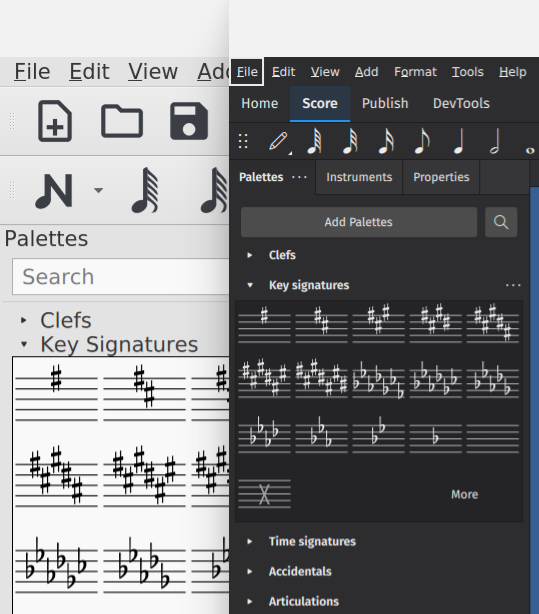
Now that I know QT_SCALE_FACTOR still provides a workaround, I'm good for now. But I'm still somewhat skeptical of the idea that this problem won't be as common in MU4 as it was in MU3. So it would be great to find a way to lessen the likelihood of it happening. Still, on the assumption we can probably never completely solve this since there are so many variables involved, I would suggest that, before release, we should provide a user-friendly workaround that doesn't involve command line options, environment variables, or custom compatibility property settings on the executable file. A simple UI scaling preference would be appropriate, I think.
BTW, another use case for such a capability has to do with how we have traditionally defined "correct" default size. Our algorithm always strove to get the icons and text literally the same physical size on any display, regardless of dimensions or resolution of the display. But this is actually the wrong answer for very large displays (eg, 40" TV sets, projections systems, etc). Since you typically view them from further away than a standard monitor, one subjectively wants things larger than usual.
Unfortunately, the QT_SCALE_FACTOR workaround stopped working sometime between the alpha and now. It scales the main UI itself but no longer scales the score or palettes or the various "example views" in things like the staff/part advanced style properties dialog or the time signature properties.
@cbjeukendrup , do we know it was the ExampleView change that broke this? Seems plausible. Could it be that the devicePixelRatio need to be factored in in order for QT_SCALE_FACTOR to work?
For my money, the best solution really is to add a GUI scaling option in Preferences - either in Appearance or Advanced. That's what we should have done back in MuseScore 2 instead of needing command-line options or environment variables. But I understand that might be out of scope for 4.0.
After chatting with @Eism - they've come to the conclusion that this specific issue is best solved in 4.x, since it implies a large amount of work. If it was widely affecting Linux users, we wouldn't do this.
We're of the opinion that auto-scaling should just work in all cases but that's going to take quite a bit of work to facilitate this specific case. I'm tagging it with 4.x and closing.
(Reminder: this doesn't mean we don't consider it to be an issue - we reopen them after 4.0 is out)

I totally get that a full solution where everything works perfectly out of the box on all systems is not achievable for 4.0. But meanwhile, I'd still like to figure out a workaround somehow, because I'd like to be able to use my best systems for doing screenshots sooner rather than later. And I suspect the issue will be more widespread than we'd like.
It will probably take me a while to get a build going again, but if/when I do, I am thinking this is probably around two lines of code to get QT_SCALE_FACTOR working correctly again.
After more research and trial and error, I discovered that the "-D" option is now working better (it was producing garbage results a few weeks ago). "-D" now scales the score correctly as well as the palettes and exampleviews, but still not the UI. Whereas QT_SCALE_FACTOR scales the UI, but not the score or palettes or exampleviews. So - my new workaround is to set them both. For the record, the combination QT_SCALE_FACTOR=1.33 and -D 125 seems to nail the UI and score size on the system I am using at the moment.
This is obviously not a reasonable workaround for anyone except me, but, until someone else reports a problem, I'm OK to live with this. Hopefully, no further changes break it! But I'll try to monitor PR's that look like they touch this part of the code and see if I can test them before they get merged.
Might be interesting to check if Qt 6 has brought any improvement w.r.t. this

Based on current 4.4 behavior, there is no change - at least, nothing we get for free. Could be there are new options or API calls we could be using somewhere, though.
Actually, one regression as far as this is concerned, but I'm not so sure it is due to Qt 6: the braille panel is now much smaller on my system when using the same scaling techniques I was using in previous 4.x releases. But on the positive site, the braille panel input is working now on my system whereas it wasn't previously, so still a net win.
The one way Qt 6 could potentially really help here is if we sort out Wayland, because everything does size itself correctly when using that in 4.3.2. It's just not usable in practice due to the menu / popup positioning. Unfortunately, Wayland is even less usable for 4.4 because I get unresolved references at run time: "/lib/x86_64-linux-gnu/libEGL_mesa.so.0: undefined symbol: wl_proxy_marshal_flags". I assume that is solvable somehow, I just haven't invested the time to figure it out.
@MarcSabatella Can we consider this fixed now the Wayland problem has been fixed? Trying to fix it for xcb (or rather Xwayland) too might not be worth the effort since Wayland will eventually replace X11 anyway (if I understand correctly). And I don't really see how we could fix it, other than somehow making the workarounds you mention more accessible.
Making the workarounds more accessible is definitely a good idea, because there has never been a release of MuseScore that scales perfectly on every single display attached to every single system running every single OS - and I suspect there never will. Independent control over GUI scaling and score scaling via two preference settings is the way to go.
That said, sure, no reason this issue can't be closed, as this specific case no longer applies.
Another update - not really a change in behavior, but an important (to me) discovery I just made.
It remains the case that running under with QT_QPA_PLATFORM=wayland solves all the scaling problems for me. But there are just enough annoying little glitches running that way to make me want to continue using xcb.
I had mentioned previously that setting QT_SCALE_FACTOR before starting MuseScore Studio would scale the UI just fine, but not the score itself - so displaying the score at 100% zoom would be too small. The workaround I had devised for that was a major kludge. But I have now stumbled on a much simpler method, which might in itself provide some clue as to what is going on.
Instead of setting QT_SCALE_FACTOR on the command line before starting mscore4portable - so, just for that process - I had the idea to stick it in my environment.d folder so it would be set at system boot. For some reason, this causes the score to now also scale properly, which makes me very happy, because now I don't need any other workaround (as far as I have discovered so far).
I am speculating that setting this environment variable during boot means it is also active when the "sommelier" process (the Wayland compositor used on Chromebooks that also handles X11) starts up, and that somehow affects its behavior. Doesn't really seem that likely to me that sommelier would be Qt-aware, but maybe somehow it affects communicating between it and client processes. At least that is my best guess.
Bottom line, I do think this issue can be closed.
Sorry, one important (again, to me anyhow) amendment: it wasn't setting QT_SCALE_FACTOR that fixed the score scaling. it was setting SOMMELIER_DPI. That makes way more sense and it's what I was experimenting with to begin with, but it didn't appear to have worked because the the UI was still tiny and I guess I didn't bother to load a score to notice it did fix that. So, the combination of setting both of these at system boot is the answer for me.
Possibly this helps some other Chromebook user in the future.