
keyviz
 keyviz copied to clipboard
 mulaRahul
Wrong key showing when you have the keyboard manager from Microsoft PowerToys
The problem is I am using a MacOS keyboard in Windows so I have a couple of keys changed. I want the command key to be the alt key and the Alt key to be the windows key so I used the keyboard manager that the Microsoft PowerToys have included in it. There you can switch keys.
The thing is now, when I click the windows key for example, the keyviz app show first the Alt key and then the windows key, resulting in this:
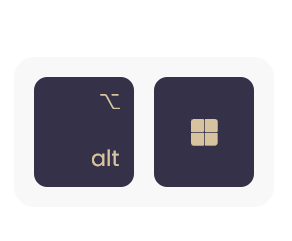
So I think is first showwing the real key of my keyboard and then "pressing" (not really) the second key that is binded with the keyboard manager.
Hope I have explained myself. 😃
Version: v1.0.6
Expected behavior I expect to only show the key that I decided to be, not the real one.

Hmm, I'll have to look into Power Toys to see how does it simulate the keypress event, to in turn filter it out. As mentioned in here, the current key listener just attaches itself to the low level driver and receives EVERY event.
There can be two possible solutions -
- Filter out raw events (keypress) and take processed events (processed by OS). But it may raise more bugs.
- Instead, only listen to raw events and add an option to let the user switch/map keys.

Thanks a lot for your answer!! That would be great.
I think option 2 would be much better, as anyone could add custom mapped keys. Let me know if there is any news related to that! 💪
Ivan