

 mui
mui
[DateTimePicker] Mask with non numeric data are not applied
Duplicates
- [X] I have searched the existing issues
Latest version
- [X] I have tested the latest version
Current behavior 😯
Using the DateTimePicker component, a warning is displayed in the console about the mask not matching the input value:
The mask "__/__/____ __:__" you passed is not valid for the format used dd MMMM yyyy HH:mm. Falling down to uncontrolled not-masked input.
No mask has been provided, so I assume this is using the default one.
The spaces instead of slashes are one issue, but adding a custom mask of '__ __ ____ :' resolves this.
It appears there is an issue with the full month name (MMMM) as a numeric month (MM) works fine (and '__ ____ ____ :' doesn't help).
Expected behavior 🤔
Custom date formats do not throw warnings in the console
Steps to reproduce 🕹
Live example here:
https://codesandbox.io/s/elegant-nobel-lqyol?file=/src/App.js:518-536
Context 🔦
Similar to issue posted here - https://github.com/mui-org/material-ui-pickers/issues/1776 - but this repo has been archived so I'm unsure if the answers are still relevant with MUI 5.
Your environment 🌎
`npx @mui/envinfo`
  Don't forget to mention which browser you used.
  Output from `npx @mui/envinfo` goes here.


Does someone know if there's an update on this? I get the same error regardless of the mask I use.

I cannot see any code on the codesandbox you posted, but I had the same issue and solved it setting both the mask and inputFormat. I think the problem is that when you set a custom inputFormat you have to also change the mask, otherwise it takes the default one and it gives a warning because they do not match.

The only way I found in order to mute the warnings is using disableMaskedInput={true}. This approach is normally discouraged but it works well in my application.
Digging deeper
I am using is inputFormat="MMM DD yyyy".
I suppose the mask should look like mask="___ __ ____" but this would lead to the well known warning The mask "___ __ ____" you passed is not valid for the format used MMM DD yyyy. Falling down to uncontrolled not-masked input.
Digging into the code it seems that the validity check is problematic. The code tries to compare my mask for equality with 2 different values (see screenshot):
-
Nov __ ____ -
Jan __ ____
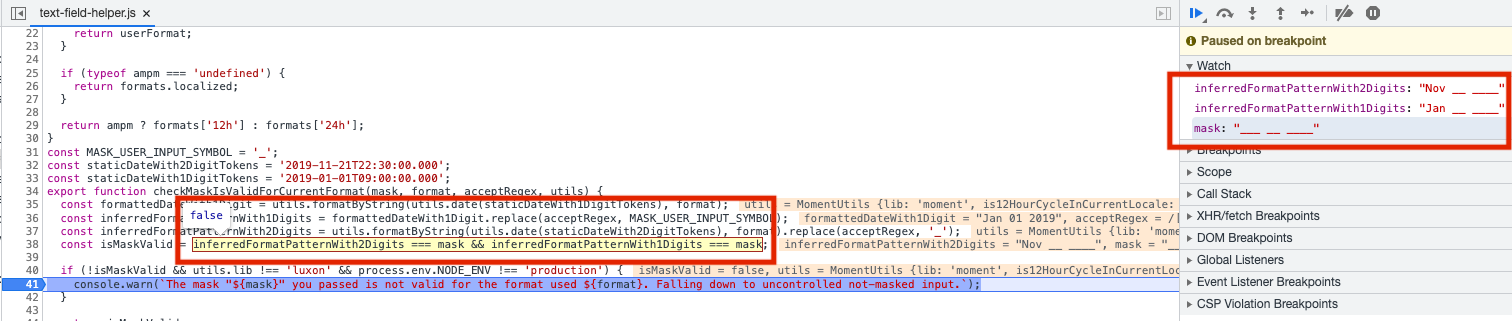

for me setting inputFormat prop resolved the issue
in my case: inputFormat="DD.MM.YYYY hh:mm"

same issue!
I have
inputFormat="MMM D, YYYY" and mask="___ __, ___" and get the error

@willarion
same issue! I have
inputFormat="MMM D, YYYY"andmask="___ __, ___"and get the error
As I see in your comment, the mask is not correct, you have two underscores for the day and three underscores for the year. It should be mask="___ _, ____"

@willarion
same issue! I have
inputFormat="MMM D, YYYY"andmask="___ __, ___"and get the errorAs I see in your comment, the mask is not correct, you have two underscores for the day and three underscores for the year. It should be
mask="___ _, ____"
I tried inputFormat="MMM DD, YYYY" mask="___ __, ___" but it doesn't work either
@willarion
same issue! I have
inputFormat="MMM D, YYYY"andmask="___ __, ___"and get the errorAs I see in your comment, the mask is not correct, you have two underscores for the day and three underscores for the year. It should be
mask="___ _, ____"I tried
inputFormat="MMM DD, YYYY" mask="___ __, ___"but it doesn't work either
I got that issue too
Log

Code


@willarion @cattre @ricardodrn
I faced this issue when using a custom input format as indicated below:-
inputFormat="dd MMM yyyy"
To solve the issue/suppress the warning, all I had to do was to pass an empty string to the mask prop
mask=""

@elijahkimani instead of passing mask="" you can add disableMaskedInput to you component. This will have the same effect
What append internally
As noticed by @AlessandroDG the code tries to match the mask with some formatted dates in checkMaskIsValidForCurrentFormat
The idea is that if your mask does not match formatted dates, we will not apply it, to avoid having a text field impossible to fill
Thest is dons with two dates which contains day and months with 1 and 2 digits. That's where the Nov and Jan comes from
const staticDateWith2DigitTokens = '2019-11-21T22:30:00.000';
const staticDateWith1DigitTokens = '2019-01-01T09:00:00.000';
To know if a formated date match with a mask, we use acceptRegex that you can specify as a prop of your component.
This regexp is used to replace characters by '_'. Default one is /\dap/gi which detect numbers, and the letters a and p
So '12/01/2012 03:51 am' becomes __/__/____ __:__ _m
And '12 Janyary 2012 03:51 am' becomes '__ J_ny_ry ____ __:__ _m'
Here you can see the difficulty when setting months as a literal. Which is the case when using MMM (Jan) or MMMM (January).
Conclusion
So for now it is impossible to use letters in your date mask. only numbers
Possible solution
- Could add support for letters with a distinct mask character, and a distinct regexp
- allows to specify in the mask where are months and days to handle words with variable length

In my case first I set LocalizationProvider in root of peroject
import { AdapterMoment } from "@mui/x-date-pickers/AdapterMoment";
import AdapterJalali from "@date-io/date-fns-jalali";
import { LocalizationProvider } from "@mui/x-date-pickers/LocalizationProvider";
// ...

<LocalizationProvider dateAdapter={i18n.language === "fa" ? AdapterJalali : AdapterMoment}>
// ...
</LocalizationProvider>
then I use DatePicker like blow
<DatePicker
	mask="____/__/__"
	value={date}
	onChange={(newValue) => setDate(newValue)}
	renderInput={(params) => <TextField {...params} />}
/>
note that I use @date-io/date-fns-jalali for Jalali Time before that I see that yellow box also time dosnt show correctly with other library's

https://github.com/mui/mui-x/issues/4487#issuecomment-1097731043 Thanks to you, I solved it👍 Thank you!
mask=""
inputFormat="yyyy-MM-dd"

Seems like the latest work around this is to set disableMaskedInput as a prop on your component. In my case it looked like this:
<DesktopDatePicker
   disableMaskedInput
   inputFormat='dd MMM yy'
   value={selectedDate}
   onChange={handleDateChange}
   renderInput={(params) => <TextField {...params} variant='standard' />}
/>


I am closing this issue.
We recently launched the first beta of @mui/x-date-pickers and @mui/x-date-pickers-pro v6.x.
This new version contains a full rework of the input editing.
You can have a look at the v6 doc which is currently in beta and the related blog post.
We won't apply complicated (and not always doable) fixes to the v5 version, I hope this new version solves your problem.
